All-Purpose Drone 1.21+
The All-Purpose Drone Addon introduces smart automation to Minecraft MCPE, allowing you to use functional drones for mining, farming, scouting, and large-scale projects while keeping gameplay balanced and mobile-friendly.
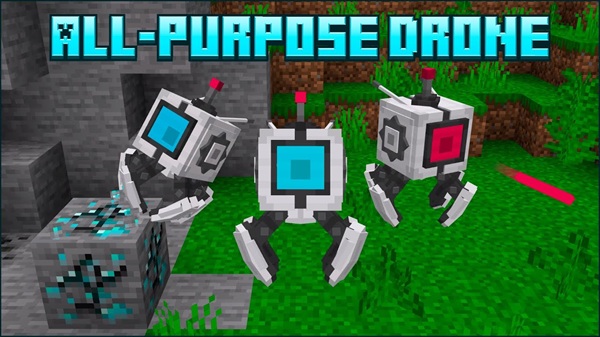
All-Purpose Drone Addon: Smart Automation for MCPE
Automation is something many Minecraft Pocket Edition players dream about, especially after spending hours mining, farming, or preparing large building areas by hand. On mobile devices, repetitive tasks can feel even more time-consuming. This is where the All-Purpose Drone Addon makes a real difference. Designed specifically for Minecraft Bedrock Edition and MCPE, this addon introduces smart automation that respects performance limits while improving your overall gameplay flow.

Instead of changing how Minecraft feels, the All-Purpose Drone Addon works alongside your existing playstyle. You stay in control, while drones handle the repetitive work that slows you down.
What Is the All-Purpose Drone Addon?
At its core, the All-Purpose Drone Addon adds functional drone entities to your Minecraft Bedrock world. These drones act as intelligent helpers that can perform practical tasks based on your instructions. The goal is not to remove effort entirely, but to let you focus on creativity, planning, and exploration.
The addon is designed with MCPE users in mind, meaning it avoids complicated commands and relies on a clean in-game interface instead.
You can use the All-Purpose Drone Addon in:
-
Survival worlds where efficiency matters
-
Creative projects that require large-scale preparation
-
Multiplayer worlds that benefit from shared automation
Core Features at a Glance
Before diving into how everything works, it helps to understand what makes this addon stand out. The following features define the All-Purpose Drone Addon experience and explain why it feels balanced rather than overwhelming.
Key features include:
-
Autonomous task execution for everyday gameplay actions
-
Multi-drone support, allowing gradual expansion
-
Battery-based operation that requires resource planning
-
Durability and repair mechanics tied to progression
-
Drone camera view for scouting and planning
-
Ownership settings for organized multiplayer use
Each feature supports a style of automation that feels earned and controlled.
How the Drone Works In-Game
This section is where most players decide whether the addon fits their world. The All-Purpose Drone Addon focuses on simple interaction and clear feedback, which is especially important on mobile devices.
Deploying and Activating the Drone
You begin by crafting or placing a Packed Drone in your world. Once placed, interacting with it activates the drone and brings up its control menu. The drone then becomes an active entity, ready to follow your instructions.
Drone Control Interface Overview
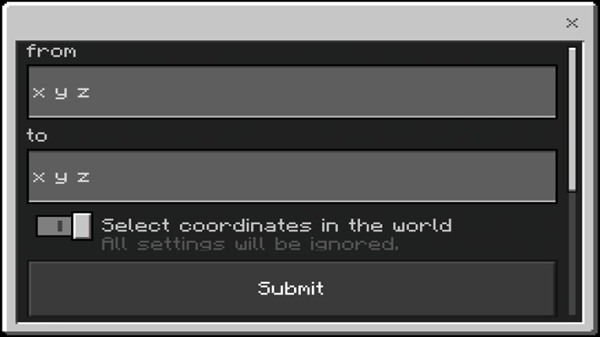
All drone actions are managed through a touch-friendly menu. From here, you can:
-
Select tasks
-
Check battery levels
-
View inventory contents
-
Adjust basic behavior options
The interface avoids clutter, making it easy to use even on smaller screens.
Assigning Tasks and Automation Jobs
Tasks are organized into clear categories. Simple jobs include moving or collecting items, while advanced tasks cover mining areas or harvesting crops. Once assigned, the drone works independently while you continue playing.
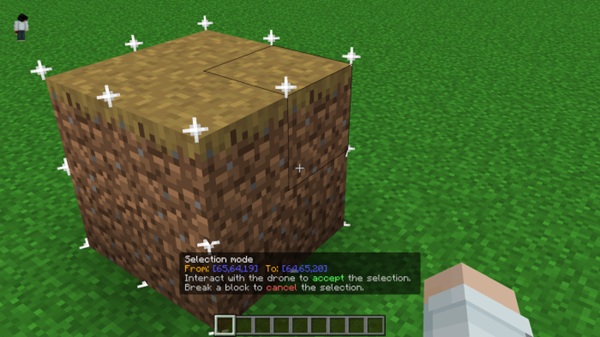
Selection Mode for Area-Based Tasks
Selection Mode allows you to define work areas visually by marking two corners in the world. This replaces manual coordinate input and is one of the most MCPE-friendly features of the addon.
Drone Movement and Behavior Modes
Depending on the task, drones can move by flying or walking. When battery power runs low, drones reduce activity instead of stopping instantly, helping avoid interruptions.
Monitoring Tasks and Using the Drone Camera
You can monitor progress at any time and switch to the drone camera view. This is useful for:
-
Checking underground areas
-
Planning builds from above
-
Making sure tasks run as expected
Completing Tasks and Next Steps
After completing a task, the drone waits for new instructions. You can unload items, recharge it, or assign another job, creating a smooth automation loop.
Automation Use Cases in MCPE
The All-Purpose Drone Addon shines when used for practical, everyday tasks. These use cases show how automation fits naturally into Minecraft gameplay.
Common examples include:
-
Mining defined areas efficiently
-
Farming mature crops without manual harvesting
-
Item management, such as collecting drops
-
Terrain preparation for large builds
-
Safe scouting using the drone camera
These features save time without removing player involvement.
Power, Maintenance, and Progression
Automation in this addon is tied closely to progression. Drones are powerful tools, but they require planning and upkeep, which keeps gameplay balanced.
Battery and Charging
Drones consume battery power while working. You can recharge them using:
-
Common resources like redstone or lapis
-
Antenna-based charging setups
-
Solar panels for long-term systems
Durability and Repairs
Over time, drones may need repairs. Using accessible materials for maintenance ensures that automation remains part of survival progression rather than a shortcut.
Compatibility and Performance Notes
The All-Purpose Drone Addon supports modern Minecraft Bedrock and MCPE versions and works across mobile and desktop platforms. Performance depends on:
-
How many drones are active
-
The size of assigned tasks
-
Your device’s hardware
For best results on mobile, scale automation gradually.
Tips for Getting the Best Experience
A few simple habits can greatly improve your experience:
-
Start with one drone
-
Build charging systems early
-
Use Selection Mode for accuracy
-
Keep an eye on battery and durability
-
Set ownership in multiplayer worlds
These tips help maintain stability and enjoyment.

Who This Addon Is Best For
The All-Purpose Drone Addon is a strong choice for:
-
Survival players tired of repetition
-
Builders working on large projects
-
Players who enjoy systems and optimization
-
Multiplayer worlds needing structure
If you enjoy improving efficiency over time, this addon fits naturally.
Final Thoughts
The All-Purpose Drone Addon delivers smart, balanced automation tailored for MCPE and Bedrock Edition. It respects performance limits, rewards planning, and enhances gameplay without taking control away from the player.
If your goal is to spend less time on repetitive tasks and more time shaping your world, this addon offers a reliable and thoughtful solution.
Installation Guide (MCPE / Bedrock)
Setting up the All-Purpose Drone Addon is straightforward, but one step is especially important.
-
Import the
.mcaddonfile into Minecraft -
Enable both the Behavior Pack and Resource Pack
-
Open world settings and enable Beta APIs
-
Enter the world and deploy a drone to confirm installation
Without Beta APIs enabled, the drone interface will not function correctly.