dvanced Floating Text 1.21+
The Advanced Floating Text Addon lets you add clean, UI-style floating text anywhere in Minecraft Bedrock Edition. It’s perfect for MCPE players who want clear instructions, labels, and information displays without using signs or complex commands.
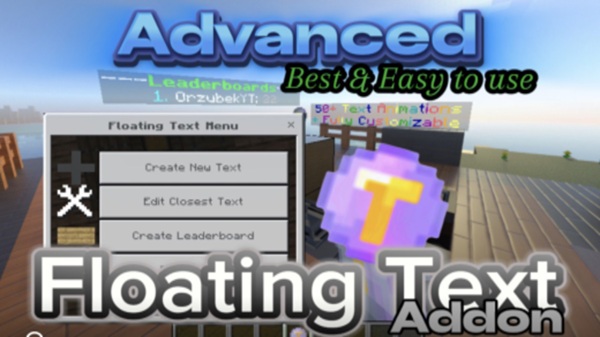
Advanced Floating Text Addon – Clean UI Text Anywhere
The Advanced Floating Text Addon is a practical and flexible addon for Minecraft Bedrock Edition (MCPE) that lets you display floating text anywhere in your world using a clean, UI-style design. Instead of filling your builds with signs or relying on chat messages that quickly disappear, this addon gives you a clear and persistent way to communicate information directly in the environment.
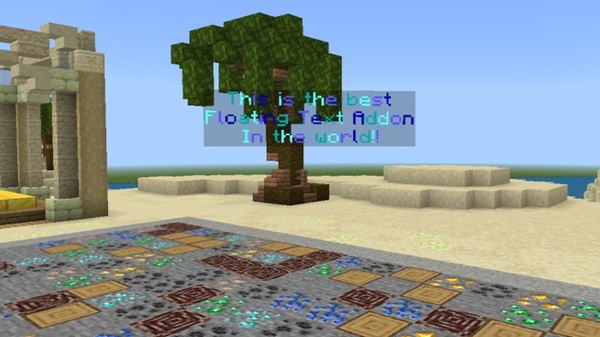
If you enjoy building organized worlds, creating maps, or hosting multiplayer sessions, the Advanced Floating Text Addon helps your creations feel more intentional and easier to navigate. Text can appear in mid-air, above structures, or at key locations, all while keeping your world visually clean and readable on mobile screens.
At its heart, this addon is about clarity, control, and simplicity, especially for MCPE players who value clean visuals and smooth performance.
What Makes This Addon “Advanced”
Not all floating text addons are built the same. This section explains why the Advanced Floating Text Addon stands out and why many creators prefer it for long-term Bedrock worlds. Each feature below contributes to stability, ease of use, and a better player experience.
Entity-Based Floating Text System
The addon uses dedicated text entities, which means the floating text behaves like a special in-game object rather than a temporary visual effect. In simple terms, this allows the text to:
-
Stay in the same position
-
Load correctly with chunks
-
Remain visible after restarting the world
For example, if you place instructions at your spawn point, they will still be there the next time you join, even in multiplayer.
Clean UI Design Built for MCPE
Mobile players often struggle with cluttered visuals. That’s why the Advanced Floating Text Addon focuses on a minimal, UI-inspired look. The text is easy to read, does not block gameplay, and blends naturally with modern builds.
This makes a noticeable difference on phones and tablets, where screen space is limited.
Menu-Driven Controls (No Complex Commands)
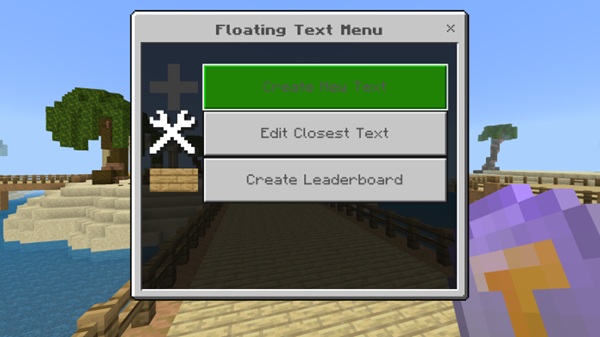
Instead of typing long commands, you manage text through a simple in-game menu. You can create, edit, or remove floating text using normal gameplay interactions.
This design helps newer players get started quickly while still giving experienced creators enough control to fine-tune their worlds.
Persistent Text Across Worlds
Once created, floating text remains part of the world. It does not reset, disappear randomly, or depend on chat history. This persistence is especially useful for:
-
Servers
-
Adventure maps
-
Educational or tutorial worlds
Designed for Multiplayer and Shared Worlds
An admin-based permission system ensures that only trusted players can modify floating text. This keeps shared worlds organized and prevents accidental edits during multiplayer sessions.
Optimized for Mobile and Bedrock Performance
The addon is built with Bedrock performance in mind. When used responsibly, it runs smoothly on mobile devices and other Bedrock platforms without unnecessary strain.
Key Features at a Glance
This section highlights the main features you can expect from the Advanced Floating Text Addon:
-
Place floating text anywhere in the world
-
Clean, modern UI-style text appearance
-
Support for multiple lines of text
-
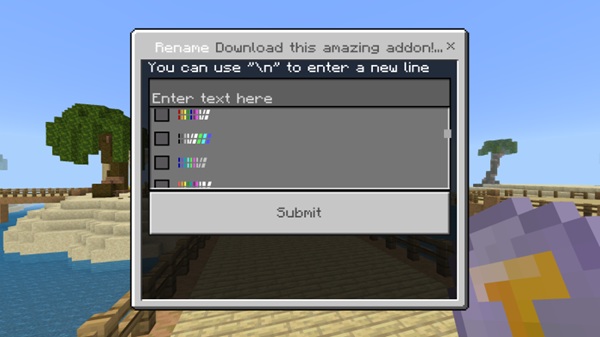
Optional color or animation options (if available)
-
Leaderboard or structured text displays
-
Admin-only editing for multiplayer safety
How It Works In-Game
Understanding how the addon works helps you use it more confidently. Once the addon is activated, you receive access to a Floating Text Menu item, which acts as the control center.
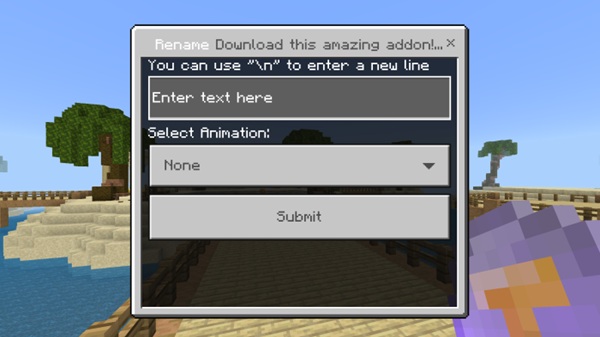
Using the menu, you can:
-
Create new floating text at your position
-
Edit the nearest existing text
-
Remove text cleanly without breaking blocks
Permissions are managed through an admin tag, which is especially useful when playing with friends or hosting a Realm.
Clean UI Use Cases (MCPE-Focused)
Floating text becomes most valuable when used with purpose. In MCPE worlds, common and effective use cases include:
-
Spawn points with rules or welcome messages
-
Servers and Realms that need clear, non-intrusive information
-
Adventure maps with quest hints or objectives
-
Creative builds where areas need labels or explanations
-
Mini-games with scores or instructions
-
Educational worlds that guide players step by step
Because the text floats freely, it communicates information without interfering with gameplay or block placement.
Compatibility & Requirements
Before using the addon, it helps to know where it works best:
-
Minecraft Bedrock Edition 1.20 or newer
-
Supported on:
-
Android (MCPE)
-
iOS (MCPE)
-
Windows 10 / 11
-
Bedrock-supported consoles
-
-
Works in singleplayer, multiplayer, and Realms
-
Resource pack is required for proper text display
-
Experimental features only if specified by the addon version
Performance & Best Practices
To keep your world running smoothly, especially on mobile:
-
Avoid placing too many floating texts in one area
-
Choose clear colors that are easy to read
-
Space text properly to reduce visual clutter
-
Plan placements before creating large groups
Thoughtful use ensures the addon stays lightweight and responsive.
Common Questions & Notes
Players often ask a few common questions:
-
If text does not appear, confirm that both packs are enabled
-
Invisible text usually means the resource pack is disabled
-
Only players with admin permissions can manage text
-
In multiplayer, all players must load the resource pack
-
Disabling the addon hides text but does not delete it permanently
Final Thoughts
The Advanced Floating Text Addon offers a reliable and user-friendly way to display information in Minecraft Bedrock Edition. Its clean UI approach, combined with simple controls and strong compatibility, makes it a valuable tool for builders, creators, and multiplayer hosts.
If you want your MCPE world to feel organized, readable, and thoughtfully designed, this addon gives you the tools to communicate clearly—right where players need it.
Installation Guide (MCPE / Bedrock)
Installing the Advanced Floating Text Addon is straightforward, even on mobile devices:
-
Download the
.mcaddonfile -
Open it with Minecraft
-
Let the game import:
-
The Resource Pack
-
The Behavior Pack
-
-
Create a new world or edit an existing one
-
Activate both packs in the world settings
-
Enable cheats if admin permissions are required
After that, you’re ready to start placing floating text.