Health Bars FWS 1.21+
Health Bars FWS Addon adds real-time mob health bars to Minecraft Bedrock Edition, helping MCPE players track mob health clearly, improve gameplay awareness, and enjoy smoother survival experiences on mobile and Bedrock devices.
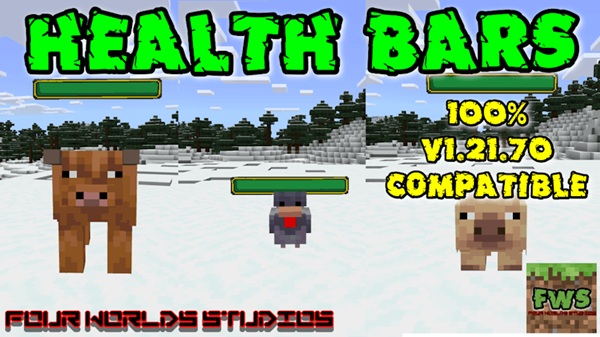
Health Bars FWS Addon – Real-Time Mob Health Display
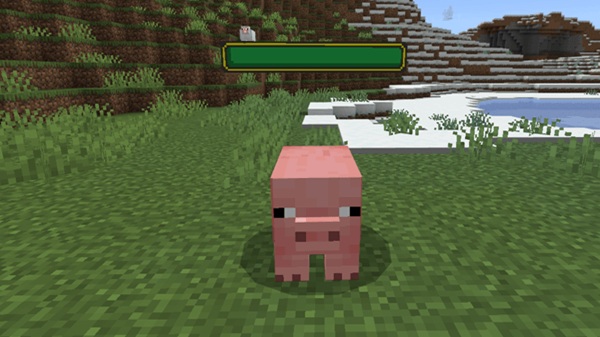
If you’ve ever fought mobs in Minecraft Bedrock Edition and wondered how close you were to finishing the encounter, Health Bars FWS Addon was made for you. This addon adds real-time health bars above vanilla mobs, giving you clear visual feedback instead of forcing you to rely on guesswork.
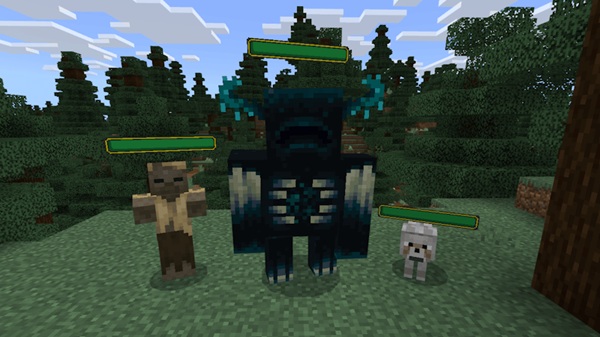
Built specifically for MCPE and Bedrock players, Health Bars FWS Addon focuses on clarity, performance, and ease of use. Once enabled, it works automatically without commands or configuration. Whether you’re playing survival on your phone, exploring caves late at night, or managing mob-heavy areas, this addon helps you stay informed and play more confidently.
Main Features
The strength of Health Bars FWS Addon lies in how naturally it integrates into normal gameplay. Each feature is designed to improve awareness without overwhelming your screen or changing core mechanics.
Real-Time Mob Health Display
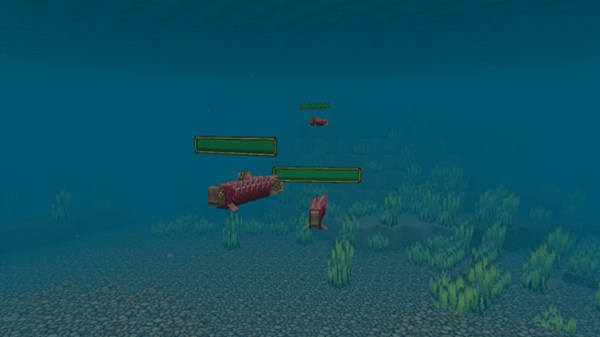
At its core, Health Bars FWS Addon shows a live health bar above vanilla mobs. As mobs take damage or recover health, the bar updates instantly. This allows you to clearly see progress during encounters and understand how effective your actions are in real time.
Multiple Health Bar Styles
The addon includes different visual styles for health bars. Depending on the version, you may see smooth bars, segmented bars, heart-based visuals, or numeric health values. This flexibility helps you choose a style that feels comfortable and works well with your existing resource packs.
Dynamic Color-Based Health Indicators
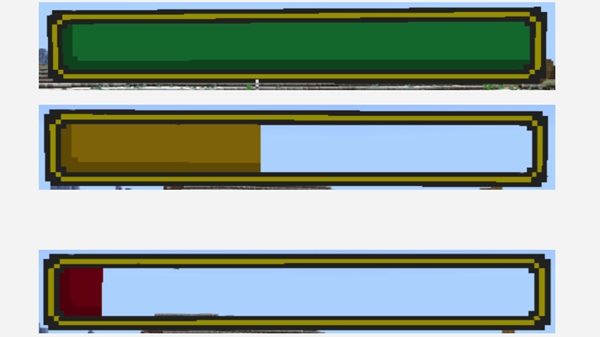
Health bars change color based on remaining health. Higher health levels appear green, while lower health gradually shifts toward red. This color system makes it easy to understand mob status at a glance, especially useful during fast-paced moments on mobile devices.
Clean and Vanilla-Friendly Design
Everything is designed to feel like part of Minecraft itself. The health bars are minimal, readable, and well-positioned, avoiding screen clutter. This makes the addon comfortable to use even on smaller MCPE screens.
Optimized for MCPE and Bedrock Devices
Health Bars FWS Addon is lightweight and optimized for mobile performance. It runs smoothly on phones and tablets, even when multiple mobs are nearby, making it suitable for a wide range of devices.
Singleplayer and Multiplayer Compatibility
The addon works in singleplayer worlds, multiplayer sessions, and Realms. All players see consistent health information, which helps improve coordination during cooperative gameplay.
How It Works In-Game
Once activated, Health Bars FWS Addon runs quietly in the background. You don’t need to toggle anything or learn new controls.
When you approach or interact with a vanilla mob, a health bar appears above it. As the mob takes damage, the bar decreases and changes color to reflect remaining health. When the mob is no longer active, the bar disappears automatically. The system is designed for clear visibility while keeping gameplay smooth and uninterrupted.
Compatibility & Requirements
Before using the addon, it helps to understand where it works best. Health Bars FWS Addon is built to support modern Bedrock gameplay.
-
Minecraft Version: Bedrock Edition 1.20 and above
-
Platforms: Android, iOS, Windows 10/11, supported consoles
-
Experimental Features: Not required
-
Multiplayer: Fully supported, including Realms
-
Mob Support: Vanilla Minecraft mobs
Custom mobs added by other addons may not always display health bars, depending on how they are built.
Performance & Safety Notes
Performance and stability matter, especially on mobile. Health Bars FWS Addon is designed to be safe for long-term use.
-
Lightweight behavior with minimal impact on performance
-
Suitable for survival worlds and extended play sessions
-
Does not modify player data or core game files
-
Health bars do not appear through blocks
-
Compatible with most addons and resource packs
These choices help ensure reliable gameplay across different devices.
Best Use Cases
Health Bars FWS Addon fits naturally into many playstyles. You’ll find it especially helpful in situations like:
-
Survival mode gameplay
-
Exploring caves or dangerous areas
-
Managing mob farms and spawners
-
Adventure or challenge-based worlds
-
Cooperative PvE sessions with friends
Both new and experienced players benefit from clearer visual feedback during gameplay.
Helpful Tips for Players
A few small tips can help you get the most out of the addon:
-
Try different health bar styles to find what feels best
-
Combine the addon with compatible resource packs for a unified look
-
Avoid stacking many heavy addons on low-end devices
-
Back up important worlds before adding new addons
-
Re-check addon activation after Minecraft updates
These habits help keep your worlds stable and enjoyable.
Conclusion
Health Bars FWS Addon is a focused, practical quality-of-life addon for Minecraft Bedrock Edition. By adding real-time mob health display, it improves awareness and decision-making while staying lightweight and mobile-friendly.
With simple installation, broad compatibility, and a clean vanilla-style design, this addon is well-suited for MCPE players who want clearer gameplay without changing how Minecraft fundamentally works.
Installation Guide for MCPE (Bedrock Edition)
Getting started with Health Bars FWS Addon is simple, even if you’re new to addons. The process follows standard Bedrock installation steps.
-
Download the addon file in
.mcaddonor.mcpackformat -
Open the file to import it into Minecraft Bedrock
-
Enable both the Behavior Pack and Resource Pack
-
Apply the addon to a new or existing world
-
Start playing—no extra setup required
The addon works on Android, iOS, and Windows Bedrock Edition, making it accessible to most MCPE players.