ZC More Chest 1.21+
ZC More Chest Addon is a practical Minecraft Bedrock addon that upgrades your storage system with high-capacity chests, helping MCPE players reduce chest clutter while keeping survival gameplay balanced and familiar.
ZC More Chest Addon – Bigger Storage Without Chest Clutter
If you’ve spent enough time in a Minecraft Bedrock survival world, you already know the problem. At first, a few chests near your crafting table are enough. But as you mine deeper, build farms, trade with villagers, and explore new areas, items start piling up. Before long, your base turns into a maze of double chests.
ZC More Chest Addon was created to solve this exact issue. It’s a storage-focused Minecraft Bedrock addon designed for MCPE players who want bigger storage without chest clutter, while keeping the vanilla survival experience intact. No shortcuts, no confusion—just smarter storage that grows with your world.
Why Storage Becomes a Problem in MCPE
Storage challenges affect all survival players, but they feel even stronger on mobile devices. MCPE players deal with limited screen space, slower inventory navigation, and compact builds that leave little room for massive storage rooms.
As your survival world progresses, several issues appear naturally:
-
Mining trips bring back stacks of blocks and ores
-
Farms and villagers generate constant item flow
-
Double chests consume valuable building space
-
Finding items becomes slower and less enjoyable
Vanilla Minecraft chests work well early on, but they don’t scale efficiently for long-term survival gameplay—especially on MCPE.
How ZC More Chest Addon Solves Chest Clutter
Instead of adding complex systems, ZC More Chest Addon improves what already exists. It focuses on reducing the number of chests you need, not changing how storage works.
Bigger Storage in a Single Block
Each custom chest holds significantly more items than a normal chest while still using one block of space. This allows you to store more without expanding your base or adding new storage rooms.
Fewer Chests, Cleaner Base Layouts
With higher-capacity chests, you replace walls of double chests with just a few upgraded ones. Bases feel cleaner, storage rooms become smaller, and navigation is much easier.
Reduced Inventory Management on MCPE
Fewer chests mean fewer taps, less scrolling, and faster access to your items. This noticeably improves gameplay flow on mobile devices.
Survival-Friendly Storage Progression
The addon introduces a clear upgrade path. As you progress through survival and gain better materials, your storage improves naturally—without skipping progression or breaking balance.
No Changes to Vanilla Gameplay Feel
All chests behave like standard Minecraft containers. There are no commands, no custom interfaces, and nothing unfamiliar. You already know how to use them.
Works with Hoppers and Automation
Custom chests fully support hoppers, making them compatible with farms, furnaces, and basic redstone automation systems.
Safe Chest Removal Prevents Item Loss
A confirmation-based removal system helps prevent accidental item loss when reorganizing storage areas or redesigning your base.
Chest Types & Storage Progression
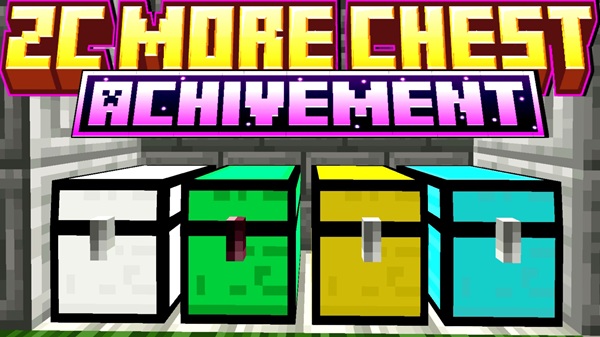
Storage progression is at the heart of ZC More Chest Addon, and each tier serves a clear purpose in survival gameplay.
-
Iron Chest – Early-game upgrade for basic resources and mining loot
-
Gold Chest – Mid-game storage for farms and growing item collections
-
Emerald Chest – Advanced storage for rare and valuable items
-
Diamond Chest – High-capacity, late-game storage for essential materials
Each chest tier offers more space than the previous one, encouraging logical upgrades as your world expands.
How It Works In-Game (Simple Explanation)
The addon is designed to feel intuitive, even for new MCPE players. Everything works the way you expect.
-
Chests are crafted at the crafting table
-
Recipes use materials that match the chest tier
-
Chests place, open, and store items normally
-
Hopper connections work as expected
-
No new mechanics to learn
If you’ve used a normal chest before, you already understand how this addon works.
Compatibility & Performance
This addon is built with performance and stability in mind, especially for mobile devices.
-
Compatible with Minecraft Bedrock Edition 1.21+
-
Works on MCPE (Android & iOS), Windows 10/11, and consoles
-
Lightweight design with minimal performance impact
-
Safe for long-term survival and multiplayer worlds
It doesn’t add entities or mechanics that cause lag, making it suitable for daily gameplay.
Practical Tips for Clean Storage
Using the addon effectively can make a big difference in how your base feels over time.
-
Store bulk blocks in lower-tier chests
-
Keep valuables in Emerald or Diamond chests
-
Place high-tier chests in central storage areas
-
Connect farms directly to chests using hoppers
-
In multiplayer worlds, assign chest tiers by item type
These habits help keep storage organized as your world grows.
Who This Addon Is Best For
ZC More Chest Addon is ideal for:
-
Long-term survival players
-
MCPE users managing large inventories
-
Builders who prefer compact, clean interiors
-
SMP and Realm players sharing storage
It’s less suitable for creative-only players or those focused on combat-heavy gameplay.
Final Summary
ZC More Chest Addon delivers exactly what its name promises: bigger storage without chest clutter. By upgrading storage capacity while keeping vanilla mechanics intact, it improves survival gameplay without changing how Minecraft feels.
If you play Minecraft Bedrock Edition on mobile and want cleaner bases, smoother inventory management, and storage that grows with your world, this addon is a practical and reliable choice.
Installation Guide for MCPE / Bedrock
Installing ZC More Chest Addon follows the standard Bedrock Edition process and works on both new and existing worlds.
-
Import the addon into Minecraft
-
Open world settings
-
Enable the Behavior Pack
-
Enable the Resource Pack (if included)
-
Enable experimental features only if required
-
Load or create your world
Once activated, the upgraded chests become available in-game.