

A Minecraft Movie Addon Epic Piglin Boss Battles
If you want your Nether to feel less like a quick resource trip and more like a full-on endgame raid, A Minecraft Movie Addon delivers exactly that. This movie-inspired MCPE addon turns piglins into real threats with structured boss fights, unique mechanics, and rewards that actually matter in your survival world.
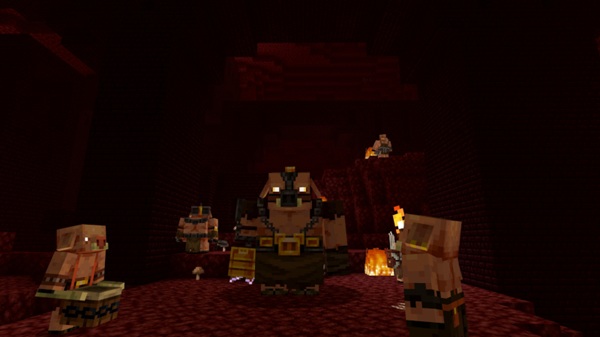
In this guide, I’ll walk you through how these piglin boss battles work in Minecraft Bedrock Edition, what makes each boss special, and how you can prepare to beat them—whether you’re on mobile, console, or Windows.
Epic Piglin Boss Battles – The Heart of the Addon
At the core of A Minecraft Movie Addon is a simple idea: piglins shouldn’t just be background mobs. They should be the stars of real boss encounters. Instead of wandering through the Nether fighting random enemies, you’re now hunting down powerful leaders, each with its own style, attacks, and rewards. The sections below break down how these fights change your MCPE gameplay and how to approach each one.
How Piglin Boss Fights Change MCPE Gameplay
Once the addon is active, the Nether stops feeling like a quick stop for blaze rods and turns into a true endgame arena:
-
You get clear goals: find each piglin boss, learn its patterns, and defeat it.
-
Fights feel like designed encounters, not random difficulty spikes.
-
You’re pushed to plan ahead with better armor, weapons, and backup items.
-
Co-op worlds suddenly have a reason to coordinate, not just wander around together.
Instead of asking “Can I survive this trip?”, you and your friends start asking:
-
“Are we geared enough for the Piglin General?”
-
“Should we try the Great Hog next, or wait for better gear?”
That mental shift—from surviving to conquering—is where this addon really upgrades MCPE combat.
Where to Find Piglin Boss Encounters in MCPE Worlds
You won’t find these bosses chilling near your starter house. To face them, you need to enter the Nether with the addon enabled and explore with intention.
Here’s what to expect:
-
Piglin bosses are tied to Nether gameplay, so everything fits the piglin theme.
-
When you load a world with the addon, you receive an in-game guidebook. This book explains:
-
Basic mechanics
-
Hints about locations
-
What to watch for as you explore
-
-
As you travel through the Nether, keep an eye out for:
-
Areas packed with new piglin variants
-
Strange piglin formations or unusual structures
-
Any visual clues or patterns that stand out
-
The goal is for each encounter to feel intentional and discoverable. You’re not just bumping into a boss by accident; you’re tracking a major threat in hostile territory.
Piglin General – Leader of the Nether Assault
The Piglin General is usually your first real test in A Minecraft Movie Addon. Think of this boss as the organized mind behind many piglin attacks.
Key traits:
-
Acts like a field commander, often surrounded by other piglins.
-
Uses direct melee attacks that hit hard if you get careless.
-
Turns the area into a chaotic battlefield, not a simple one-on-one duel.
To handle the Piglin General, focus on fundamentals:
-
Watch the attack rhythm and avoid panic-clicking. Wait for safe openings.
-
Clear nearby piglins early so you can focus on the boss.
-
Use blocks, pillars, or walls to break line of sight and recover.
When you finally bring the Piglin General down, it feels like you’ve shut down a major Nether invasion plan, and it naturally motivates you to aim for bigger bosses.
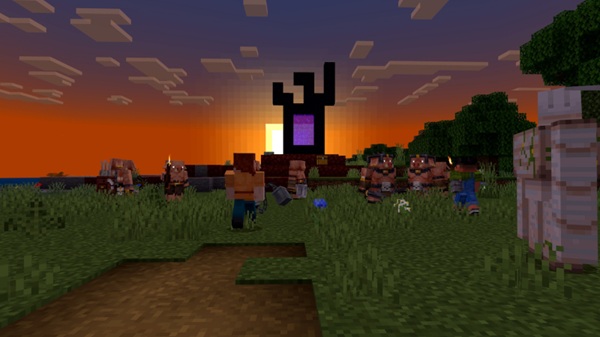
The Great Hog – Massive Tank of the Nether
If the General is the brain, The Great Hog is the bulldozer. This boss feels like a living battering ram built to crush anything in its path.
What to expect:
-
A large, heavy-looking beast that dominates the arena.
-
A huge health pool, so you’re in for a longer fight.
-
Dangerous moves such as:
-
Charge-style attacks that punish standing still
-
Knockback or area damage that punishes staying too close
-
To beat the Great Hog, you need patience and smart movement:
-
Lean on ranged weapons like Buck-Chuckets or the Potato Launcher so you can hit from a safer distance.
-
Drop blocks and simple barriers to break charges or give yourself cover.
-
Keep moving; being rooted in front of this boss is a fast way to get flattened.
On touch controls in MCPE, this fight tests your ability to line up your shots and dodge cleanly, so expect a few messy attempts at first.
Malgosha – Mysterious Piglin Seer of the Movie Realm
Malgosha isn’t built like a brute. This boss feels more like a mysterious piglin seer connected to the movie’s lore and the darker side of the Nether.
What makes Malgosha different:
-
Thematically fits the role of a prophetic or mystical piglin leader.
-
The fight focuses more on abilities and patterns than pure heavy hits.
-
You may face mechanics like:
-
Unusual attack angles or projectiles
-
Effects that push you to move or reposition
-
Constant pressure that punishes standing still
-
Where the Great Hog checks your durability, Malgosha checks your adaptability:
-
Learn the timing and reach of each attack.
-
Avoid overcommitting; go in for short, safe combos instead of greedy swings.
-
Watch the entire arena, not just Malgosha’s model, so you don’t get trapped in a corner.
Defeating Malgosha feels like closing a major chapter in A Minecraft Movie Addon—a payoff for everything you’ve learned from the earlier piglin boss fights.
Recommended Gear and Loadouts for Each Piglin Boss
You can charge into these fights undergeared, but you’ll probably regret it. A smart loadout makes the difference between a frustrating wipe and a satisfying win, especially on mobile.
General preparation for all piglin bosses:
-
Solid armor, ideally enchanted (Protection or Fire Protection if you can).
-
Reliable food, like cooked meat or high-saturation items, so you heal quickly.
-
Extra blocks for on-the-fly walls, bridges, and elevation.
-
At least one strong melee weapon and one ranged weapon ready to go.
Against the Piglin General:
-
Balanced melee setup:
-
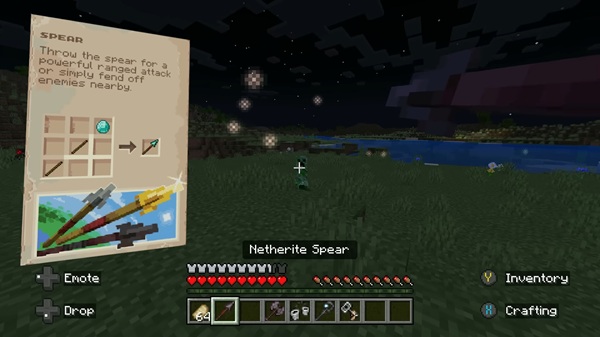
Spear for quick hits and safe retreats, or
-
Battle Axe for heavy, well-timed blows.
-
-
Any shield or defensive trick helps with close-range trades.
-
Clear supporting piglins first so you can focus on the General.
Against the Great Hog:
-
Focus on ranged options:
-
Buck-Chuckets for steady mid-range pressure.
-
Potato Launcher for bursts of damage at range.
-
-
Keep your armor in good condition; charges hurt.
-
Use blocks to build escape routes and safe lanes during the fight.
Against Malgosha:
-
The Staff of Dominance and other controlled-range tools work well.
-
Bring defensive boosts like potions or strong foods to stay in the fight longer.
-
Keep your hotbar organized so you’re not scrolling in panic on mobile.
Adjust your loadout based on your platform. A player on Android or iOS might feel safer leaning on ranged tools, while someone on controller or keyboard can afford more aggressive melee play.
Rewards and Progression After Defeating Piglin Bosses
These piglin bosses aren’t just there to look cool. Beating them in A Minecraft Movie Addon actually changes how your MCPE world progresses.
Typical outcomes after a successful kill:
-
You earn valuable loot that reflects the boss’s strength—better weapons, rare resources, or movie-themed items.
-
Your character’s combat power increases, making future Nether runs smoother.
-
You get a clear sense of growth: you’re no longer just surviving; you’re dominating.
You can treat each boss as a milestone:
-
Piglin General – first big step into movie-style content.
-
The Great Hog – proof you can handle heavier, longer battles.
-
Malgosha – the point where your skills, gear, and knowledge all come together.
Depending on the addon version, you may even gain trophy-style items to display in your base. That turns your survival world into a gallery of victories instead of just another Nether hub.
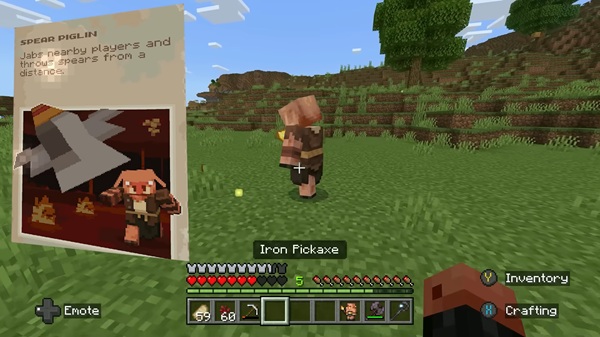
Turning Boss Battles into Repeatable MCPE Challenges
Once you’ve beaten every piglin boss at least once, the fun doesn’t have to stop. These fights are perfect for repeatable challenges, especially if you play with friends or create content.
Here are some challenge ideas:
-
No-shield runs – Defeat bosses without heavy defensive tools.
-
Weapon-only runs – Use just movie weapons like the Spear, Battle Axe, or Staff of Dominance.
-
Armor limits – Try bosses with iron gear or lower.
-
Speed challenges – Time how quickly your group can defeat each boss.
If you like recording clips or streaming, piglin boss battles in A Minecraft Movie Addon are great material:
-
Close escapes at half a heart.
-
Side-by-side comparisons of different loadouts.
-
Fun restrictions like “Can we beat Malgosha using only Potato Launchers?”
By treating these encounters as a repeatable challenge mode instead of a one-time checklist, you turn the addon into a long-term combat layer for your MCPE worlds. It becomes something you keep installed, revisit often, and share with your friends—not just another addon you try once and forget.











