Medieval Alive 1.21+
Medieval Alive Addon transforms Minecraft MCPE survival into a living RPG experience with quests, NPCs, dungeons, and kingdom progression designed for long-term Bedrock gameplay.

Medieval Alive Addon – A Living RPG World for MCPE
If you enjoy Minecraft survival but often feel lost after the early game, Medieval Alive Addon offers a different path. This addon turns a normal Minecraft Bedrock / MCPE world into a living RPG-style experience, where your actions matter, your world evolves, and progression follows a clear direction. Instead of random features, everything connects into one long-term medieval journey designed especially for mobile and Bedrock players.
What Is Medieval Alive Addon?
Before diving into the systems, it helps to understand what kind of experience this addon is designed to deliver.
Medieval Alive Addon is an RPG-focused Minecraft Bedrock addon that adds quests, NPCs, dungeons, and kingdom development into standard survival gameplay. It does not replace vanilla mechanics. Instead, it builds on them, giving you structure, goals, and progression that unfold naturally as you play.
Think of it as survival Minecraft with purpose. You still mine, explore, and craft, but now each step pushes you toward something bigger.
What Makes the World Feel “Alive”
A key promise of Medieval Alive Addon is that the world reacts to your progress. This feeling comes from guided systems rather than random events.
Below are the core elements that give the world direction and meaning.
Quest-Based Progression
Quests act as your main guide throughout the game. Instead of wondering what to do next, you always have a clear objective.
Key benefits include:
-
Clear goals for early, mid, and late game
-
Smooth pacing that avoids overwhelming new players
-
A sense of progress as new systems unlock over time
For MCPE players, this structure keeps sessions focused and rewarding.
NPCs and World Interaction
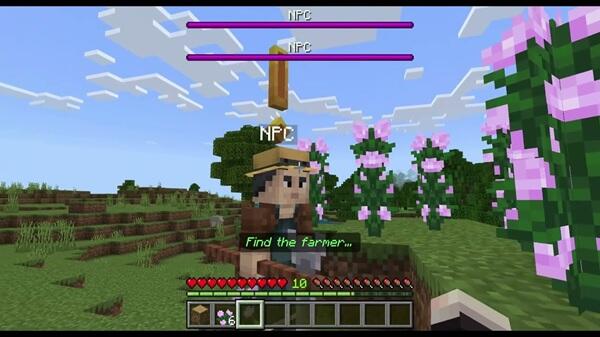
NPCs play an active role in your journey. They are not decoration.
-
The King NPC introduces the main progression path
-
Quest givers provide context and direction
-
Interaction replaces guessing with clarity
This design is especially helpful on mobile, where clear guidance improves the overall experience.
Core Gameplay Systems Explained
This section is the heart of the Medieval Alive Addon. Each system connects to the others, forming a single, easy-to-follow gameplay loop.
Quest System and Structured Progression
The quest system ensures steady growth instead of rushed content.
-
Early quests teach core mechanics
-
Mid-game quests encourage exploration and preparation
-
Late-game progression focuses on expanding your world
This structure keeps long-term MCPE worlds engaging without forcing grind.
NPC Roles and World Direction
NPCs define what matters at each stage of the game.
-
They unlock new content
-
They guide your next steps
-
They make progression feel intentional
As a result, the world feels designed around your journey.
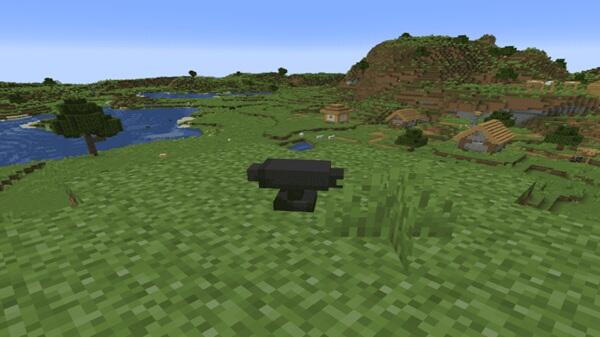
Magic Anvils and Controlled Content Generation
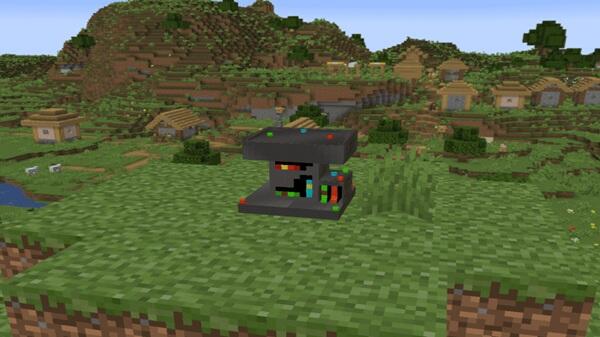
Magic Anvils allow you to control how content appears in your world.
With them, you can:
-
Spawn dungeons intentionally
-
Place medieval structures where they fit best
-
Avoid random clutter and performance issues
This controlled approach is safer and smoother for MCPE devices.
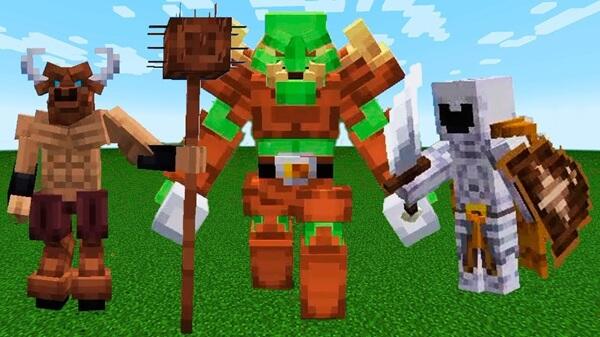
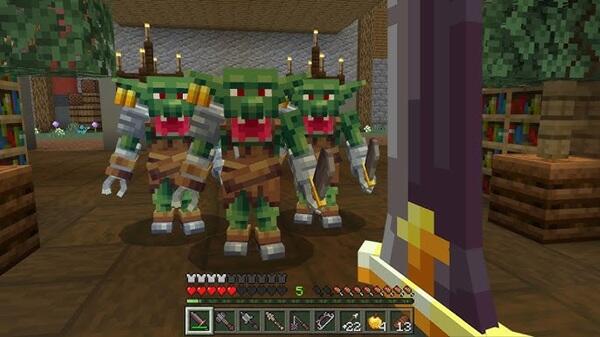
Dungeons as Progression Content
Dungeons are part of advancement, not just exploration.
-
Each dungeon requires preparation
-
Rewards support further progression
-
Exploration feels meaningful instead of repetitive
This system encourages thoughtful play rather than rushing content.
Kingdom Development and World Evolution
As you progress, your world changes.
-
Buildings unlock gradually
-
The kingdom grows alongside your journey
-
Visual changes reflect your achievements
Over time, your world becomes a record of your progress.
Gem Smithing and Progression Crafting
The Gem Smithing Table supports RPG-style advancement.
-
Special crafting options unlock through progress
-
Upgrades feel earned, not instant
-
Systems integrate with normal survival resources
This keeps crafting meaningful without replacing vanilla gameplay.
How These Systems Work Together
All systems follow one clear loop:
Quests → Exploration → Rewards → World Growth
Because everything connects, nothing feels isolated or confusing.
How Medieval Alive Fits MCPE Survival
Medieval Alive Addon is built with mobile players in mind.
It focuses on:
-
Simple interaction without complex menus
-
Minimal changes to vanilla survival rules
-
Smooth integration into existing MCPE worlds
The addon enhances survival instead of replacing it, making it easy to learn and enjoyable long term.
Compatibility and Performance on Mobile
Medieval Alive Addon is designed for modern Bedrock versions.
-
Works on Android, iOS, and Windows Bedrock
-
More demanding than cosmetic addons
-
Best on mid-range or better devices
For smoother performance:
-
Reduce render distance
-
Avoid stacking large addons
-
Use a fresh world when possible
Best Practices for New Players
A few habits improve the experience significantly.
-
Start quests early to unlock systems correctly
-
Place Magic Anvils in open areas
-
Keep world backups
-
Avoid mixing multiple heavy adventure addons
-
Progress at a steady pace
These tips help prevent issues and improve stability on MCPE.
Who This Addon Is Best For
Medieval Alive Addon is ideal for:
-
Players who enjoy RPG-style survival
-
Long-term world builders
-
Role-play or cooperative groups
-
MCPE users who prefer structured gameplay
It is less suitable for players seeking fast, casual mods.
Final Thoughts
Medieval Alive Addon – A Living RPG World for MCPE brings structure, progression, and meaning to Minecraft Bedrock survival. By combining quests, NPCs, controlled world expansion, and gradual kingdom development, it creates an experience that feels focused yet flexible.
If you want a Minecraft world that grows with you and rewards long-term play, Medieval Alive Addon is a strong and reliable choice for MCPE.
Photos
Installation Guide for MCPE / Bedrock
Getting started is straightforward.
Follow these steps:
-
Download the
.mcaddonfile for your Bedrock version -
Open the file to import it into Minecraft
-
Activate both the Behavior Pack and Resource Pack
-
Enable required experimental settings if prompted
-
Create or load a world and begin playing
Even new players can complete setup without difficulty.
Your comment