
Admin Menu 1.21+
The Admin Menu Addon gives Minecraft Bedrock and MCPE players a simple, menu-based way to manage multiplayer worlds. With all essential admin tools in one place, it helps you control players, chat, and gameplay quickly—without relying on complex commands.
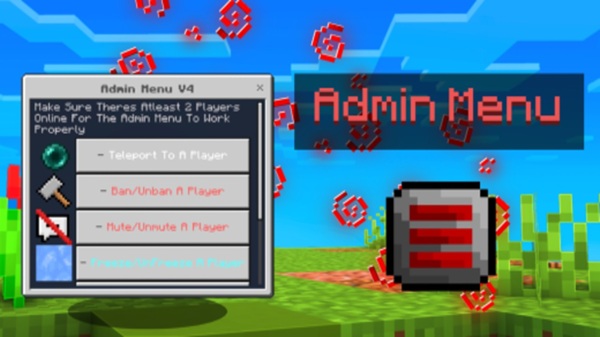
Admin Menu Addon – One Menu, Total Admin Control
Managing a multiplayer world in Minecraft Bedrock Edition can feel overwhelming—especially on mobile. Commands take time, mistakes happen easily, and reacting quickly to player issues isn’t always simple. The Admin Menu Addon was created to solve this exact problem. It gives you a single, easy-to-use menu that brings total admin control into one place, without complicated setups or constant command typing.
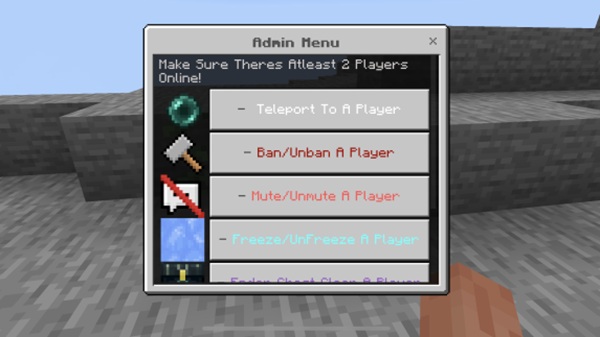
Built specifically for MCPE and Bedrock Edition, the Admin Menu Addon focuses on speed, clarity, and control. Whether you manage a small Realm with friends or a busy multiplayer world, this addon helps you stay in control while keeping gameplay smooth and fair.
Why “One Menu” Changes Everything on MCPE
Running admin tools on mobile is very different from playing on a keyboard. Touch screens are slower for typing, and switching between commands during live gameplay often breaks focus. This is where the Admin Menu Addon makes a real difference.
By placing all important admin tools inside one interactive menu, the addon lets you react instantly. Instead of remembering long commands, you simply open the menu and choose what you need. This design fits naturally with MCPE playstyles and reduces stress during multiplayer sessions.
Core Admin Controls (Feature Breakdown)
This section explains what you can actually do once the Admin Menu Addon is installed. Each feature is designed to give you practical control without disrupting gameplay.
Player Management Tools
Player management is often the most time-sensitive task for admins. The Admin Menu Addon gives you fast tools to handle situations as they happen.
You can:
-
Teleport players to locations or to other players
-
Bring players to you for help or moderation
-
Spectate players to observe behavior quietly
-
Temporarily restrict movement to calm situations
For example, if a player reports suspicious behavior, you can spectate first instead of acting blindly. This keeps moderation fair and controlled.
Chat & Interaction Management
Chat can quickly become unreadable in active multiplayer worlds. The Admin Menu Addon provides simple tools to keep communication clean.
With a few taps, you can:
-
Clear chat to remove spam or clutter
-
Reduce distractions during events
-
Keep conversations readable for everyone
This is especially useful during roleplay sessions or community events where clear communication matters.
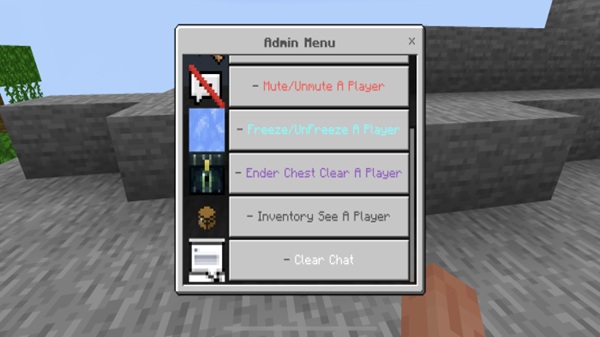
Inventory & Item Oversight
Inventory control plays an important role in fair gameplay. The Admin Menu Addon allows you to review player inventories without interrupting their experience.
Admins can:
-
View inventories in real time
-
Identify restricted or unwanted items
-
Remove items that break world rules
These actions help maintain balance in survival worlds and prevent issues from escalating.
World-Level Admin Utilities
Sometimes, admins need quick access to world-related actions. Instead of running multiple commands, the Admin Menu Addon keeps essential tools easy to reach.
This helps you:
-
Prepare worlds for events faster
-
Apply changes consistently
-
Reduce setup mistakes
The result is a more stable and organized world for everyone.
Centralized Menu Workflow
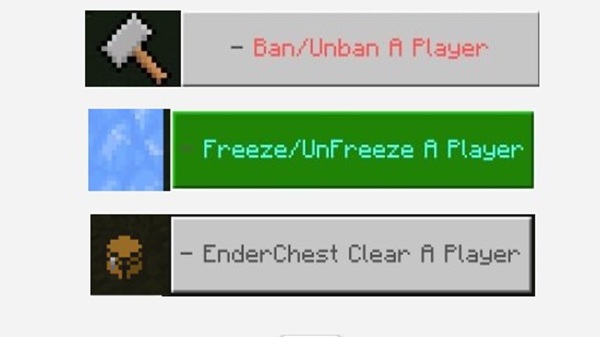
What truly sets the Admin Menu Addon apart is its centralized workflow. Every feature—player tools, chat controls, inventory checks, and world utilities—lives inside one menu.
This means:
-
No command memorization
-
Faster decisions during live gameplay
-
A smoother experience on touch devices
The addon fully delivers on its promise: one menu, total admin control.
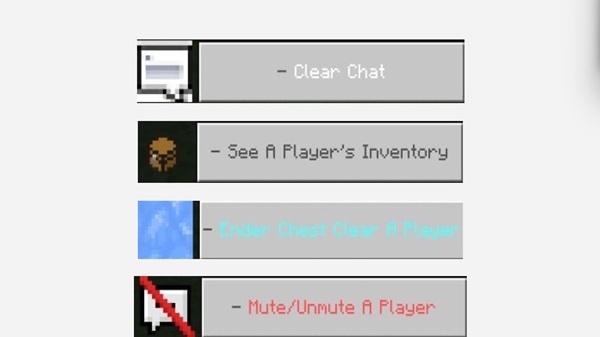
Secure Admin Access & Permissions
Powerful tools need proper access control. The Admin Menu Addon uses a tag-based permission system to keep admin features secure.
Only players with the correct admin tag can open the menu. You can add or remove admin access easily, making it suitable for shared administration in Realms or multiplayer worlds. This approach reduces misuse while staying simple to manage.
How the Admin Menu Works In-Game
The in-game experience is designed to feel natural, even during intense multiplayer moments.
The general flow looks like this:
-
Assign admin access to trusted players
-
Open the admin menu
-
Select the feature you need
-
Choose a player or option
-
Apply the action instantly
There’s no need to pause the game or switch focus. Everything happens smoothly within gameplay.
Compatibility & Performance
The Admin Menu Addon is optimized for Bedrock performance, especially on mobile devices.
You can expect:
-
Support for modern Minecraft Bedrock versions
-
Smooth performance on MCPE
-
Minimal impact on world stability
-
Compatibility with most other addons
This makes it suitable for both short play sessions and long-term worlds.
Best Practices for Admins
To get the best results:
-
Grant admin access only to trusted players
-
Observe before taking action
-
Use moderation tools fairly
-
Communicate clearly with your players
-
Back up your world regularly
Good admin habits lead to better multiplayer experiences.
Who This Addon Is Best For
The Admin Menu Addon is ideal for:
-
Realm owners managing friends or communities
-
Multiplayer server admins
-
Roleplay hosts and event organizers
-
MCPE players who want fast, menu-based admin control
If you value simplicity, speed, and control, this addon fits perfectly.
Final Summary
The Admin Menu Addon delivers a clean, reliable way to manage Minecraft Bedrock worlds. By replacing command-heavy workflows with a touch-friendly interface, it gives MCPE admins confidence and control without complexity.
If you want smoother moderation, faster reactions, and better multiplayer management, this addon provides exactly what its title promises: one menu, total admin control.
Installation Guide (MCPE / Bedrock)
Installing the Admin Menu Addon is straightforward and uses Minecraft’s official addon system.
Supported Platforms
The addon works on:
-
Android
-
iOS / iPadOS
-
Windows 10 & 11
-
Consoles using Bedrock Edition
It supports singleplayer worlds, multiplayer servers, and Realms.
Installation Steps
-
Import the
.mcaddonfile -
Apply the behavior pack (and resource pack if included)
-
Enable required experimental features if prompted
-
Turn on cheats for admin functionality
-
Back up your world before first use
Once installed, the addon is ready immediately.











