

All Enchantments Menu Addon: Fast, Confident MCPE Gear
If you play Minecraft Bedrock Edition on mobile, console, or Windows, you know how much your gear controls the pace of a world. A weak pickaxe or half-enchanted chestplate can turn every session into a slow grind. The All Enchantments Menu Addon is made for MCPE players who want strong tools and armor without fighting random enchantment rolls or clunky menus.
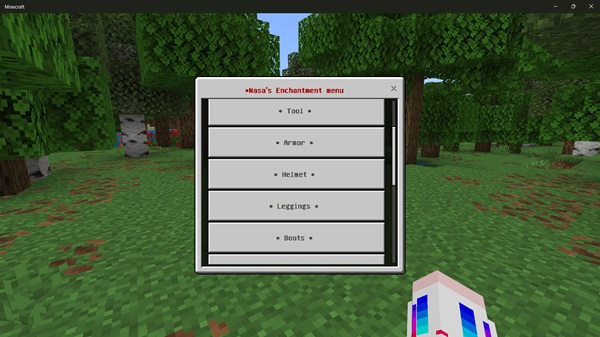
Instead of hoping the enchanting table gives you something useful, this MCPE addon gives you a clear, menu-based way to pick your own upgrades. You choose the item, you choose the enchantment, and you decide how fast you progress in survival and on Realms.
Key Features That Make Your MCPE Gear “Fast and Confident”
At its core, the All Enchantments Menu Addon is a quality-of-life upgrade for enchanting in MCPE. It removes extra steps, keeps everything touch-friendly, and stays within vanilla Bedrock rules. The features below show how it turns enchanting from a gamble into a quick, dependable part of your usual gameplay loop.
Instant Access with the !enchant Chat Command
The addon starts with one simple habit: when you want to enchant, you type !enchant.
-
Hold the item you want to upgrade in your main hand.
-
Open chat, type the command, then close chat.
-
The enchantment menu appears.
You don’t need a special room, bookshelf setup, or trip back to base. On MCPE, this single command replaces a lot of walking and tapping, especially when you’re mining or exploring far from home.
Clean, Touch-Friendly Enchantment Menu for MCPE
When the menu opens, it’s clearly built for Bedrock and Pocket Edition players. You’re not stuck with tiny buttons or crowded screens.
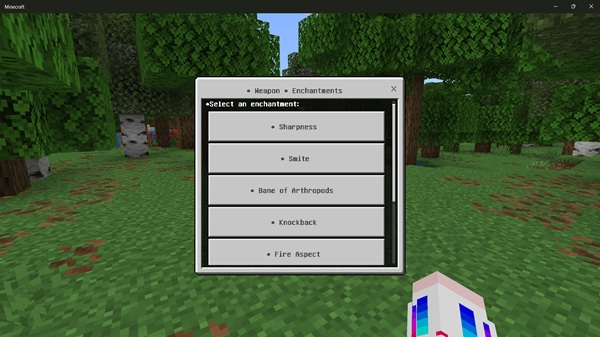
You get:
-
A simple, readable interface that works on phones, tablets, and controllers.
-
Organized sections for tools, weapons, and armor so you find what you need quickly.
You can apply several enchantments in one visit, then jump straight back into your adventure.
Complete Vanilla Enchantment Coverage
The All Enchantments Menu Addon supports the core Bedrock enchantments you already know. You can upgrade:
-
Tools – pickaxes, axes, shovels, hoes
-
Weapons – swords, bows, crossbows, tridents
-
Armor – helmets, chestplates, leggings, boots
-
Books – useful if you prefer combining enchants on an anvil later
You still follow normal Bedrock limits, but you pick the exact effect and level you want, such as Efficiency, Fortune, Protection, or Feather Falling. Every upgrade is deliberate rather than random.
Smart Targeting of the Item in Your Hand
To keep things simple, the addon focuses on the item you’re holding. When you open the menu, it reads your main-hand item and shows only compatible enchantments.
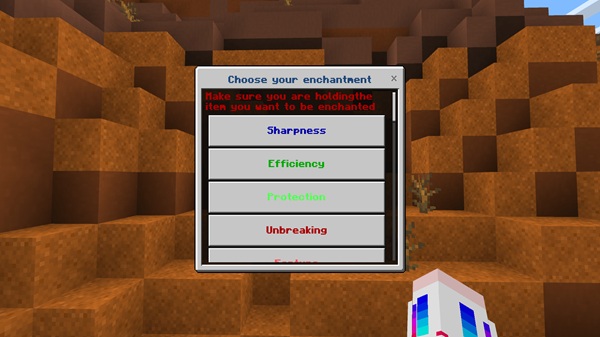
That means you:
-
Don’t accidentally enchant the wrong tool or armor piece.
-
Don’t waste time dragging items into extra slots or scrolling past unusable options.
Hold a sword and you see sword enchants. Hold a pickaxe and you see tool enchants. This is especially helpful for newer players or anyone who likes to move quickly.
“Most Used Enchants” for One-Tap Loadouts
Most MCPE players have favorite setups: a Fortune pickaxe for ores, a Silk Touch pickaxe for building, or a standard armor set for dangerous biomes. The addon turns those habits into shortcuts.
It tracks your most frequently used enchantment combinations and offers them in a “Most Used Enchants” section. It feels like presets: you re-gear quickly when tools break, share your usual armor build with friends on a Realm, and keep multiple worlds using the same trusted loadouts.
Optional Enchantment Points (EP) Economy
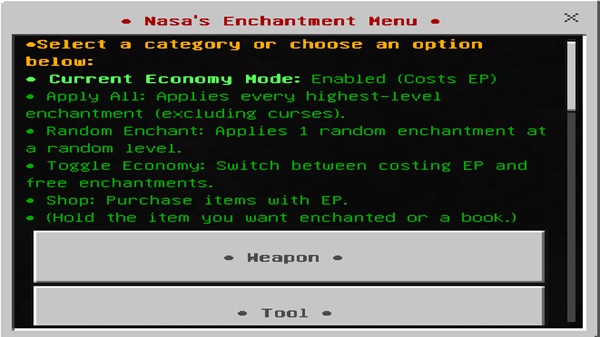
If you enjoy structured progression, the Enchantment Points (EP) system adds a light economy to your enchant menu. EP works as a custom cost:
-
You earn EP while playing your world.
-
Each enchantment spends a certain amount of EP.
You decide which tools and armor deserve that investment. Because the EP system is optional and configurable, you can keep enchanting free in casual worlds or use it to balance survival servers and Realms.
Admin & Realm Controls for Shared Worlds
For Realm owners and server hosts, the All Enchantments Menu Addon includes clear controls so your rules stay consistent. Admins or tagged players can:
-
Turn the EP system on or off.
-
Adjust enchantment costs to match your world’s difficulty.
-
Control how easily regular players access the menu.
This lets you run relaxed community Realms, more serious survival servers, or anything in between, while keeping the enchantment system fair and easy to understand.
Works Alongside Vanilla Enchanting
The addon doesn’t remove existing mechanics; it works beside them. You can still:
-
Use enchanting tables for classic XP-based rolls.
-
Combine and repair items on anvils.
-
Strip bad enchants with grindstones.
Many players use the All Enchantments Menu Addon for precise upgrades and vanilla enchanting for early-game randomness or role-play. That mix makes it easy to drop the addon into any MCPE world without changing how you already like to play.











