
Baku Metro 1.21+
Discover how the Baku Metro Addon transforms Minecraft Bedrock (MCPE) with realistic metro stations, tunnels, and automation tools to build vibrant, modern underground cities.
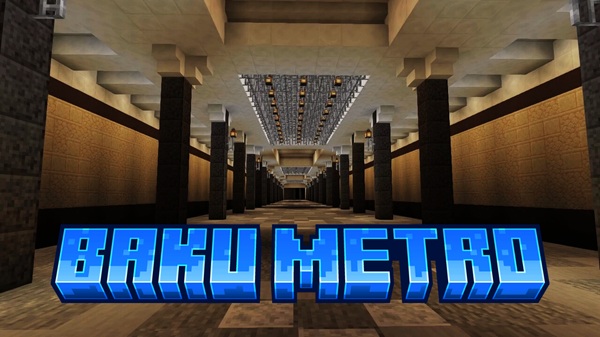
Baku Metro Addon – Transform Bedrock Worlds into Modern Cities
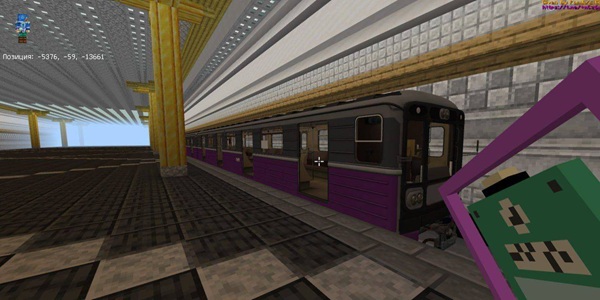
The Baku Metro Addon introduces a new era of creative building in Minecraft Bedrock Edition (MCPE). Inspired by Azerbaijan’s renowned Baku Metro, this addon gives players the freedom to design realistic, fully functional subway systems beneath their cities. Whether you’re an engineer in survival mode or an artist in creative mode, it helps turn ordinary Bedrock worlds into vibrant, modern urban environments filled with motion, light, and atmosphere.
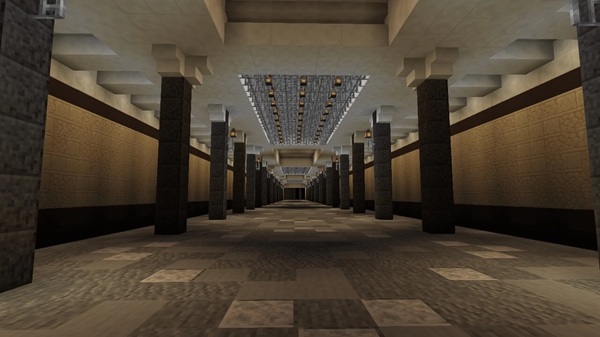
With optimized performance across devices and a perfect blend of realism and accessibility, the Baku Metro Addon makes metro construction both simple and inspiring.
Experience Urban Realism Underground
This addon brings architectural depth and cultural inspiration to your Minecraft worlds. It transforms underground builds into detailed transit networks that look and feel authentic — from wall patterns to lighting schemes.
Authentic Baku-Inspired Metro Design
Every block, texture, and decorative piece reflects the spirit of the real Baku Metro system. You can recreate polished tiles, modern platforms, and curved tunnel walls with remarkable accuracy. The addon includes signage and lighting options that allow each build to tell its own story.
Seamless Integration with Vanilla Gameplay
No external tools or scripts are required. The Baku Metro Addon fits perfectly within the vanilla Minecraft building system. Players can access all new blocks through the creative inventory and blend them effortlessly with standard materials for a natural look and feel.
Core Features That Transform Your Builds
The Baku Metro Addon offers more than visual enhancements — it provides functional and creative tools that empower builders to bring their cities to life.
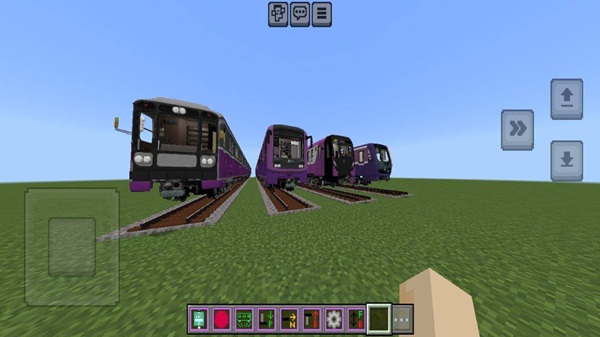
Custom Blocks and Decorative Elements
-
Station tiles, rail platforms, tunnel supports, and unique lighting fixtures.
-
Distinct Baku-themed aesthetics that make underground builds stand out.
Smooth Performance Across Devices
-
Fully optimized for Android, iOS, and Windows 10/11.
-
Runs efficiently on low- and mid-range devices while maintaining stable FPS.
Redstone and Automation-Friendly
-
Works seamlessly with minecarts and redstone circuits.
-
Perfect for automated train lines, lighting systems, and immersive roleplay setups.
Building Your Metro System in MCPE
Building your metro network in Minecraft is both exciting and rewarding. With the right planning and tools, the Baku Metro Addon turns complex design ideas into achievable projects.
Plan Your City Layout Before You Build
Start by mapping key routes connecting important areas — residential zones, plazas, and commercial districts. Use distinct colors or signage to organize your metro lines and maintain consistent spacing between stations.
Constructing Stations and Platforms
Use metro blocks from the addon to design realistic stations. Add staircases, benches, and glow-lit ceilings for immersion. Focus on lighting balance — bright enough for safety, yet atmospheric enough to feel underground.
Designing Realistic Tunnels and Rail Lines
Shape tunnels with arches or curved ceilings for visual depth. Install minecart rails or command-based train systems to simulate movement. Combine redstone lamps and soft shadows for cinematic tunnel lighting.
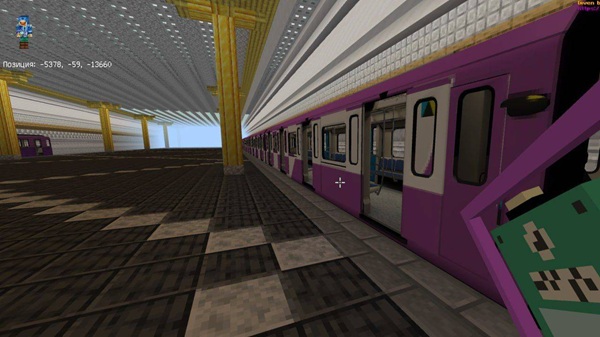
Integrate Redstone and Minecart Automation
Turn static builds into working transport systems. Add automatic doors, minecart stops, and timed departures using pressure plates or repeaters. Great for multiplayer maps or roleplay cities.
Add Finishing Touches and City Integration
Build exits that connect directly to streets, modern plazas, or skyscraper zones. Add streetlights, signs, and surface details to make your metro part of a larger city ecosystem.
Bonus Tip: Combine With Other Addons
Pair with other modern building addons such as furniture, lighting, or traffic systems. This creates a cohesive, realistic city world that looks alive from underground to skyline.
Compatibility and Optimization
The addon works smoothly on Minecraft Bedrock 1.20–1.21+ and supports all major platforms.
| Platform | Support |
|---|---|
| Android / iOS | ✅ Full support |
| Windows 10/11 | ✅ Optimized |
| Xbox / PlayStation / Switch | ✅ Compatible |
| Realms / LAN Worlds | ✅ Multiplayer Ready |
Performance Tips:
-
Lower render distance when working on large metro systems.
-
Use fewer active addons to maintain stable performance.
-
Keep enough storage (500MB+) for big city projects.
Creative Ideas and Build Inspiration
The Baku Metro Addon invites players to think beyond the tracks. Use it to:
-
Create realistic city networks that connect landmarks and districts.
-
Build cinematic environments for screenshots, videos, or machinimas.
-
Add roleplay depth by designing ticket gates, staff rooms, and maintenance areas.
Every metro system you build can become a signature part of your city — a mark of design mastery in Minecraft Bedrock.
Why the Baku Metro Addon Is a Game-Changer for MCPE Builders
The Baku Metro Addon is more than an architectural resource — it’s a creative framework for the modern Minecraft player.
It teaches design logic, space planning, and structure, all while fueling imagination. For creators seeking realism, city builders aiming for atmosphere, and players dreaming of movement and depth, this addon delivers the perfect blend of functionality and beauty.
With its simplicity, optimization, and cultural flair, the Baku Metro Addon truly transforms Minecraft Bedrock into a living, modern metropolis — built block by block, line by line.
Installation Guide for Bedrock Edition
Setting up the Baku Metro Addon is quick and easy:
-
Download the
.mcaddonfile and open it with Minecraft Bedrock. -
The game automatically imports both Behavior and Resource Packs.
-
In your world settings, enable these packs under the Add-ons section.
-
Turn on Experimental Features to unlock full functionality:
-
Holiday Creator Features
-
GameTest Framework
-
Custom Biomes
-
-
Create or load your world — you’ll find the metro blocks ready in your inventory.











