
Beachside Furniture 1.21+
Bring a vibrant tropical atmosphere to your MCPE world with the Beachside Furniture Addon. This collection adds beach-themed furniture, colorful décor, and interactive props that blend perfectly with Minecraft’s vanilla style. Ideal for builders who want to transform their coastal areas into paradise.
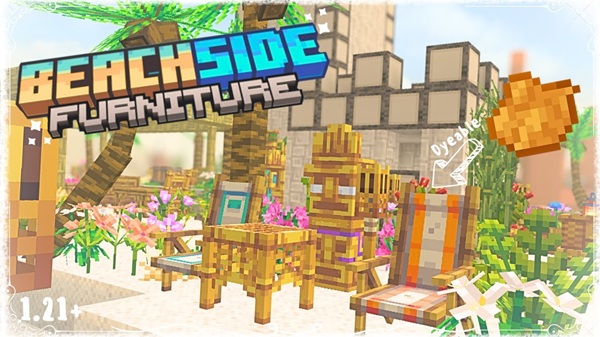
Beachside Furniture Addon – Paradise Coast Collection
If you’ve ever wanted to turn your Minecraft Bedrock world into a calm, tropical escape, the Beachside Furniture Addon makes that vision easy. The Paradise Coast Collection brings beach décor, vibrant furniture, and interactive coastal props into your builds without disrupting Minecraft’s natural style. Whether you’re designing a sunny resort or adding life to a simple beach hut, this addon gives you the tools to build your own paradise.
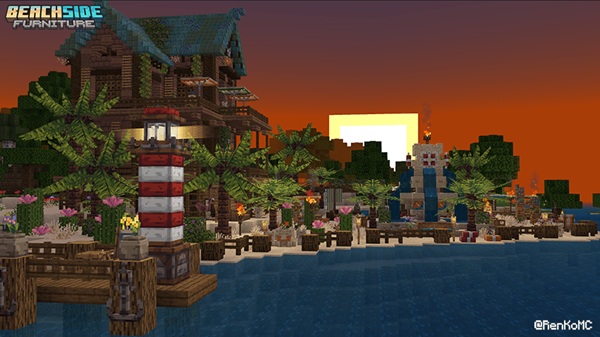
Introduction to the Paradise Coast Collection
The Beachside Furniture Addon focuses on warm colors, tropical shapes, and coastal decorations tailored for MCPE players. It fits naturally into beaches, piers, islands, and oceanside bases. You can use it to build boardwalks, cafés, or calm vacation spots that feel welcoming from the moment you step inside your world.
This addon runs smoothly on Bedrock Edition devices, including mobile, Windows, and consoles. If you enjoy decorating, roleplaying with friends, or experimenting with themed builds, this collection offers plenty of creativity without overwhelming your world.
Main Features of the Beachside Furniture Addon
This section gives you a quick look at the core features before diving into each one. These features are the heart of the Paradise Coast Collection and shape the building experience.
Tropical-Themed Furniture & Decorative Props
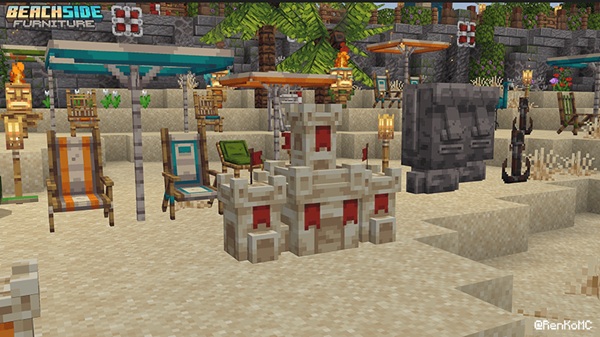
The addon includes a wide range of tropical decoration pieces such as:
-
Beach chairs, loungers, umbrellas
-
Tiki totems, Moai figures, carved pillars
-
Seashells, starfish, driftwood
-
Potted palms and small tropical plants
-
Lighthouse blocks for tall coastal structures
-
Life rings, anchors, and marine decorations
Every model is designed to match Minecraft’s vanilla block style.
Full Dyeable Furniture System (16 Colors)
Most furniture pieces support all 16 Minecraft dye colors.
You can recolor them by:
-
Tapping the block while holding a dye
-
Resetting with a crouch + tap using an empty hand
This makes it easy to build themed areas such as:
-
Tropical resorts
-
Poolside hangouts
-
Event spaces
-
Color-coordinated beaches
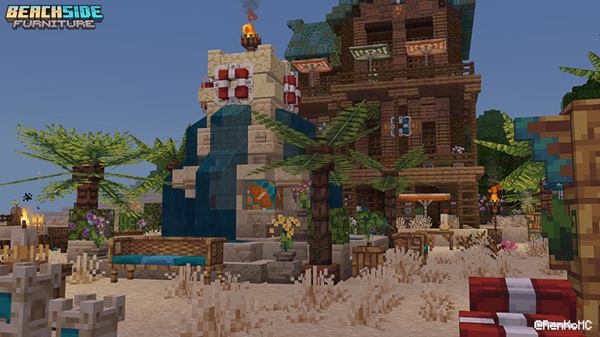
Connectable & Multiblock Structures
Some items automatically link or stack to form larger structures. Popular examples include:
-
Stackable sandcastles
-
Buildable lighthouses
-
Multi-section tiki totems
-
Connected seating arrangements
These structures give your builds a clean, polished look without complicated building methods.
Interactive Elements & Ambient Effects
A few decorations respond when you interact with them. You’ll notice:
-
Soft ambience from seashells and starfish
-
Sand particles from certain props
-
Anchors that change appearance over time
-
Subtle animations that bring life to the beach
These effects add depth without becoming distracting.
Vanilla-Friendly Modeling & Textures
The addon uses simple, Minecraft-friendly models. This ensures:
-
No ultra-realistic visuals
-
Consistent texture quality
-
Smooth blending with shaders
-
Compatibility with most resource packs
Everything looks like it naturally belongs in your MCPE world.
Optimized Performance for MCPE
The Beachside Furniture Addon is optimized for mobile users. It uses lightweight models and avoids heavy effects, making it suitable even on older or low-end devices.
How It Works In-Game (MCPE / Bedrock)
Here’s how you’ll use and interact with everything once the addon is installed.
Creative Mode Access
All items are placed in the Creative Inventory. You can freely build with:
-
Furniture
-
Decorative items
-
Stacked and linked structures
This makes it ideal for creators who want to experiment.
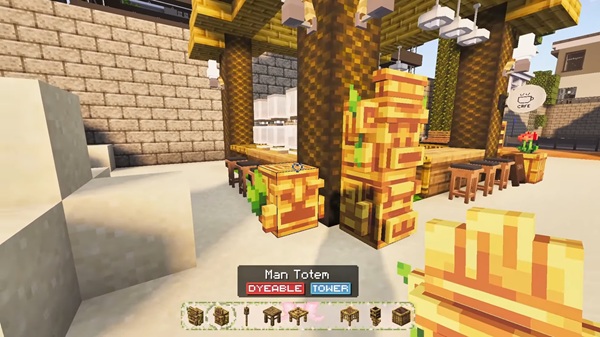
Survival Mode Status & Future Plans
Right now, the addon is mainly designed for Creative builds. Survival crafting recipes may be added later, but the addon is still fully usable inside survival worlds if you enable it in the world settings.
Placement & Interaction System
Placing and customizing furniture is simple:
-
Tap blocks to place
-
Align furniture to auto-connect
-
Stack pieces to build larger designs
-
Tap with dyes to recolor
The system feels natural even for new players.
Compatibility & Performance Notes
These points help ensure smooth gameplay on your device.
Supported MCPE Versions
Best suited for MCPE 1.21+.
Device Compatibility
Works on:
-
Android
-
iOS
-
Windows 10/11
-
Most console versions of Bedrock
Shader & Texture Pack Compatibility
Compatible with most shaders and texture packs. If you see visual glitches, try disabling heavy shaders temporarily.
Build Inspiration for Paradise Coast Worlds
This section helps you imagine what you can build using the Beachside Furniture Addon.
Resort & Hotel Areas
Use umbrellas, loungers, and palm pots to create relaxing spaces.
Island Villages & Boardwalks
Marine props and lanterns help build lively coastal towns.
Beach Bars & Tropical Cafés
Tiki totems, stools, and décor pieces create fun social spots.
Pools, Piers, and Harbors
Life rings and lighthouse parts enhance water-focused builds.
Creative Color Themes
Mix dyes to match ocean, summer, or island palettes.
Tips for Getting the Most Out of the Addon
-
Build on flat surfaces for cleaner alignment
-
Pair with tropical trees or custom vegetation
-
Use shaders for warm lighting
-
Add seating areas for multiplayer hangouts
-
Try themed builds like waterparks or island towns
Final Thoughts
The Beachside Furniture Addon – Paradise Coast Collection gives you the freedom to design peaceful, colorful beach builds in Minecraft Bedrock. With dyeable furniture, interactive props, and naturally styled models, it’s a strong choice for anyone who enjoys tropical building. Whether you're shaping a full island town or decorating a beachfront home, this addon helps you create a world that feels refreshing, inviting, and full of personality.
Installation Guide for MCPE
The steps are quick and work across Bedrock Edition devices.
Android / iOS Installation
-
Download both the Resource Pack and Behavior Pack.
-
Tap each file to import into Minecraft.
-
Activate both packs inside world settings.
Windows 10/11 Installation
-
Double-click the .mcpack files.
-
Open Minecraft and edit your world.
-
Enable both packs.
No Experimental Features Required
The Beachside Furniture Addon works without toggling experiments. Your worlds remain stable, and achievements stay enabled.
Troubleshooting Tips
If items don’t load properly:
-
Reinstall the packs
-
Move the pack priority higher
-
Check MCPE version compatibility
-
Remove unused packs to free space











