
Bedrock Teams 1.21+
The Bedrock Teams Addon introduces a complete team system for MCPE, allowing players to organize groups, communicate privately, and enjoy a more united multiplayer experience across Bedrock Edition.
Bedrock Teams Addon United Multiplayer System
The Bedrock Teams Addon introduces a unified, flexible, and player-friendly team system tailored for Minecraft Bedrock Edition. It creates a more coordinated multiplayer environment where you and your friends can organize teams, communicate clearly, and enjoy collaborative gameplay without confusion. Designed for MCPE and cross-platform audiences, this addon enhances teamwork, identity, and structure across survival worlds, Realms, and shared adventures.
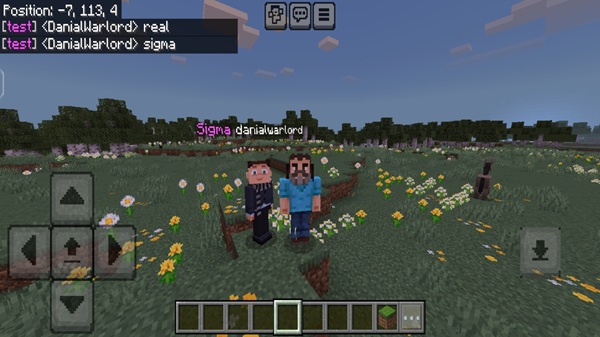
Overview of the Bedrock Teams Addon
The Bedrock Teams Addon brings team-based gameplay to Bedrock Edition through clear team roles, private messaging, and a coordinated structure. You can customize team identity, keep communication organized, and strengthen cooperation in long-term survival worlds.
Ideal for:
-
MCPE mobile players
-
Realms groups
-
SMP communities
-
Family survival worlds
-
Multiplayer events
This system works inside the game itself—no plugins, modloaders, or external tools required.
Why Team Systems Matter in Minecraft Bedrock
Unlike Java Edition, Bedrock lacks a built-in team framework. As a result, multiplayer worlds can feel disorganized, especially during group mining, co-op combat, and shared projects.
The Bedrock Teams Addon addresses challenges such as:
-
unclear team boundaries
-
no official team labels
-
scattered communication
-
frequent misunderstandings
It adds structure and clarity, supporting fair and enjoyable gameplay for everyone involved.
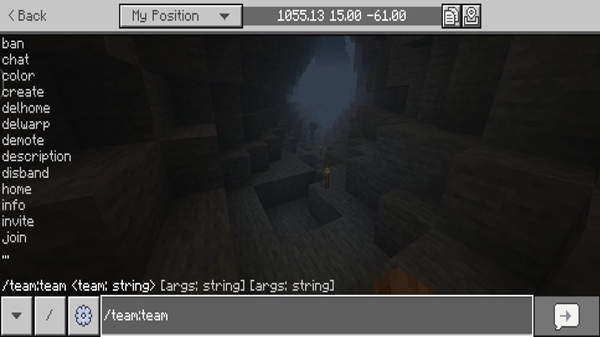
Core Features of the United Multiplayer System
Team Creation and Player Management
Create, join, leave, and invite players directly through in-game commands.
Alliance System Between Teams
Teams can align strategically and collaborate as needed.
Team-Only Communication Channel
Private messages keep internal conversations focused and clear.
Visible Team Identification In-Game
Team tags and name indicators help everyone know who belongs where.
Friendly Interaction Controls
Optional safety settings prevent teammates from harming each other.
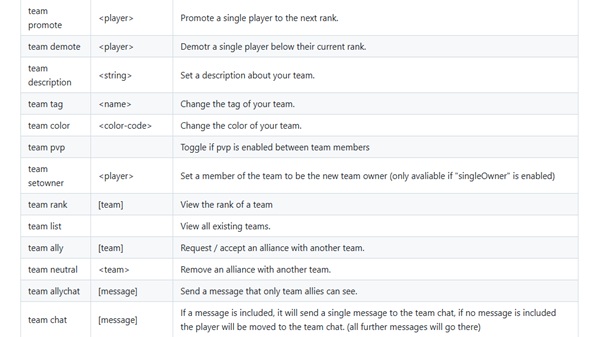
Command System Overview
All functions use a simple, unified command format.
Optional Settings & Customization
Team limits, interaction rules, and alliance toggles can be adjusted anytime.
How Team Management Works In-Game
Every team action is powered by direct player commands. You can form groups quickly, adjust alliances, and organize communication without needing permissions or configuration files. Team membership persists throughout shared sessions, making this addon ideal for SMP and Realm continuity.
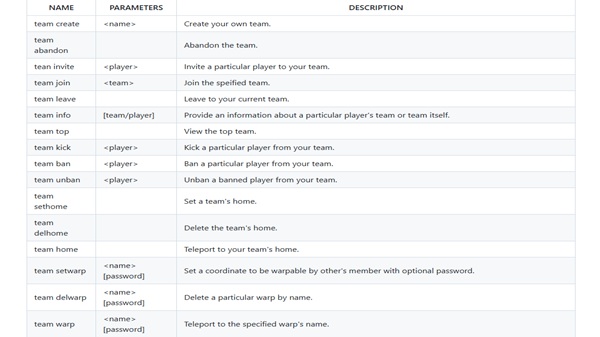
Players can:
-
create or join teams instantly
-
communicate using team chat
-
adjust safety settings
-
manage alliances
Required Settings & Beta APIs
Make sure your world has:
-
Beta APIs enabled
-
Experimental toggles active
-
Script permissions turned on
Without these, features may not activate fully.
Compatibility Overview
Best performance on:
-
Minecraft Bedrock 1.21+
Works with:
-
Android
-
iOS
-
Windows
-
Console via Realms
Lightweight and optimized to minimize performance impact.
Tips for Teams & Community Play
Suggestions:
-
define team roles early
-
use private chat for planning
-
support new teammates
-
set shared goals
- rotate leadership if needed
Recommended Group Scenarios
Best suited for:
-
cooperative survival worlds
-
Realm families & friend groups
-
SMP communities
-
event-driven gameplay
-
challenge series
-
exploration teams
Closing Summary
The Bedrock Teams Addon strengthens communication, structure, and teamwork across Minecraft Bedrock Edition. Whether you’re building, exploring, or hosting a Realm, this addon helps create a more unified multiplayer journey. If you want organized gameplay, clearer collaboration, and lasting community engagement, this addon is a meaningful upgrade for MCPE.
How to Install on MCPE / Bedrock Edition
Installation steps:
-
Download the
.mcaddonfile -
Open it to import automatically
-
Activate the Behavior Pack
-
Confirm the Resource Pack
-
Enable Experimental & Beta API options
-
Start your world
Supported Devices
-
Android / MCPE
-
iOS / iPadOS
-
Windows Bedrock Edition
-
Consoles via cross-transfer or Realms











