
Block Duplicator 1.21+
The Block Duplicator Addon lets you duplicate blocks and items instantly in Minecraft Bedrock Edition. Build bigger worlds, save time, and enhance your Survival or Creative gameplay with this must-have MCPE addon.
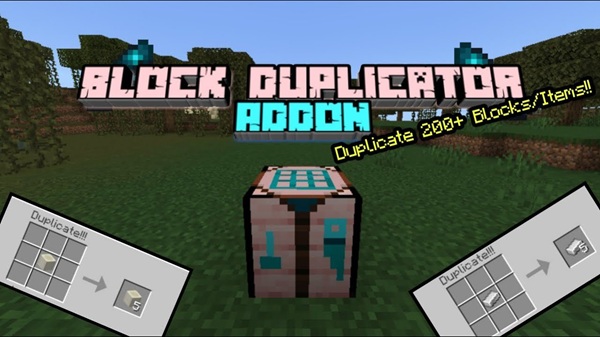
Block Duplicator Addon – Build Bigger with Instant Resources
Minecraft Bedrock Edition (MCPE) players often spend hours mining or gathering resources for ambitious builds. The Block Duplicator Addon changes the game by letting you duplicate blocks and items instantly. This addon streamlines your workflow, giving you more time to focus on building, exploring, and experimenting in Survival or Creative mode. Whether you want to construct massive castles, automate farms, or collaborate on multiplayer Realms, this addon makes it simple to expand your world efficiently.
Introduction
Building in Minecraft can be both rewarding and repetitive. Collecting the materials for large-scale projects often takes much longer than the actual construction. With the Block Duplicator Addon, you can skip repetitive grinding while maintaining survival-friendly gameplay. This addon allows you to duplicate over 250 blocks and items, including ores, decorative blocks, and rare materials. By streamlining resource gathering, it empowers players to focus on creativity, strategy, and efficiency, making your MCPE worlds feel more dynamic and expansive.
Key Features
The Block Duplicator Addon brings several game-changing features that make it invaluable for MCPE players.
Duplicate Most Blocks & Items
This addon supports building blocks, ores, decorative items, and food. With duplication, you can quickly expand your resource stockpile and accelerate large-scale projects.
Survival-Friendly Mechanics
The addon integrates seamlessly with Survival mode, allowing resource scaling without making the game feel unbalanced. You still collect the first block, maintaining a sense of progression.
Access Rare or Uncraftable Items
Items like fire blocks, nametags, suspicious sand, and decorative blocks can be duplicated for creative builds or experimental gameplay, adding more possibilities to your world.
Mobile-Friendly Interface
The user interface is optimized for taps, long-presses, and intuitive navigation, making it ideal for MCPE on smartphones and tablets.
Optimized Performance
Lightweight coding ensures smooth gameplay on mobile, Windows, and consoles, without causing lag during duplication.
Regular Updates
The addon is regularly updated with new duplicable blocks, bug fixes, and improved compatibility, ensuring it stays relevant across Minecraft versions.
How It Works In-Game
Understanding how the Block Duplicator Addon functions is key to getting the most out of it.
Crafting the Block Duplicator
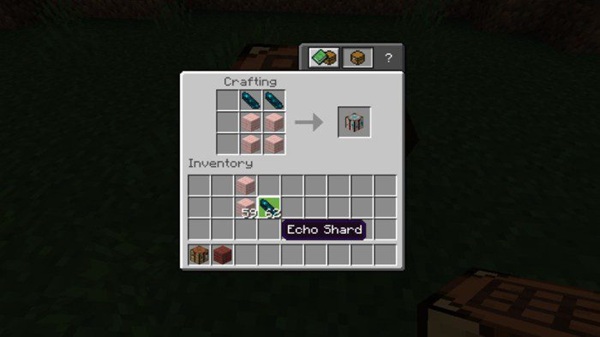
You need the following materials to craft the duplicator:
-
4 Cherry Planks
-
2 Echo Shards
Only cherry planks work, and the mid-game recipe ensures balanced progression. Crafting it feels like an achievement rather than an easy cheat.
Placing and Using the Duplicator
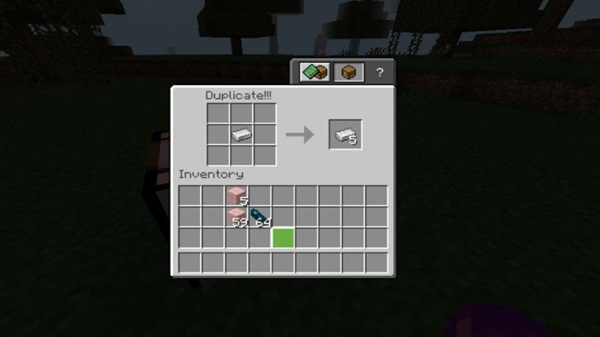
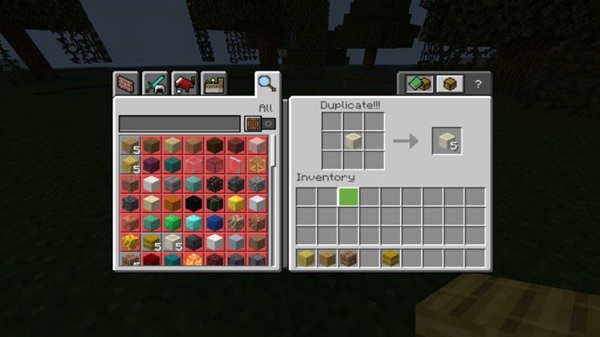
Place the Block Duplicator in your world. Open the interface via tap, long-press, or right-click, then insert the block or item you want to duplicate.
Duplication Process & Output
-
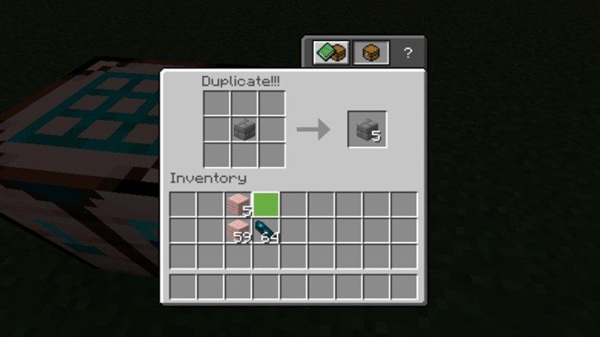
Each input produces five duplicates.
-
Works on most building, decorative, and ore blocks.
-
Some technical blocks, such as command blocks, bedrock, and portals, cannot be duplicated.
Example: Placing 1 diamond block yields 5 diamond blocks instantly.
Best Practices
-
Keep an original block separate to avoid accidental duplication errors.
-
Use multiple duplicators near large builds for efficiency.
-
Combine with storage and sorting systems for optimal workflow.
Survival-Friendly Mechanics
Duplication is balanced to enhance Survival gameplay without trivializing challenges. In multiplayer worlds, ensure all players have the addon enabled.
Common Mistakes to Avoid
-
Not activating both behavior and resource packs.
-
Using incorrect input blocks.
-
Playing on unsupported MCPE versions.
Compatibility
-
Minecraft Bedrock Versions: 1.20 – 1.21+
-
Devices: Mobile (iOS & Android), Windows, Xbox, PlayStation, Nintendo Switch
-
Multiplayer: Works in Realms and LAN; all players must have the addon active
-
Performance: Low system impact; optimized for smooth gameplay on all platforms
Tips & Strategies
-
Place multiple duplicators near construction sites for quick access.
-
Keep original blocks separate to prevent mistakes.
-
Use duplication for rare or decorative blocks first.
-
Combine with sorting systems for large builds.
-
Apply duplication strategically in Survival to maintain balance and fun.
Use Cases / Creative Ideas
-
Mega Builds: Castles, cities, or large themed worlds.
-
Redstone Experiments: Automate farms and decorative mechanisms.
-
Multiplayer Collaboration: Shared resources for community builds.
-
Creative Testing: Experiment with rare or uncraftable items for unique designs.
Conclusion
The Block Duplicator Addon is a must-have for MCPE players seeking efficiency, creativity, and larger-scale builds. It reduces grinding, enhances creative freedom, and works across mobile, PC, and console platforms. Whether in Survival mode, Creative, or multiplayer Realms, this addon lets you build bigger and unlock your full Minecraft potential.
Installation Guide
Mobile (iOS & Android)
-
Download the
.mcaddonfile from a trusted source. -
Open the file; Minecraft will import it automatically.
-
Activate Behavior Pack and Resource Pack in world settings.
Windows 10/11
-
Download the
.mcaddonfile. -
Double-click to import.
-
Enable both packs in your world settings.
Console (Xbox, PlayStation, Switch)
-
Transfer the addon via Realms or world export.
-
Activate both packs in the world settings.
-
Ensure all multiplayer participants have the addon activated.
Tip: Always restart Minecraft after installation to ensure full functionality.











