
Blurry’s Java Saturation 1.21+
Enhance your MCPE survival experience with Blurry’s Java Saturation Addon. Manage hunger, boost health regeneration, and enjoy Java-style saturation mechanics in Minecraft Bedrock. Learn how to install the addon, optimize your food, and play smarter on both solo worlds and multiplayer Realms.
Blurry’s Java Saturation Addon – Never Starve, Play Smarter
Surviving in Minecraft Bedrock Edition (MCPE) can sometimes feel tricky. Hunger drains unpredictably, health regeneration is inconsistent, and managing food often feels like guesswork. That’s where Blurry’s Java Saturation Addon comes in. This addon brings the Java Edition hunger and saturation system to Bedrock, allowing you to manage your resources smarter and enjoy a more balanced survival experience.
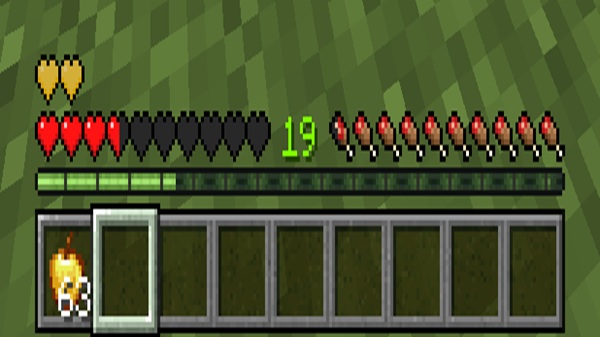
Whether you’re mining deep caves, farming crops, or exploring new biomes, this addon ensures you never starve and always play smarter.
Why Hunger and Saturation Matter in MCPE
Before this addon, Bedrock Edition treated hunger differently than Java, often leaving players frustrated. Hunger drains inconsistently, and your health might not regenerate at the rate you expect. In contrast, Java Edition uses a saturation system—an invisible buffer that fills first and then protects your hunger bar. This creates predictable health regeneration and makes strategic food management possible.
Blurry’s Java Saturation Addon brings this mechanic to MCPE, offering smoother gameplay. With it, survival becomes less guesswork and more strategy, letting you focus on exploration, building, and adventure.
Key Features of Blurry’s Java Saturation Addon
The addon enhances your survival experience by introducing several key improvements. Understanding these features helps you play smarter and make the most of every meal.
Java-Style Saturation System
Saturation works as a hidden buffer before your visible hunger bar drains. Foods with higher saturation, like steak, golden carrots, and cooked salmon, keep you full longer. During activities like walking, sprinting, mining, or building, saturation depletes first, which protects your hunger bar and gives you longer, uninterrupted regeneration.
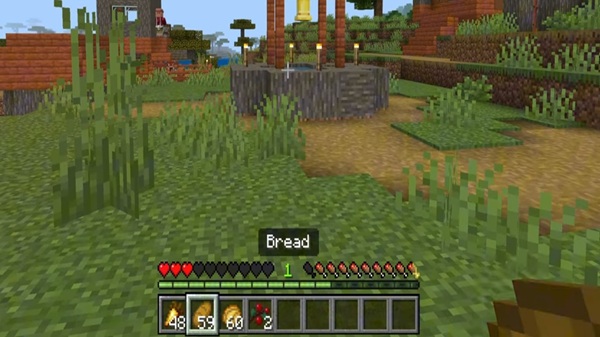
Appleskin Visual Overlay
The addon includes a visual indicator that shows your current saturation and hunger levels. This overlay helps you know exactly when to eat so that your health regeneration remains consistent. You can toggle the overlay on or off through the configuration menu, making it adaptable to your preferred gameplay style.
Golden Apple Behavior
Pre-gapping with golden apples now functions like Java Edition, respecting heart caps and preventing over-healing exploits. This makes regeneration during combat and survival predictable, helping you plan your encounters and maintain fairness in multiplayer sessions.
Config Menu & Customization
You can access the configuration menu using the command:
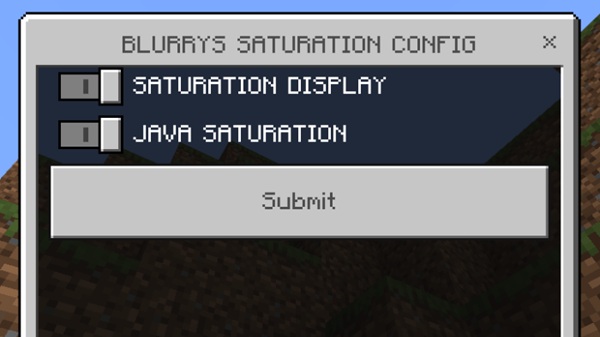
Here, you can adjust saturation depletion rates, enable or disable the visual overlay, and tweak difficulty or gameplay settings. This allows you to tailor the addon to match your preferred survival experience in MCPE.
Benefits for Survival
Overall, the addon makes your food choices meaningful, enhances health regeneration timing, and supports longer exploration sessions. It works seamlessly with other behavior packs and survival-focused mods, giving you a richer and more strategic Bedrock experience.
How It Works In-Game
Understanding how saturation and hunger interact helps you play smarter:
-
Saturation Fills First – When you eat, the invisible saturation buffer fills before the visible hunger bar.
-
Hunger Bar Fills After – Only after saturation is full does your hunger increase visibly.
-
Saturation Drains During Activities – Walking, sprinting, and mining deplete saturation before hunger.
-
Health Regeneration Depends on Saturation – Once saturation is gone, regeneration stops until you eat again.
This system rewards strategic food planning, particularly during long adventures, mining expeditions, or survival challenges.
Survival Tips & Strategies
-
Prioritize High-Saturation Foods: Eat steak, golden carrots, cooked salmon, and pumpkin pie for longer-lasting energy.
-
Prep Before Exploration: Build a saturation buffer before mining, exploring, or farming.
-
Build Efficient Food Farms: Maintain multiple food sources to ensure continuous high-saturation supply.
-
Monitor Appleskin Overlay: Track your saturation to prevent unexpected hunger loss.
-
Manage Activity Wisely: Walk when possible, sprint strategically to conserve saturation.
Multiplayer & Realm Use
The addon is fully compatible with Realms and multiplayer worlds. All players benefit when installed, and it doesn’t require experimental features. Hunger and regeneration mechanics remain consistent, maintaining fairness and stability for group gameplay.
Conclusion – Smarter Survival Made Easy
Blurry’s Java Saturation Addon transforms MCPE survival by adding Java-style mechanics to Bedrock. Every meal becomes meaningful, health regeneration is reliable, and survival planning becomes strategic. With visual indicators, golden apple consistency, and customizable settings, you can truly never starve and play smarter.
Install the addon today to enhance your MCPE experience, making every adventure more rewarding and every survival session smoother.
Installation Guide for MCPE
Mobile (iOS/Android)
-
Tap or open the
.mcaddonfile. -
Minecraft will automatically import the addon.
Windows 10/11
-
Place the
.mcaddonfile in:
-
Minecraft will detect it automatically.
Console
-
Follow platform-specific instructions for importing behavior packs.
Activating in Your World
-
Open Behavior Packs in your world settings.
-
Move Blurry’s Java Saturation Addon to the active section.
-
Restart the world to apply changes.
Optional Config Access
-
Use
/scriptevent bf:configto adjust settings for saturation rates and visual indicators.











