
Build Wand 1.21+
The Build Wand Addon is a smart building utility for Minecraft Bedrock and MCPE that helps you construct large structures faster without repetitive block placement. Designed for Survival and Creative mode, it improves efficiency while keeping gameplay balanced and intuitive.
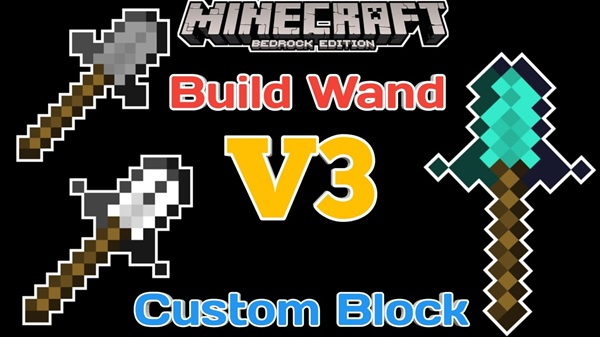
Build Wand Addon – Smart, Fast Building Without the Grind
Building is one of the most rewarding parts of Minecraft, but if you play on Minecraft Pocket Edition (MCPE) or Bedrock Edition, you know how tiring large builds can become. Touch controls, repeated taps, and long construction sessions often slow you down and drain motivation. Many players start ambitious projects only to leave them unfinished.
The Build Wand Addon is designed to change that experience. This addon helps you build faster and smarter while keeping survival gameplay fair and familiar. Instead of placing blocks one by one, you use a simple selection system to construct entire sections at once. The result is less repetition, more progress, and a smoother building flow—without removing the challenge that makes Minecraft enjoyable.
What Is the Build Wand Addon?
At its core, the Build Wand Addon is a building utility created for Minecraft Bedrock Edition, including MCPE. Its goal is simple: reduce repetitive building tasks while respecting normal gameplay mechanics.
The addon works by letting you define an area and automatically place blocks within that space. It does not rewrite Minecraft rules or give unlimited resources. Instead, it builds on existing systems you already understand.
Key characteristics include:
-
Uses blocks directly from your inventory
-
Includes durability when used in Survival mode
-
Supports Creative mode for planning and testing
This makes the Build Wand Addon especially appealing if you enjoy survival progression but want to spend more time designing and less time tapping the screen.
Key Features That Remove the Grind
This section explains why the Build Wand Addon feels so effective in everyday gameplay. Each feature focuses on saving time without removing player control.
Area-Based Building Instead of Single-Block Placement
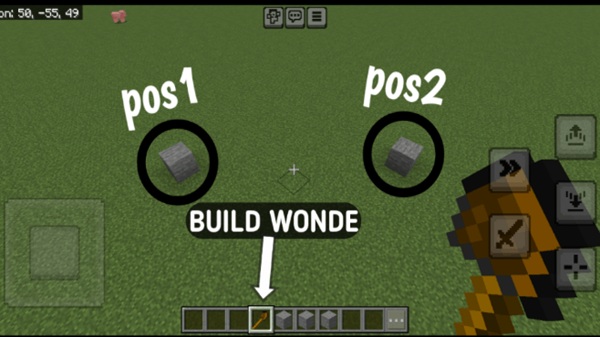
With the Build Wand Addon, you select two points in the world to define a build area. The addon then fills that space automatically. For MCPE players, this dramatically reduces repetitive actions and helps prevent placement mistakes caused by touch controls.
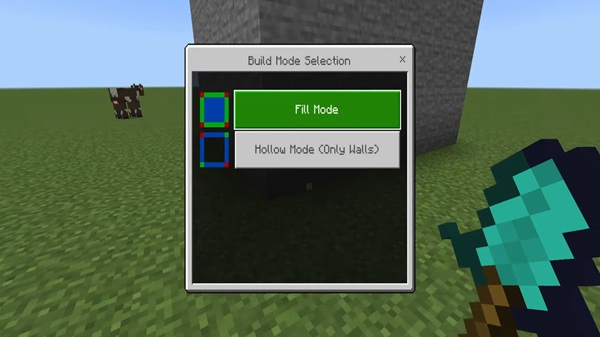
Fill Mode for Solid Structures
Fill Mode creates a fully solid structure inside your selected area. It works well for:
-
Walls and floors
-
Foundations and platforms
-
Large flat surfaces
This mode handles the basic structure quickly, allowing you to move on to detailing and decoration.
Hollow Mode for Resource-Efficient Builds
Hollow Mode builds only the outer shell of your selection, leaving the inside empty. This is ideal for base shells, rooms, and large buildings that will be detailed later. In Survival mode, Hollow Mode helps you save materials while still building on a large scale.
Inventory-Based Block Selection
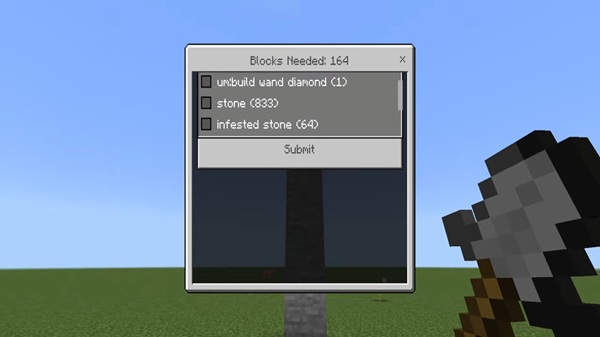
Before building, the addon shows which blocks from your inventory can be used and how many are required. This prevents wasted materials and keeps the experience balanced and predictable.
Survival-Friendly Durability System
When used in Survival mode, the Build Wand Addon consumes durability. This encourages planning and prevents excessive use. The wand feels like a proper tool, not a shortcut that replaces effort.
Creative Mode Support
In Creative mode, durability and block limits are removed. This makes the addon useful for testing designs, planning large projects, or creating maps before committing resources in Survival mode.
How the Build Wand Works In-Game
Understanding how the Build Wand Addon works helps you use it confidently and efficiently. The process is designed to stay simple, even on mobile devices.
You start by holding the Build Wand and selecting the first corner of your build. Then, you select the opposite corner to define the area. After that, you choose a building mode—Fill or Hollow—and select a block from your inventory. Once confirmed, the addon places the blocks automatically.
Visual cues and messages guide you through each step, so you always know what the addon is doing.
Why This Addon Feels Smart, Not Overpowered
Many players worry that building addons might break survival balance. The Build Wand Addon avoids that problem by focusing on efficiency rather than automation.
-
It does not create free blocks
-
It requires real materials
-
It respects survival progression
-
It limits use through durability
You still mine, craft, and plan your builds. The addon simply removes repetitive labor. This balance makes it suitable for long-term survival worlds and multiplayer environments.
Compatibility & Performance
The Build Wand Addon supports Minecraft Bedrock 1.20 and newer. It works in single-player worlds, multiplayer worlds, and Realms when enabled correctly.
Because the addon is lightweight, performance remains stable even during large builds. Visual effects are minimal, and block placement is fast, which is especially important for lower-end mobile devices. The addon also works well alongside many custom block and decorative addons.
Best Use Cases for the Build Wand Addon
The Build Wand Addon shines during structural work, such as:
-
Large walls and floors
-
Base shells and outer frames
-
Platforms and flat terrain
-
Community builds in multiplayer worlds
For fine decoration or redstone mechanics, manual placement is still recommended.
Tips to Get the Most Out of the Addon
To use the Build Wand Addon effectively:
-
Choose Hollow Mode to save materials
-
Plan build dimensions before selecting large areas
-
Test designs in Creative mode first
-
Avoid selecting extremely large areas on weaker devices
-
Always confirm inventory requirements
Small habits like these help you build faster with fewer mistakes.
Final Verdict: Who This Addon Is For
The Build Wand Addon is ideal for MCPE players who enjoy building but want a more efficient workflow. It’s especially useful for survival builders, realm architects, and anyone working on large projects.
If you value balance, control, and smart design tools, this addon fits naturally into your world. It won’t build for you—but it will help you build better, faster, and without the grind.
Installation Guide for MCPE (Bedrock Edition)
Installing the Build Wand Addon is quick and beginner-friendly. Once you import the addon file, you only need to enable it in your world settings.
Steps to install:
-
Download the
.mcaddonfile -
Open it with Minecraft
-
Enable the Behavior Pack
-
Enable the Resource Pack if included
-
Enter your world
The addon works on Android, iOS, and Windows 10/11 Bedrock Edition. Recent versions do not require experimental features, which keeps setup simple.











