
Bundlepacks 1.21+
The Bundlepacks Addon brings a powerful upgrade to MCPE by adding wearable backpacks, expanded storage, and explorer-focused features. Perfect for long adventures, survival gameplay, and mobile-friendly inventory management, this addon helps you travel farther, gather more, and stay fully organized wherever your journey leads.
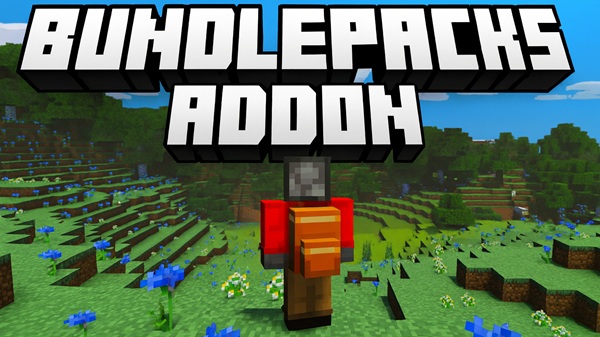
Bundlepacks Addon Ultimate Explorer Pack Upgrade
The Bundlepacks Addon brings a smarter, cleaner way to manage your inventory in Minecraft Bedrock Edition. The Ultimate Explorer Pack Upgrade builds on this idea by giving you a dependable travel companion—one that helps you stay organized, carry more, and focus on discovering new biomes instead of running home every few minutes. Whether you're exploring caves, gathering resources, or trekking across distant landscapes, this upgraded pack keeps your adventure flowing smoothly.
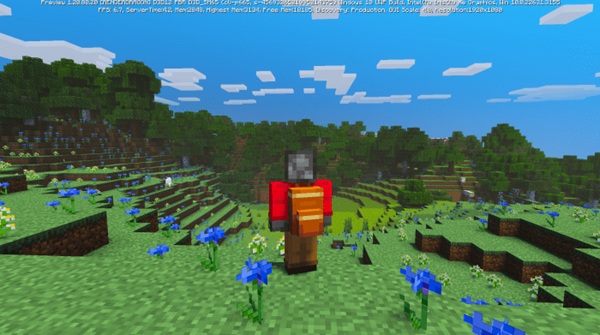
Core Features of the Ultimate Explorer Pack Upgrade
The Bundlepacks Addon includes several features that make the Explorer Pack Upgrade a powerful tool for Bedrock and MCPE players. Below are the main highlights and how each one improves your experience in survival and exploration.
High-Capacity Storage for Long Adventures
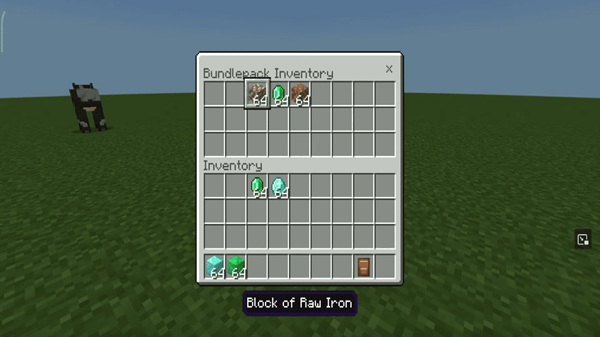
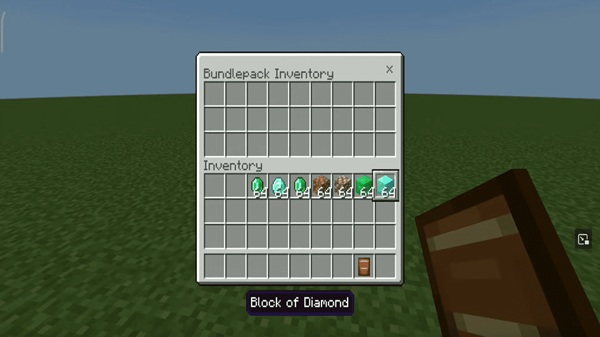
The Explorer Pack Upgrade expands your inventory by giving you more room for resources, tools, blocks, and loot. This helps you travel farther without stopping, especially on mobile where storage feels tight.
Ideal for:
-
Mining sessions
-
Structure exploration
-
Large-scale farming
-
Long-distance biome hunting
Wearable Backpack System With Visual Indicators
When placed in your off-hand, the backpack appears directly on your character’s back. A clear on-screen indicator lets you know when the pack is active, making the system both practical and immersive.
Explorer-Focused Utility Enhancements
The upgrade focuses on exploration efficiency. It reduces how often you return to base and helps you manage resources while traveling through multiple biomes.
Intuitive Storage Access for All MCPE Control Styles
No matter your device, accessing storage is simple:
-
Mobile: Tap the “Open” button
-
Controller: Use the interact button
-
PC: Right-click
Customization Through Dyeing and Pack Variants
The Bundlepacks Addon supports over 16 color options. You can personalize your Explorer Pack or organize multiple packs by purpose—useful in solo and multiplayer gameplay.
In-World Placement for Temporary Camps and Bases
Sneak + interact to place the pack on the ground. This acts like a portable chest, perfect for setting up quick camps or drop-off points during long exploration routes.
Optimized Performance for Mobile and Low-End Devices
The addon uses lightweight textures and models, keeping performance smooth even on basic smartphones and tablets.
Exploration Gameplay Benefits for MCPE Players
If you enjoy traveling across your world, the Bundlepacks Addon enhances nearly every part of the journey. The Explorer Pack Upgrade gives you more range, better item control, and fewer interruptions.
Key benefits:
-
Travel farther without returning home
-
Organize items easily on mobile
-
Carry essential gear while exploring risky biomes
-
Save time when gathering large amounts of materials
It essentially removes one of the biggest limitations of survival exploration: inventory space.
How the Explorer Pack Works In-Game
The Explorer Pack Upgrade remains easy to use while offering advanced utility. Here’s how it works once you’ve crafted and equipped it.
Equipping the Pack
Place it in your off-hand slot. You’ll see it appear on your character and become usable instantly.
Opening Storage
-
Tap the button on mobile
-
Right-click on PC
-
Use the interact button on console
Placing the Pack
Sneak + interact to place it on the ground as temporary storage.
Item Restrictions
Some items may not be stored due to technical limitations. This ensures smooth performance.
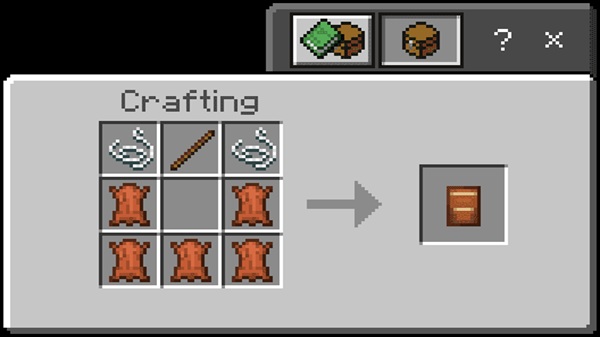
Crafting & Upgrading the Explorer Pack
The Explorer Pack upgrade is accessible even early in survival mode. The crafting system keeps things simple while still offering room to grow.
Crafting Overview
-
Uses basic materials like leather and string
-
No rare or late-game items required
Upgrade Modules
These enhance storage or add special explorer features, depending on the version you craft.
Customization
Use dyes to label packs by purpose—mining, building, looting, or farming.
Compatibility & Device Support
The Bundlepacks Addon is widely compatible, making it ideal for players on different devices.
Supported Versions
-
Works on MCPE/Bedrock 1.20–1.21+
Supported Devices
-
Mobile
-
Windows
-
Xbox
-
Nintendo Switch
Multiplayer
The addon supports Realms, LAN worlds, and servers.
Addon Conflicts
Potential conflicts with other backpack or player-model mods, though most setups run smoothly.
Pro Tips for Maximizing the Explorer Pack Upgrade
Here are some simple strategies to get more out of your Explorer Pack.
Organize With Color-Coding
Assign colors for mining, building, looting, and farming.
Build a Travel Kit
Carry multiple packs for different tasks during long adventures.
Use Temporary Bases
Place packs on the ground to organize your loot mid-expedition.
Combine With Other Addons
Pair with UI or survival-enhancing addons for smoother gameplay.
Final Thoughts
The Bundlepacks Addon Ultimate Explorer Pack Upgrade elevates exploration in Minecraft Bedrock Edition. It simplifies storage, reduces travel interruptions, and gives you more freedom to discover your world at your own pace. If survival, exploration, or building is a big part of your gameplay, this addon becomes an essential companion for every journey.
Installation Guide for MCPE (Bedrock Edition)
Installing the Bundlepacks Addon is simple and only takes a few steps.
-
Download the
.mcaddonor.mcpackfile. -
Tap or double-click to import it into MCPE.
-
Activate both resource and behavior packs in world settings.
-
Enable all required experimental gameplay toggles.
-
Restart or create a new world if features don’t load.
Troubleshooting tips:
-
Re-enable packs if textures don’t appear
-
Check storage permissions on mobile
-
Confirm the file format is correct











