
Bundles Plus 1.21+
The Bundles Plus Addon introduces a powerful multi-tier storage system for MCPE, giving you more space, smoother inventory management, and a cleaner survival experience. Discover how each bundle tier upgrades your gameplay and helps you explore, build, and organize with ease.

Bundles Plus Addon – Ultimate Multi-Tier Storage System
Managing inventory can be one of the most time-consuming parts of Minecraft Bedrock Edition, especially on smaller mobile screens. The Bundles Plus Addon offers a clean and scalable solution by introducing a complete multi-tier bundle system designed to help you store more, stay organized, and explore farther. If you’re tired of running out of space during mining trips or building sessions, this addon gives you the freedom to carry what you need without slowing down your adventure.
Introduction: What Is Bundles Plus Addon?
The Bundles Plus Addon is a storage-focused MCPE enhancement that adds five upgradeable bundle tiers, each offering more item slots than the last.
It’s designed as a Vanilla+ feature—simple, intuitive, and fully aligned with Minecraft’s natural progression system. This makes it a great fit for survival players, builders, explorers, and mobile users who want a smoother, more efficient inventory experience.
In this section, you’ll get a quick overview before diving into how the multi-tier system works and why it matters for your world.
The Multi-Tier Storage Concept
Before looking at individual tiers, it helps to understand the idea behind them. This addon introduces progressive storage, similar to how tools and armor improve through Copper, Iron, Gold, Diamond, and Netherite.
Instead of one oversized container, you earn bigger and better bundles as you move through your world.
This structure keeps gameplay balanced and motivating. Each bundle tier offers:
-
More storage slots
-
Upgraded capacity for resource-heavy tasks
-
A smooth progression that fits survival pacing
-
Better item management for MCPE players
Now let’s explore how each tier supports your journey.
Bundle Tiers & Their Storage Capacities
This section breaks down every bundle tier in the Bundles Plus Addon, showing how each one fits into your gameplay rhythm. Whether you're a miner, explorer, or builder, selecting the right tier makes a huge difference.
Overview of the Five-Tier Progression System
-
Copper → beginner-friendly organization
-
Iron → stable mid-game storage
-
Gold → flexible multi-purpose capacity
-
Diamond → strong late-game utility
-
Netherite → maximum storage power
Copper Bundle – Entry-Level Organization
-
Ideal for early-game survival
-
Easy to craft with basic materials
-
Useful for wood, stone, crops, and starting resources
Iron Bundle – Reliable Mid-Tier Storage
-
Great for mining trips and resource gathering
-
Helps reduce inventory overflow
-
A natural upgrade as your world expands
Gold Bundle – Balanced Storage Upgrade
-
Excellent for farming, trading, and mixed inventories
-
Works well for players who juggle many item types
Diamond Bundle – Advanced Capacity
-
Perfect for cave runs, nether travel, and exploration
-
Popular among builders thanks to the high slot count
Netherite Bundle – Maximum Storage Power
-
Top-tier storage option
-
Great for mega builds, large mining sessions, and long adventures
Visual & Functional Differences Between Tiers
-
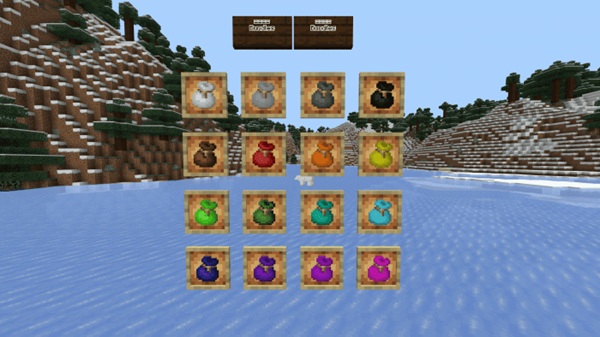
Unique textures for quick identification
-
Clean tooltip previews
-
Consistent functionality across all five tiers
How Tier Progression Enhances MCPE Gameplay
-
Longer journeys without returning to base
-
Better organization on mobile
-
Smooth inventory flow in survival and Realms
Choosing the Right Bundle Tier for Your Playstyle
-
Builders → Diamond & Netherite
-
Explorers → Iron or Diamond
-
New players → Copper to start
-
Multiplayer users → Mix-and-match bundles for cooperation
How Bundles Function In-Game
Before crafting your first bundle, it helps to know how they work. Bundles are easy to use, even on touchscreens.
You can store items by interacting with the bundle while holding them, preview the contents by hovering, and remove items with a quick selection. The system is designed to be fast, intuitive, and reliable in every game mode.
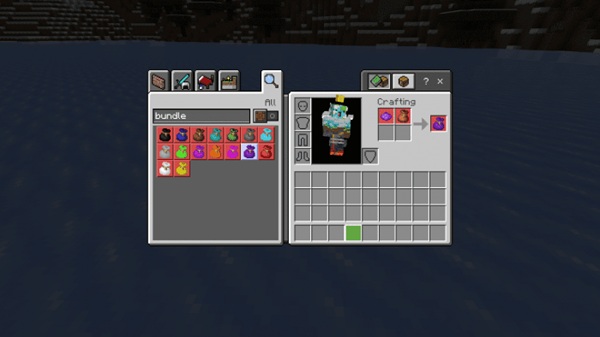
Key functions include:
-
Store items directly into the bundle
-
Retrieve items from a clean interface
-
Preview contents without opening menus
-
Touch-friendly controls for mobile players
Crafting & Upgrade Path
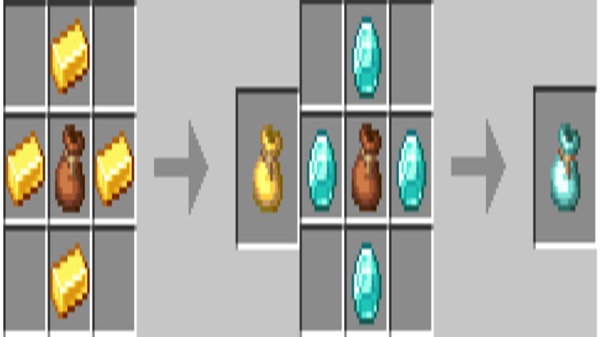
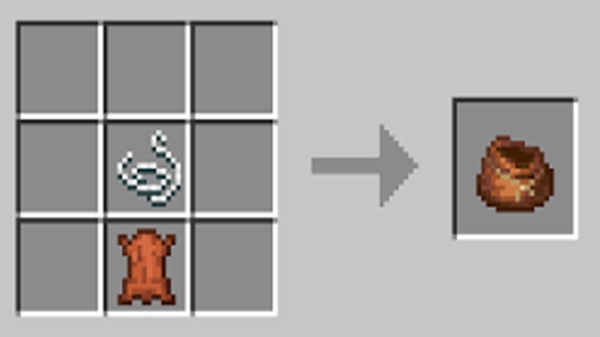
Each bundle tier requires materials that match its level.
For example, Copper bundles use early ores, while Diamond and Netherite require advanced resources. You can view recipes directly in the in-game recipe book, making progression simple and natural.
Compatibility & Technical Requirements
-
Works on MCPE/Bedrock 1.20.x – 1.21.x
-
Suitable for Android, iOS, and Windows 10/11
-
Recommended 2GB+ RAM
-
Supports single-player, local multiplayer, and Realms
-
Disable conflicting storage addons to avoid issues
Benefits for MCPE Players
With the Bundles Plus Addon, you’ll notice improvements like:
-
Cleaner, more flexible item management
-
Longer mining and building sessions
-
Improved mobile usability
-
Faster resource transport
-
Less stress and more creativity
Tips for Getting the Most Out of Bundles
-
Create themed bundles (e.g., ores, food, building blocks)
-
Upgrade slowly and naturally
-
Use shulker boxes for permanent storage
-
Keep bundles in your hotbar for quick access
Conclusion: Why This Is the Ultimate MCPE Storage Upgrade
The Bundles Plus Addon is more than a storage boost—it’s a complete inventory upgrade for Bedrock and MCPE. With its five-tier system and intuitive design, it turns item management into a smooth, enjoyable part of your adventure. Whether you build, mine, explore, or play with friends, this addon gives you the tools to stay organized and focus on what you love most.
Installation Guide for MCPE / Bedrock Edition
To install the Bundles Plus Addon, follow these steps:
-
Download and open the
.mcaddonor.mcpackfiles -
Allow Minecraft Bedrock to import the addon
-
Enable Experimental Features
-
Activate both the Behavior Pack and Resource Pack
-
Launch your world and check the recipe book











