
Cheapest Trades 1.21+
The Cheapest Trades Addon for Minecraft MCPE and Bedrock Edition makes villager trading simple and efficient by reducing every trade to just 1 emerald. It’s a lightweight, vanilla-friendly addon designed for players who want faster progression, less grinding, and more time to build and explore—especially on mobile devices.
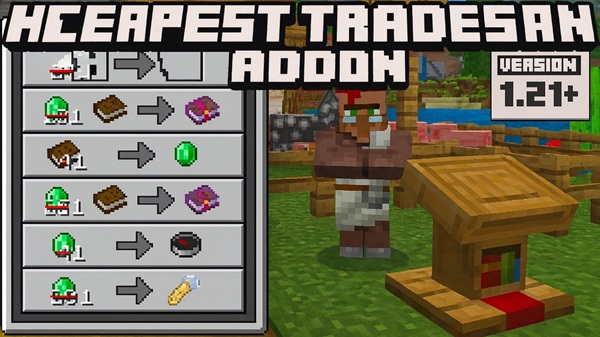
Cheapest Trades Addon – Every Villager Trade Costs 1 Emerald
If you enjoy Minecraft but feel that villager trading takes too much time and effort, the Cheapest Trades Addon is designed with you in mind. This addon for Minecraft Bedrock Edition and MCPE rebalances the in-game economy by making every villager trade cost only 1 emerald. The result is a smoother, more flexible gameplay experience that lets you focus on creativity, exploration, and progression instead of repetitive grinding.
Built specifically for Bedrock and mobile players, the Cheapest Trades Addon stays true to vanilla mechanics while removing one of the biggest progression bottlenecks. You still play survival Minecraft—but with far less friction.
Key Features at a Glance
This section highlights what makes the Cheapest Trades Addon stand out. Each feature directly supports faster, more enjoyable gameplay on MCPE without overcomplicating the system.
All Villager Trades Cost Only 1 Emerald
Every trade in the game is reduced to a single emerald, whether you are buying tools, armor, enchanted books, food, or building materials. This simple rule applies across all trade levels, making progression predictable and stress-free.
Works with Every Villager Profession
The addon affects all villager types, not just a few selected ones. From librarians and armorers to farmers and masons, every profession follows the same 1-emerald pricing logic.
Vanilla-Friendly Trading Mechanics
Villagers still behave exactly as you expect:
-
Professions work normally
-
Villagers level up through trading
-
Job sites and restocking remain unchanged
Only the pricing is adjusted, so your world still feels like Minecraft.
Ideal for Survival, Creative, and Casual Play
Whether you enjoy classic survival, creative survival builds, or relaxed multiplayer worlds, the Cheapest Trades Addon adapts naturally to your playstyle.
Lightweight and Optimized for MCPE
This addon does not rely on heavy systems or advanced scripts. It runs smoothly on phones and tablets, making it suitable for most MCPE devices.
No Commands or Setup Required
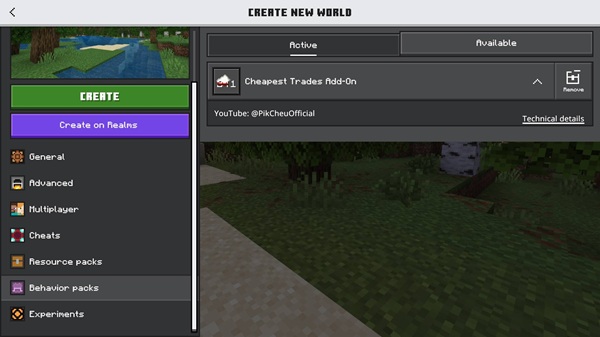
You simply enable the addon in world settings. There are no commands, cheats, or extra configuration steps.
How the Addon Works In-Game
Understanding how the addon behaves in real gameplay helps you use it effectively. Fortunately, its design is simple and transparent.
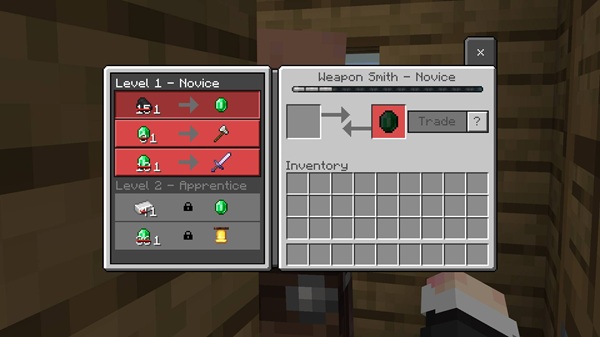
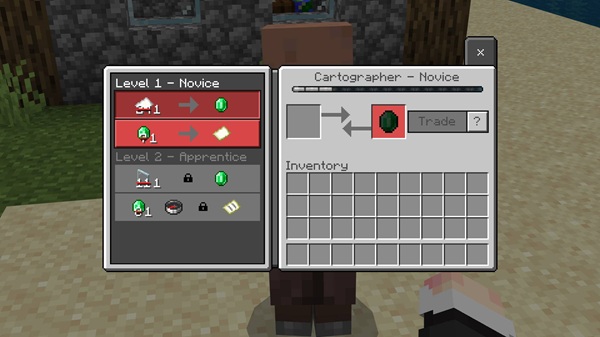
Once activated, opening the trading interface with any villager will show that all trades cost 1 emerald. This applies to both basic trades and high-level offers. Villagers still require job site blocks, and they restock trades at the usual times.
In some cases, newly spawned villagers or refreshed trade offers may be needed for the pricing to fully apply. This behavior is normal for Bedrock trading addons and does not affect world stability.
Why Use Cheapest Trades Addon on MCPE
Mobile players often have limited playtime, which makes long resource loops less appealing. This is where the Cheapest Trades Addon really shines.
With cheaper trades, you can:
-
Gear up early without complex farms
-
Access enchanted books sooner
-
Build large projects without constant interruptions
-
Spend more time exploring and designing your world
For players like Alex, who plays MCPE in short evening sessions, this addon removes pressure and keeps the game enjoyable.
Supported Villager Professions
To fully deliver on its promise, the Cheapest Trades Addon supports every villager profession in Minecraft Bedrock.
-
Librarian – enchanted books and bookshelves
-
Armorer / Toolsmith / Weaponsmith – armor and tools
-
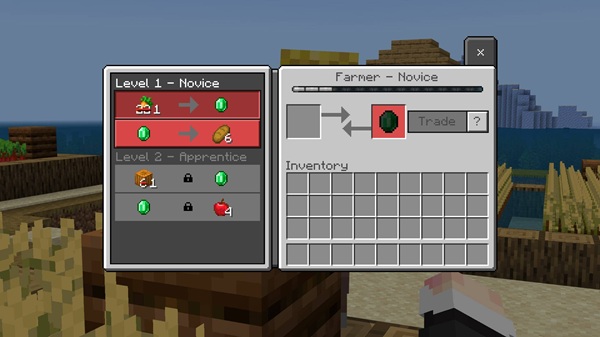
Farmer – crops and food items
-
Fletcher – sticks and related trades
-
Mason – stone and decorative blocks
-
Cleric – items like glowstone and ender pearls
No matter which villager you trade with, the 1-emerald rule always applies.
Compatibility & Requirements
Before adding the addon to your main world, it’s helpful to understand compatibility details.
-
Platform: MCPE (Android, iOS), Windows 10/11 Bedrock
-
Minecraft Version: Recent Bedrock versions recommended
-
Experimental Features: Usually not required
-
Performance Impact: Minimal
-
Multiplayer: Works when enabled by the host
The Cheapest Trades Addon is designed to be stable and easy to integrate.
Important Notes & Tips
A few practical tips can help you avoid common issues and get the best experience.
-
Behavior packs disable achievements in Bedrock worlds
-
Place the addon high in the Behavior Pack priority list
-
Avoid using it with other villager trade addons
-
Set difficulty to Hard if you want to keep survival challenging
-
Test the addon in a new world if you’re unsure about balance
Who This Addon Is Best For
The Cheapest Trades Addon is especially useful for:
-
Builders working on large-scale projects
-
Casual MCPE players
-
Players who dislike repetitive grinding
-
Creative survival worlds
-
Multiplayer servers that want faster progression
If you value efficiency and flexibility, this addon fits naturally into your world.
Final Summary
The Cheapest Trades Addon redefines villager trading by making every trade cost just 1 emerald, while preserving core Minecraft mechanics. It is lightweight, easy to use, and tailored for MCPE and Bedrock Edition players who want a smoother, more enjoyable experience.
If your goal is to spend less time grinding and more time building, exploring, and enjoying Minecraft, the Cheapest Trades Addon delivers exactly that.
How to Install on MCPE / Bedrock
Installing the addon is straightforward, even if you are new to Bedrock addons. The process is similar across platforms.
Android
-
Download the addon file (
.mcaddonor.mcpack) -
Tap the file to import it into Minecraft
-
Create or edit a world
-
Enable the addon under Behavior Packs
-
Enable the Resource Pack if included
-
Start the world
iOS
-
Download the addon file
-
Open it using the Files app
-
Import it into Minecraft
-
Enable it in World Settings
-
Start the world
Windows 10 / 11 (Bedrock)
-
Double-click the addon file
-
Minecraft will import it automatically
-
Enable it in Behavior Packs
Installing the addon is straightforward, even if you are new to Bedrock addons. The process is similar across platforms.
Android
-
Download the addon file (
.mcaddonor.mcpack) -
Tap the file to import it into Minecraft
-
Create or edit a world
-
Enable the addon under Behavior Packs
-
Enable the Resource Pack if included
-
Start the world
iOS
-
Download the addon file
-
Open it using the Files app
-
Import it into Minecraft
-
Enable it in World Settings
-
Start the world
Windows 10 / 11 (Bedrock)
-
Double-click the addon file
-
Minecraft will import it automatically
-
Enable it in Behavior Packs











