
CMDBlocc’s Vehicles 1.21+
CMDBlocc’s Vehicles Addon brings a fully dyeable car fleet, smooth driving, and survival-ready mechanics to MCPE. Customize every vehicle, unlock traders, and enhance your Bedrock world with modern transportation built for creativity, roleplay, and exploration.
CMDBlocc’s Vehicles Addon – Signature Dyeable Car Fleet
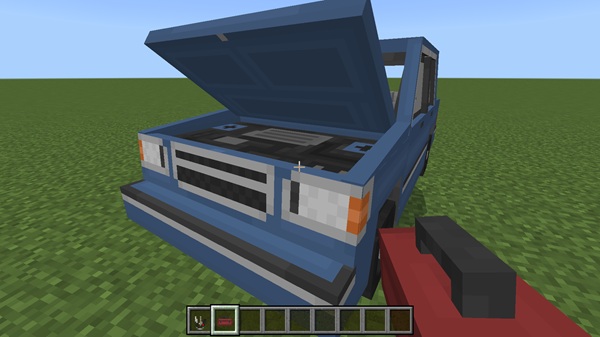
If you’re looking to upgrade how you move, build, and roleplay in Minecraft Bedrock, CMDBlocc’s Vehicles Addon gives you a full transportation system tailored for MCPE. This addon introduces a modern fleet of player-owned vehicles, each fully customizable through a signature dyeing system. It’s simple to use, survival-ready, and built for players who want function and style in their worlds.
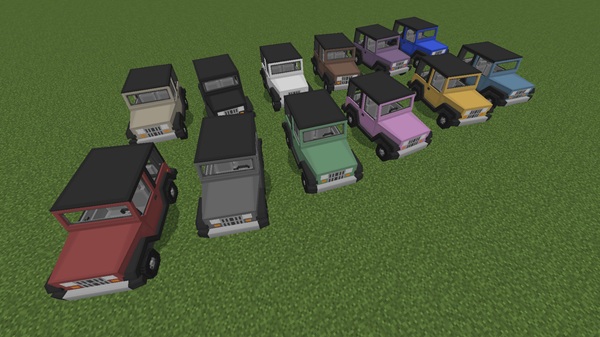
The additive combination of customization, realistic behavior, and smooth mobile performance makes this addon a versatile choice for builders, survival players, and anyone who enjoys creating modern or city-themed maps.
Overview of the Signature Dyeable Car Fleet
The fleet includes 15 vehicle types, all optimized for touch controls and mobile-friendly performance. These vehicles fit naturally into MCPE worlds, balancing clean visual style with efficient modeling.
What the Fleet Offers
-
A variety of cars: sporty, compact, classic, utility
-
Smooth animations for doors, wheels, and movement
-
Designs that blend well with urban and suburban builds
Every model has been created with MCPE players in mind, keeping file sizes light while maintaining detail.
Full Vehicle Customization (Dyeing System Explained)
The dyeing system is the highlight of CMDBlocc’s Vehicles Addon. This feature gives you creative freedom to personalize your vehicles in ways that match your world’s style or your character’s identity.
How the Dyeing System Works in MCPE
Applying a dye changes the vehicle’s color instantly. You can recolor your car as often as you like, allowing you to refresh designs whenever inspiration strikes.
Personalizing Your Vehicle for Your World Style
Players often use the dyeing system to:
-
Match city color themes
-
Separate player roles in multiplayer
-
Design fleets for events or businesses
Customization in Survival Mode
The system works the same in survival, requiring only standard dyes you can craft or trade.
Signature Visual Identity
Dyeing lets you create themed fleets such as:
-
Racing teams
-
Roleplay services
-
District or neighborhood vehicles
Color Persistence
Each vehicle remembers its assigned color, even in multiplayer, keeping your designs safe and consistent.
Creative Uses
Players often build:
-
Car showrooms
-
Dealerships
-
Event-themed exhibitions
-
Racing arenas
The system brings personality to any MCPE world.
Ownership & Vehicle Management Features
Ownership is a core mechanic in CMDBlocc’s Vehicles Addon. Every vehicle is tied to its owner, making multiplayer worlds more fair and more secure.
What Ownership Enables
-
No unauthorized driving
-
No accidental griefing
-
Stable vehicle placement in busy worlds
-
Player-to-player trading
Players often turn this mechanic into:
-
Vehicle rental shops
-
Player-run dealerships
-
Community-based transport systems
Ownership blends well with survival and roleplay gameplay, supporting long-term world progression.
Vehicle Systems: Driving, Storage, Damage & Maintenance
This addon goes beyond simple vehicles by adding systems that support practical survival use.
Driving Mechanics
Cars are responsive, intuitive, and optimized for mobile controls.
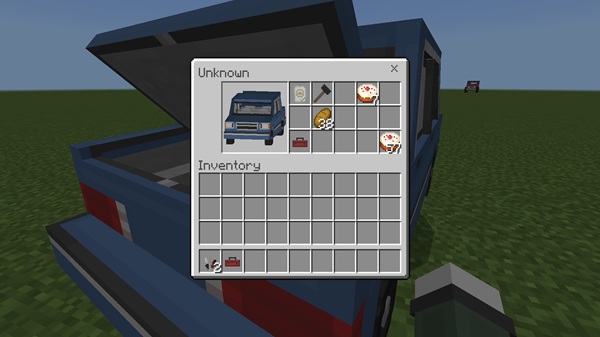
Working Trunk Storage
Each vehicle can carry items. You decide whether storage is public or private, making vehicles useful for:
-
Long expeditions
-
Resource transport
-
Multiplayer collaboration
Damage & Visual Wear
Vehicles show visible wear after collisions, giving you feedback about their condition.
Maintenance & Repairs
Cars will eventually break down if ignored. Repairing them keeps your fleet reliable and adds strategic depth to survival gameplay.
Survival Mode Integration: Traders & Mystery Lemon
CMDBlocc’s Vehicles Addon fits naturally into survival worlds, offering structured progression without feeling complicated.
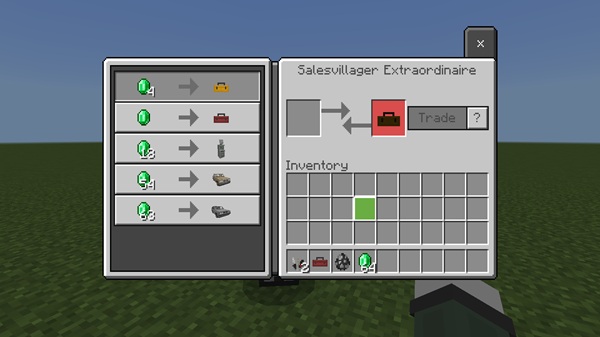
Vehicle Traders
You can buy vehicles using emeralds or other tradeable items.
Mystery Lemon
A Mystery Lemon gives you a random car. It’s a fun, gamble-style feature many players enjoy in multiplayer.
Survival Progression
This system encourages exploration, trading, and resource management.
Compatibility, Performance & Device Requirements
CMDBlocc’s Vehicles Addon works best on MCPE 1.21 and modern devices with 3GB of RAM or more.
Performance Notes
-
Works smoothly on Android, iOS, and Windows
-
Limit vehicle counts on low-end devices
-
Multiplayer worlds must have experiments enabled
Best Ways to Use This Addon in Your MCPE Worlds
Here are popular ways players use this addon:
City Builds
Populate streets, malls, suburbs, and parking areas.
Roleplay
Design:
-
Taxi services
-
Delivery jobs
-
Emergency lines
-
Car shops
Survival Gameplay
Cars improve travel efficiency and item transport.
Multiplayer Activities
Organize:
-
Races
-
Car meetups
-
Team games
-
Trading events
Conclusion: Why This Addon Elevates MCPE Gameplay
CMDBlocc’s Vehicles Addon creates a richer and more expressive experience for MCPE players. With its Signature Dyeable Car Fleet, intuitive vehicle mechanics, and strong survival integration, it suits nearly every playstyle—from builders and roleplayers to explorers and multiplayer fans. If you want your world to feel more alive, connected, and creative, this addon is a perfect choice.
Installation Guide for MCPE (Android, iOS, Windows 10/11)
Before using the addon, import the .mcaddon file directly into Minecraft.
Installation Steps
-
Download the addon file.
-
Open it to import into Minecraft.
-
Enable the resource and behavior packs.
-
Turn on experimental features (Holiday Creator, Custom Mobs, etc.).
Troubleshooting
If the addon doesn’t load:
-
Re-enable experiments
-
Reinstall the addon
-
Restart Minecraft











