
Crafting Plus 1.21+
The Crafting Plus Addon brings a clean Vanilla+ crafting upgrade to Minecraft Bedrock, adding logical new recipes that improve survival gameplay without changing the core experience. If you want smoother progression, better resource options, and a more complete crafting system in MCPE, this addon delivers exactly what you need.
Crafting Plus Addon – Standout Vanilla+ Crafting for Bedrock
The Crafting Plus Addon delivers a smooth, Vanilla+ crafting experience for Minecraft Bedrock players who want more flexibility without changing the game’s identity. If you’ve ever wished Minecraft offered a few more logical recipes—especially in survival—this addon brings exactly that. It keeps things simple, mobile-friendly, and balanced, making it a favorite among MCPE players who appreciate clean improvements to crafting gameplay.
Introduction to Crafting Plus Addon (Vanilla+ for MCPE)
This section introduces what the addon does and helps you understand its place in a Vanilla+ playstyle before exploring the deeper features below.
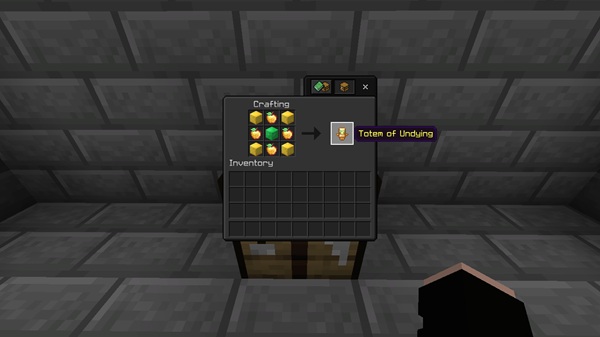
The Crafting Plus Addon expands the default recipe list with practical, lore-friendly crafting options that feel like they should have been in Minecraft from day one. Instead of adding flashy items or complicated mechanics, it focuses on small upgrades that make survival more efficient. For mobile users or anyone playing on Bedrock Edition, it delivers better crafting flow without draining performance.
What Makes Crafting Plus a Standout Addon
Here you’ll see why this addon appeals to MCPE survival players and why it fits the Vanilla+ category so well.
The addon shines because of its simplicity and usefulness. Every recipe has a clear purpose:
-
Enhances survival progression without shortcuts
-
Adds missing recipes while respecting vanilla balance
-
Uses standard crafting stations, so nothing feels out of place
-
Works smoothly on low-end devices
-
Integrates directly into the MCPE crafting book
For players who enjoy the purity of survival but want better resource options, Crafting Plus feels like an upgrade the game always needed.
Key Features & Enhanced Crafting Recipes
This section highlights the core features of the Crafting Plus Addon, breaking down how each recipe improves your Minecraft Bedrock world.
Lightweight Vanilla+ Crafting Enhancements
-
Vanilla-friendly improvements
-
No new blocks or mobs
-
Uses your existing crafting table or furnace
-
Seamless for mobile controls
Logical and Balanced New Crafting Recipes
Every recipe follows Minecraft logic—no overpowered trades or unrealistic item combinations.
Early-Game Crafting Improvements
-
Convert rotten flesh into leather
-
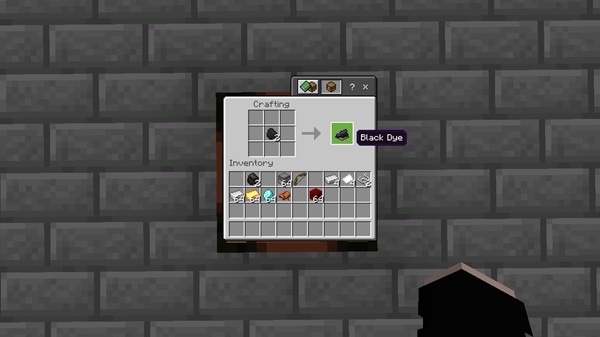
Create black dye from coal or charcoal
-
Gain early access to essential materials
Mid-Game Utility Upgrades
-
Craft name tags for mob organization
-
Craftable horse armor improves exploration
-
Dropper-to-dispenser conversion supports redstone builds
-
Break down nether wart blocks for brewing supplies
How These Recipes Improve MCPE Gameplay
-
Reduces repetitive farming
-
Supports long-term survival planning
-
Smoothes out resource bottlenecks
-
Perfect for Realms, SMPs, or solo play
Crafting Table & Furnace Compatibility
-
Works with crafting tables, furnaces, smokers, and blast furnaces
-
Recipes appear automatically in MCPE’s recipe book
Why These Recipes Stand Out in the Vanilla+ Category
They feel like natural extensions of the base game—nothing forced, nothing excessive.
How Crafting Plus Enhances Vanilla+ Survival Gameplay
This section explains how the addon affects moment-to-moment survival and long-term world progression.
By solving small crafting frustrations, the addon makes survival more enjoyable. You spend less time grinding for rare drops and more time exploring, building, and advancing your world. Mobile players especially benefit from smoother crafting progression and fewer interruptions to gameplay flow.
Complete Recipe List & What Each One Adds to MCPE
Below is a clear list of what the addon includes and why each recipe matters.
-
Leather from rotten flesh
-
Black dye from coal or charcoal
-
Craftable name tags
-
Craftable horse armor
-
Nether wart block → nether wart
-
Dropper → dispenser conversion
Each recipe helps you progress without altering Minecraft’s intended challenge.
Compatibility, Requirements & Recommended Settings
This section ensures your device and game settings work smoothly with the addon.
-
Supports MCPE/Bedrock 1.21+
-
Runs on mobile, Windows, and synced consoles
-
Lightweight for low-RAM devices
-
Compatible with most Vanilla+ addons
-
Avoid stacking multiple crafting-recipe addons
Troubleshooting Tips (For MCPE Players)
Quick fixes for the most common issues.
-
Enable experimental features
-
Reimport the file
-
Restart Minecraft
-
Remove conflicting addons
-
Update your MCPE version
Why MCPE Players Love Crafting Plus Addon
This section connects emotionally with the reader’s experience.
Players appreciate how the Crafting Plus Addon improves crafting without changing what makes Minecraft fun. It respects the vanilla experience, helps you progress efficiently, and keeps everything lightweight for mobile play. It’s a simple addon that makes a meaningful difference.
Final Thoughts & Download Information
Crafting Plus Addon is a must-have for anyone who enjoys Vanilla+ survival on Bedrock Edition. It brings missing recipes to life, strengthens resource progression, and makes MCPE feel more complete without stepping away from its roots. If you want a clean, balanced, and reliable crafting enhancement, this addon fits perfectly into any Bedrock world.
Installation Guide for Bedrock Edition (Android, iOS, Windows)
Follow these steps to install Crafting Plus smoothly on any MCPE device.
Android
-
Download the
.mcaddonfile -
Tap to import
-
Enable behavior pack + resource pack
-
Turn on required experiments
iOS
-
Download and open the
.mcaddon -
Activate both packs in world settings
Windows 10/11
-
Download the file
-
Double-click to import or place manually in pack folders
-
Enable packs when creating your world
Verify Installation
-
Open the crafting table and search for new recipes











