
Disenchanter Table 1.21+
The Disenchanter Table Addon adds smarter enchantment control to Minecraft Bedrock Edition, allowing you to remove unwanted enchantments in a balanced, survival-friendly way. Designed for MCPE players, this addon improves long-term gameplay without breaking progression or immersion.
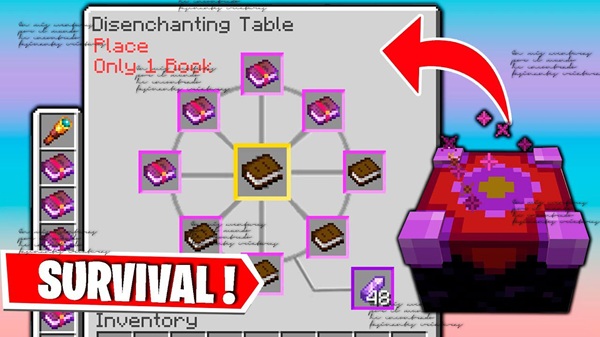
Disenchanter Table Addon – Smarter Enchantment Control
Enchantments are a core part of Minecraft Bedrock Edition, but if you play on MCPE, you already know how frustrating they can be. One unlucky roll can turn a hard-earned tool into something you don’t want to use anymore. In vanilla gameplay, fixing that mistake usually means starting over.
The Disenchanter Table Addon offers a smarter approach. Instead of punishing you for experimentation, it gives you controlled, survival-friendly ways to manage enchantments. This addon focuses on balance, simplicity, and player choice—making it a natural fit for long-term MCPE survival worlds.
What the Disenchanter Table Addon Adds
At its core, this addon introduces a new functional block that expands how enchantments are handled in Minecraft Bedrock. Rather than replacing existing systems, it enhances them with a focused quality-of-life improvement.
The Disenchanter Table Addon adds:
-
A custom Disenchanter Table block
-
A simple interface designed for touch controls
-
A controlled method for removing enchantments
-
Lightweight behavior suitable for mobile devices
Everything is designed to feel familiar. If you’ve ever thought, “This should already exist in Minecraft,” this addon will feel right at home.
How the Disenchanter Table Works In-Game
This section is where most players decide whether the addon fits their world. Understanding how it works in practice helps set clear expectations and builds trust.
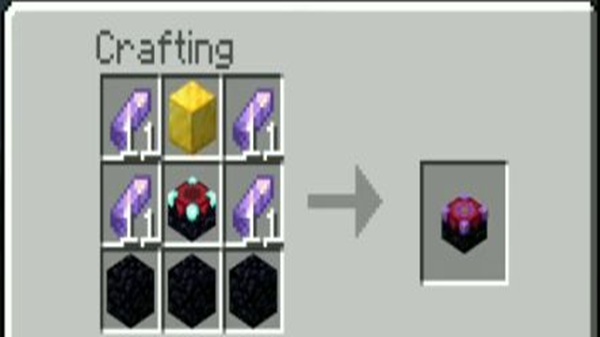
Crafting the Disenchanter Table
The Disenchanter Table is crafted using materials that align with survival progression. You won’t unlock it instantly in a fresh world, which helps preserve balance and pacing.
This design choice encourages players to think strategically—just like with enchanting tables or anvils—rather than treating disenchanting as an early shortcut.
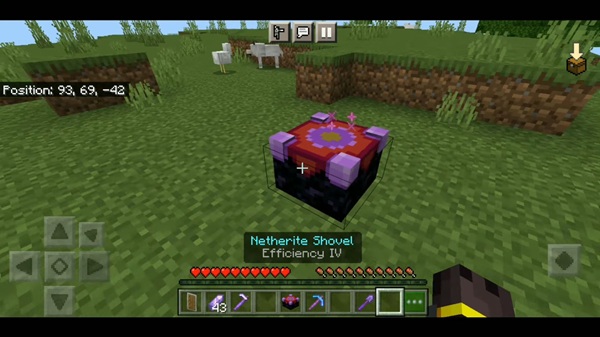
Placing and Using the Disenchanter Table
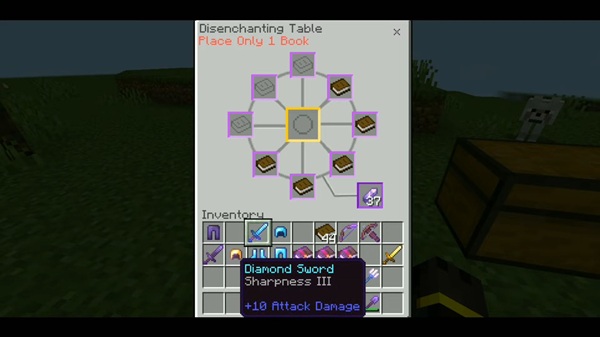
Once crafted, the table can be placed like any standard block. Interacting with it opens a clean interface that works smoothly on MCPE, whether you’re tapping on a phone or playing with a controller.
The layout avoids clutter and keeps actions clear, which is especially important for mobile players.
Removing Enchantments from Items
You can insert enchanted tools, armor, or other gear into the Disenchanter Table. After processing, the item is returned without its enchantments, depending on how the addon is configured.
This allows you to:
-
Recover items ruined by unwanted enchantments
-
Reuse gear instead of discarding it
-
Keep inventories cleaner and more organized
The process feels deliberate, not instant or chaotic.
What Happens to the Enchantments
Enchantments are removed in a predictable way. There’s no duplication, no unintended side effects, and no hidden mechanics.
This consistency matters for:
-
Long-term survival worlds
-
Multiplayer servers
-
Realm-based gameplay
You always know what the result will be, which makes the system reliable.
Survival Balance and Fair Use
The Disenchanter Table Addon avoids common balance problems. It doesn’t bypass progression or remove the need for effort.
Instead, it:
-
Rewards planning
-
Reduces unnecessary frustration
-
Keeps survival gameplay meaningful
For players who care about fairness—especially in shared worlds—this balance is a major advantage.
Common Player Mistakes to Avoid
To ensure smooth gameplay:
-
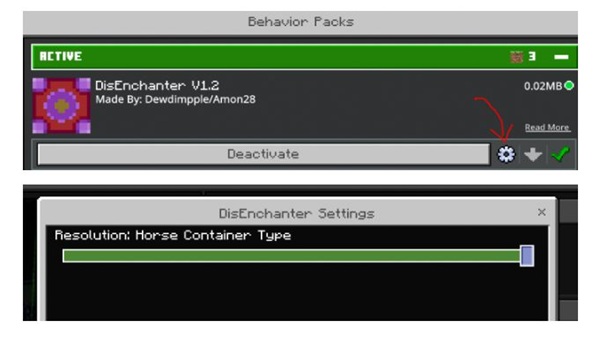
Always enable the Behavior Pack
-
Restart the world after installation if needed
-
Don’t assume features beyond what the addon offers
-
Back up your world before testing new addons
These simple steps prevent most issues.
Why This Addon Improves Enchantment Control
Enchanting in Minecraft Bedrock often feels random. The Disenchanter Table Addon introduces a sense of control without removing risk or reward.
Key benefits include:
-
Fewer wasted items
-
Better use of enchanted loot
-
Cleaner long-term progression
-
More confidence when experimenting
Instead of feeling locked into bad outcomes, you stay in control of your choices.
Compatibility & Performance
The Disenchanter Table Addon is built specifically for Minecraft Bedrock Edition and optimized for MCPE.
Supported platforms:
-
Android and iOS
-
Windows 10/11 Bedrock
-
Consoles (Xbox, PlayStation, Switch)
It supports single-player, multiplayer, and Realm environments, with minimal performance impact—even on lower-end mobile devices.
Tips for Best Use
To keep gameplay balanced:
-
Use the table for valuable items, not every tool
-
Save it for mid-game or later progression
-
Combine it with organized storage systems
-
Avoid overusing it early in a new world
Used wisely, the addon enhances gameplay instead of replacing it.
Who This Addon Is Best For
The Disenchanter Table Addon is ideal for:
-
MCPE survival players
-
Long-term world builders
-
SMP and Realm communities
-
Players who value efficiency and balance
-
Mobile players with limited playtime
If you enjoy thoughtful progression, this addon fits naturally into your playstyle.
Final Overview
The Disenchanter Table Addon – Smarter Enchantment Control adds a missing layer of flexibility to Minecraft Bedrock Edition. It respects survival balance, improves player agency, and integrates smoothly into MCPE gameplay.
If you want better control over enchantments without breaking the core experience, this addon is a smart and reliable choice.
Installation Guide for MCPE / Bedrock Edition
Installing the addon is straightforward, even for players new to mods and addons.
Steps:
-
Download the
.mcaddonor.mcpackfile -
Open it to import into Minecraft
-
Enable the Behavior Pack in world settings
-
Enable the Resource Pack if included
-
Turn on experimental options only if required
-
Enter the world and start playing
The addon works in both new and existing worlds.











