
Dragon Mounts 3 1.21+
Discover the Dragon Mounts 3 Addon for Minecraft Bedrock Edition and experience the thrill of hatching, raising, and riding your very own dragons. Explore hidden nests, bond with unique companions, and unleash adventure across your MCPE world in this immersive addon.
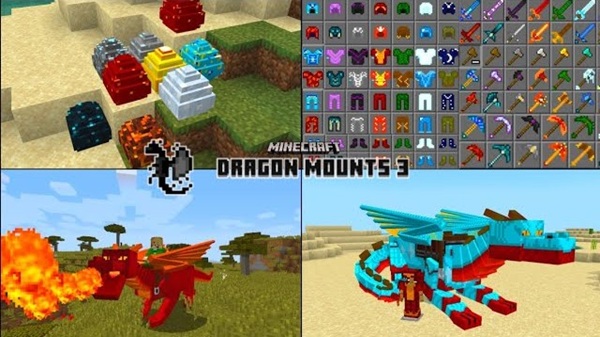
Dragon Mounts 3 Addon – Hatch Dragons and Unleash Adventure
The Dragon Mounts 3 Addon is a thrilling addition to Minecraft Bedrock Edition (MCPE) that lets you hatch, raise, and ride dragons. This addon transforms your world into a vibrant fantasy realm where adventure, exploration, and companionship meet. From discovering hidden Dragon Nests to bonding with your first dragon, the addon provides a rich, immersive experience for both creative and survival players.
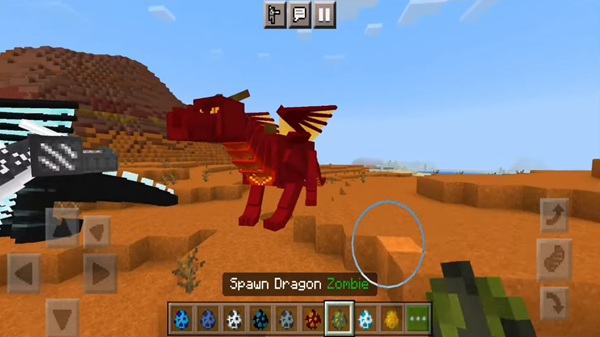
With dragons as companions, your MCPE world expands beyond walking, building, and mining. Every flight and interaction opens new possibilities, making the gameplay exciting, dynamic, and uniquely yours.
Discovering Dragon Nests
Before your dragon adventure begins, you need to find Dragon Nests. These nests are biome-specific, with different dragons appearing in distinct environments.
-
Forest Dragons: Spawn in forests and plains.
-
Water Dragons: Found near oceans, rivers, and lakes.
-
Sunlight or Desert Dragons: Appear in deserts and sandy beaches.
-
Nether Dragons: Generate in Nether biomes surrounded by lava.
Some Dragon Nests may include loot chests, providing items useful for starting your dragon journey. Paying attention to unusual terrain can lead to rare dragons that offer unique abilities. Careful exploration ensures that you maximize the chances of finding diverse eggs for hatching.
Hatching Your First Dragon
Hatching is the heart of the Dragon Mounts 3 Addon experience. This section will guide you through the entire process, ensuring your dragons grow into loyal companions ready for adventure.
Finding and Activating Dragon Eggs
Once you locate a Dragon Nest, eggs can be activated:
-
Right-click on PC or tap on mobile devices.
-
Place eggs in a safe, well-lit location to prevent interference from mobs.
-
Activation initiates the hatching process, allowing you to interact with the egg until it breaks.
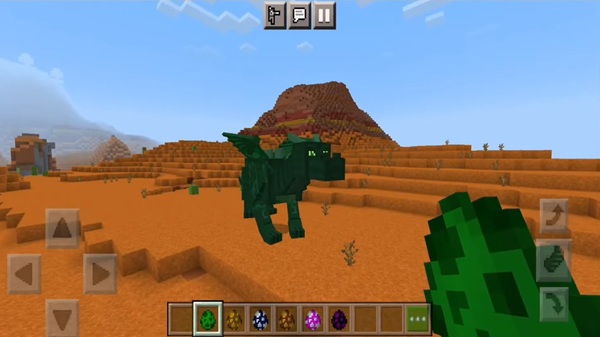
Understanding Dragon Growth Stages
Dragon growth occurs in four stages:
-
Egg – Requires protection and activation.
-
Baby Dragon – Small and vulnerable; feeding is essential.
-
Juvenile Dragon – Begins to interact with the environment; abilities develop.
-
Adult Dragon – Fully grown, rideable, and capable of special actions.
Growth time varies but can be accelerated through proper care and feeding.
Feeding and Bonding Mechanics
Feeding is key to growth and bonding:
-
Raw fish is effective for Water Dragons.
-
Meat or addon-specific items work for other dragon types.
-
Regular feeding increases emotional bonding, which improves dragon responsiveness.
-
Strongly bonded dragons can breed, producing new eggs with inherited traits.
Tips for Accelerating Hatching
-
Use items such as Ender Eyes (if included in your version) to advance progress.
-
Protect eggs from hostile mobs and environmental hazards.
-
Build small protective enclosures for optimal hatching success.
Preparing for Your First Flight
Before mounting your dragon, ensure it reaches adulthood:
-
Equip a saddle to ride.
-
Learn basic flight controls for PC, mobile, or console.
-
Bonding in advance ensures your dragon follows commands effectively and safely.
Raising & Caring for Dragons
Caring for dragons is more than feeding. Monitoring growth, health, and emotional bonding is crucial. Emotional connections influence breeding success and dragon behavior. Breeding adult dragons allows players to create dragons with unique abilities or traits, enhancing gameplay and personalizing your collection. Proper care fosters attachment and ensures that dragons feel like genuine companions within your world.
Riding & Exploring
Riding dragons introduces a new dimension of freedom in MCPE:
-
Fly across oceans, mountains, and forests, reaching areas inaccessible on foot.
-
Dragon abilities like speed boosts or elemental effects enhance safe exploration.
-
Chest-equipped dragons can transport items, acting as mobile storage companions.
-
Riding adds adventure, fun, and creative possibilities, allowing you to traverse your world efficiently.
Exploration with dragons encourages players to uncover hidden biomes, secret treasures, and rare Dragon Nests while enhancing survival or creative gameplay.
Customization & Progression
Dragon Mounts 3 offers several ways to personalize and progress with your dragons:
-
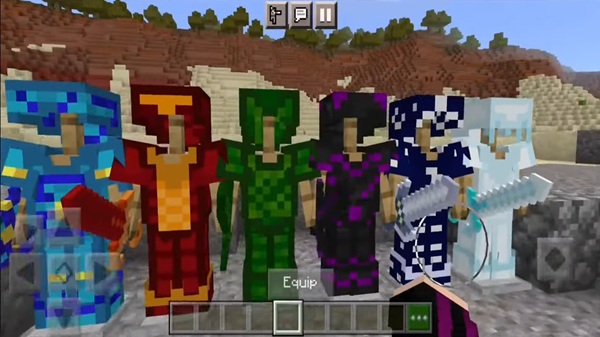
Equip armor or decorative items for protection and aesthetic appeal.
-
Attach chests for additional storage during extended adventures.
-
Collect dragon scales to craft armor or weapons.
-
Build dragon stables or themed bases to showcase your dragons.
These progression features reward time invested in your dragons, creating a satisfying sense of achievement and ownership.
Tips, Tricks, and Expert Advice
-
Hatch multiple dragons efficiently with strategic feeding and fast hatching methods.
-
Protect eggs using enclosures in survival mode to avoid accidental destruction.
-
Optimize performance on mobile devices by adjusting render distance and visual effects.
-
Make full use of chest-equipped dragons for efficient exploration and item transport.
These tips help you maximize gameplay enjoyment while ensuring your dragons thrive in any MCPE world.

Conclusion – Embark on Your Dragon Adventure
The Dragon Mounts 3 Addon brings a world of fantasy, companionship, and exploration to Minecraft Bedrock Edition. Hatching dragons, nurturing them, and taking flight unlocks a unique experience, blending adventure with creativity.
Whether exploring vast landscapes, building dragon sanctuaries, or simply bonding with your first companion, this addon transforms ordinary MCPE gameplay into something extraordinary. Prepare to hatch dragons and unleash your ultimate adventure.
Compatibility & Installation
-
Minecraft Bedrock 1.20+ is recommended for best performance.
-
Supported platforms: Android, iOS/iPad, Windows 10/11, Xbox, Nintendo Switch.
-
Installation Steps:
-
Download the
.mcaddonfile from a safe source. -
Open to import it into MCPE.
-
Enable resource and behavior packs in world settings.
-
Activate experimental gameplay features for full functionality.
-
-
Avoid using multiple addons modifying dragon entities to prevent conflicts.
Following these steps ensures smooth integration and optimal gameplay.











