
Durability Viewer 1.21+
The Durability Viewer Addon lets you see the exact condition of your tools, weapons, and armor in real time. Stay informed, prevent gear loss, and explore confidently in MCPE.
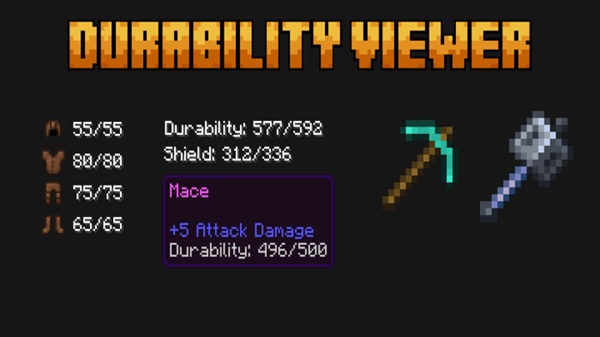
Durability Viewer Addon – Know Before It Breaks
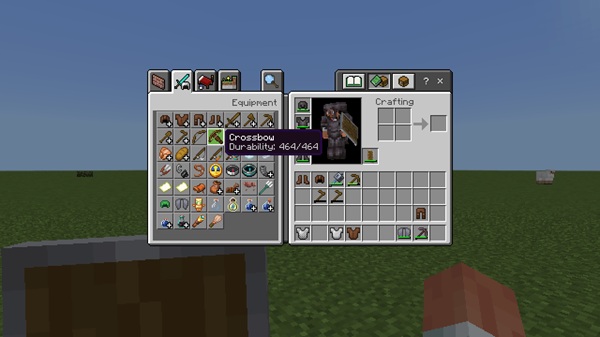
The Durability Viewer Addon gives Minecraft Bedrock Edition players clear, real-time visibility into the lifespan of tools, weapons, armor, shields, and other gear. Instead of wondering when something will snap mid-adventure, you can monitor durability directly on your HUD as you mine, fight, and explore. This creates a smoother, more strategic survival experience—especially when you rely on enchanted or high-value equipment.
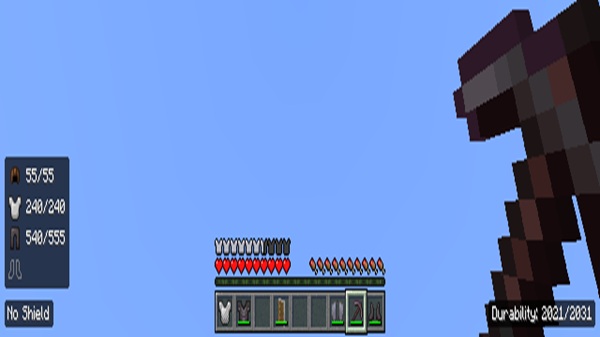
By knowing exactly when your items are wearing down, you avoid preventable losses, save resources, and gain a sense of control over your world progression. For many players, this addon becomes a permanent part of their MCPE setup.
Why Durability Awareness Matters in MCPE
Having durability visible in MCPE may not seem critical at first—but once you experience sudden tool failure underground or lose enchanted armor during combat, the value becomes clear. The Durability Viewer Addon makes everyday survival more predictable and enjoyable.
The Problems Bedrock Players Face
-
No native durability display
-
Tools breaking unexpectedly underground
-
Armor wearing down without warning
-
Enchanted gear disappearing suddenly
-
Wasted resources due to early repairs
How This Addon Improves Gameplay
-
Gives clarity instead of uncertainty
-
Encourages smart planning
-
Helps reduce material waste
-
Protects progress over time
Main Features Overview
This section highlights how the Durability Viewer Addon works in MCPE and what makes it useful every time you play.
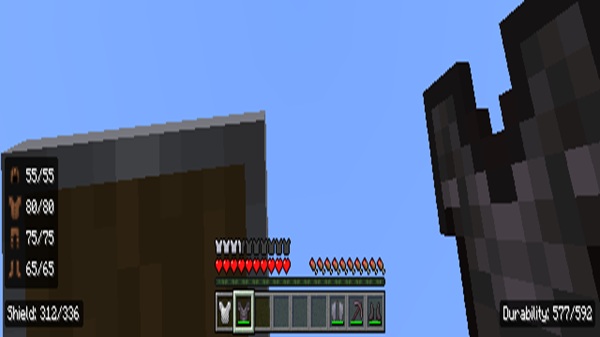
Real-Time Durability Display
Durability updates live as you use your tools, weapons, and armor, allowing you to react instantly.
Supports All Breakable Gear
Including:
-
Tools
-
Swords
-
Armor
-
Shields
-
Elytra
Color-Coded Indicator System
A simple, intuitive alert style:
-
Green – Safe
-
Yellow/Orange – Worn
-
Red – Close to breaking
Multiple HUD Position Styles
Depending on the version, the display can appear:
-
In a corner of the screen
-
Near the hotbar
-
Integrated into a compact overlay
Optimized for Mobile & Low-End Devices
Lightweight code ensures smooth gameplay without FPS drops.
No Commands Needed
Once installed and activated, it works automatically.
How It Works In-Game
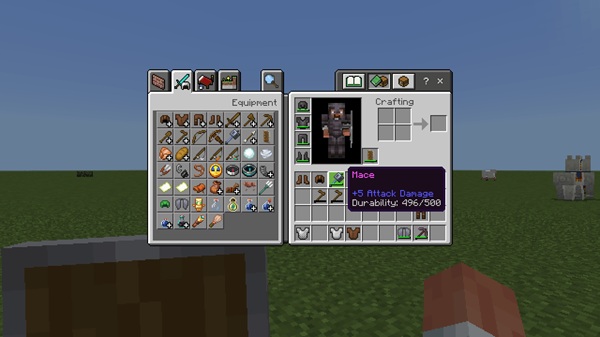
The Durability Viewer Addon displays your equipment condition while you play, without needing menus or inventory checks. This keeps your focus on the adventure itself.
In-World Behavior Examples
-
Equipping a pickaxe updates the HUD instantly
-
Armor durability appears when worn
-
Switching items refreshes the display immediately
-
Indicators adapt in combat, mining, and exploration
This gives you the right information at the right time.
Compatibility Information
The Durability Viewer Addon is compatible with current MCPE versions and works across:
-
Android
-
iOS / iPadOS
-
Windows Bedrock
-
Supported consoles
It performs reliably on most devices, including mid-range phones.
Best Practices for Survival Players
To get the most value from this addon, consider:
-
Check durability before long expeditions
-
Keep gear rotations available
-
Repair based on remaining percentage
-
Monitor armor after major encounters
-
Use it alongside enchantments like Mending
These habits extend tool and armor life significantly.
Troubleshooting & Common Issues
If the display doesn’t appear or updates incorrectly, try:
-
Confirming experiments are enabled
-
Re-activating resource and behavior packs
-
Restarting the world
-
Adjusting GUI scale if text overlaps
These fixes resolve most setup concerns.
Recommendations & Useful Tips
-
Lower GUI scale for clarity on mobile
-
Test each HUD mode to find your favorite
-
Combine with other UI quality-of-life packs
-
Keep your device storage from filling up
Conclusion
The Durability Viewer Addon gives you clarity, confidence, and control in your Minecraft Bedrock worlds by letting you see exactly how long your tools and armor will last. It removes uncertainty, prevents unnecessary losses, and supports smarter survival decisions. If you want a smoother, more informed experience in MCPE, this addon is a highly valuable upgrade that helps you stay prepared instead of surprised.
Installation Guide
Installing the Durability Viewer Addon is straightforward and only takes a few steps.
Addon File Installation
Download the .mcaddon or .mcpack file and open it on your device.
Activate Required Packs
Enable:
-
Resource Pack
-
Behavior Pack
inside your world settings.
Enable Required Experimental Options
Activate relevant experimental settings such as:
-
Beta APIs
Load Your World and Test
Equip any durability-based item to verify proper display.











