
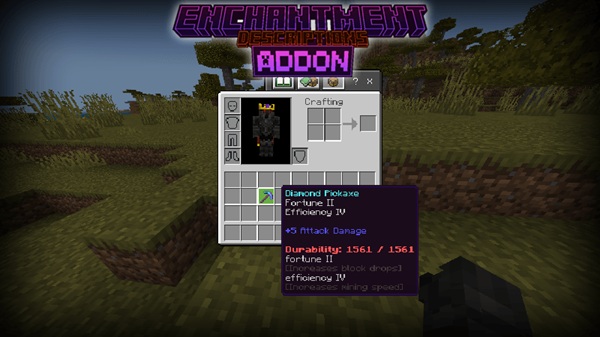
Enchantment Descriptions Addon – Clear Enchants Instantly
Enchanting plays a huge role in Minecraft Bedrock Edition. It affects how fast you mine, how strong your weapons feel, and how long your armor lasts. Yet for many MCPE players, enchantments remain confusing. Names like Efficiency, Smite, or Aqua Affinity don’t always explain what actually happens in-game, especially when you’re playing on a phone with limited screen space.
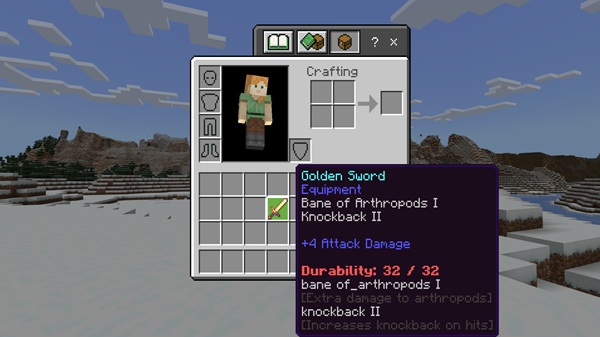
The Enchantment Descriptions Addon exists to remove that confusion. By adding clear, readable enchantment descriptions directly into the game, it helps you understand your gear instantly. You no longer need to memorize enchantments or pause your session to look things up. Everything you need appears right where you’re already playing.
This addon is built as a vanilla-friendly quality-of-life improvement. It does not change mechanics, add power, or affect progression. Instead, it improves clarity—something MCPE players benefit from every single day.
What This Addon Does
At its core, the Enchantment Descriptions Addon focuses on one simple goal: helping you understand enchantments without altering how Minecraft Bedrock Edition works. It enhances information, not gameplay, which makes it ideal for survival worlds and long-term saves.
Adds Clear Enchantment Descriptions In-Game
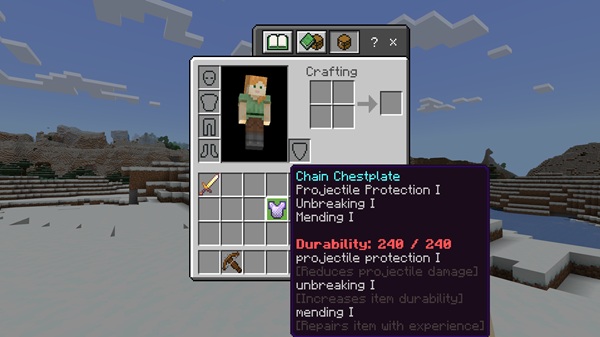
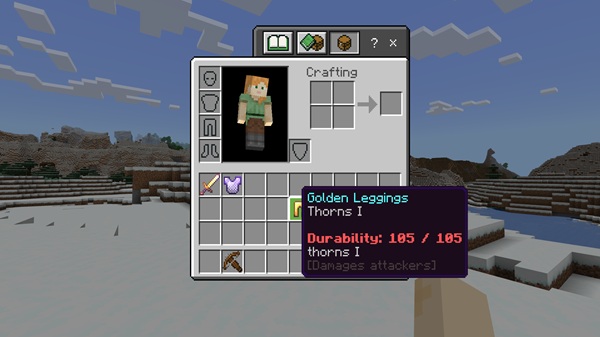
The addon adds short, easy-to-read explanations to enchantments directly in your inventory. Each enchantment description explains its effect in plain language, so you immediately know what it does. For example, instead of just seeing an enchantment name, you’ll understand how it affects mining speed, damage, or movement.
Shows Enchant Effects Instantly on Items
Once activated, the Enchantment Descriptions Addon works automatically. When you select or tap and hold an enchanted item, the description appears instantly. There are no commands to type and no settings to adjust. This makes it especially useful during fast-paced survival gameplay.
Works with All Standard Bedrock Enchantments
The addon supports all vanilla Minecraft Bedrock enchantments. This includes tools, weapons, armor, and enchanted books. Whether you’re checking a pickaxe from a villager trade or reviewing books before using an anvil, the information stays consistent.
Does Not Change Gameplay or Balance
Nothing about enchanting mechanics is modified. XP costs, enchantment levels, and progression remain exactly the same. Because of this, the Enchantment Descriptions Addon is safe for survival mode, multiplayer worlds, and Realms.
Designed for MCPE and Bedrock Players
MCPE players use touch controls, not a mouse. This addon respects that. Descriptions are displayed in a touch-friendly way that works smoothly on phones and tablets without cluttering the screen.
Main Features
This section highlights the core strengths of the Enchantment Descriptions Addon in a quick, scannable format:
-
In-game enchantment descriptions for vanilla Bedrock Edition
-
Supports tools, weapons, armor, and enchanted books
-
Automatic functionality with no setup or configuration
-
Lightweight resource pack with minimal performance impact
-
Safe for survival mode, multiplayer, and Realms
-
Vanilla-style design that preserves balance and progression
How It Works In-Game (MCPE Focus)
Understanding how the addon behaves during normal gameplay helps set clear expectations. The Enchantment Descriptions Addon blends naturally into the Bedrock interface, making it feel like a built-in feature.
To use it:
-
Open your inventory, enchanting table, or anvil
-
Select or tap and hold an enchanted item
-
Read the enchantment descriptions instantly
On mobile devices, tap-and-hold gestures reveal information smoothly. Tablets benefit from larger displays, while phones still show clear text without blocking other items. The addon integrates with the default Bedrock UI, so it never feels intrusive.
Compatibility & Requirements
Before installing, it helps to know where the addon works best. The Enchantment Descriptions Addon is designed to be widely compatible.
-
Minecraft Bedrock Edition (latest versions recommended)
-
Platforms: Android, iOS, Windows 10/11
-
Works offline once installed
-
Compatible with most texture packs
-
May conflict with heavy UI-overhaul resource packs
-
Achievements remain enabled
Because it is lightweight, performance impact stays minimal even on lower-end MCPE devices.
Helpful Tips for Players
Using the addon strategically improves its value even more. These tips help you get the most out of it:
-
Use it when combining books on an anvil to avoid wasting XP
-
Check villager trades carefully before spending emeralds
-
Keep enchanted tools in your hotbar for faster checks
-
Safe to add or remove from existing worlds
-
Pairs well with other quality-of-life Bedrock addons
For mobile players, tap-and-hold interactions provide the clearest viewing experience.
Who This Addon Is For
This addon is ideal for a wide range of Bedrock players:
-
MCPE and Bedrock Edition users
-
New players learning enchantments
-
Survival players optimizing gear
-
Multiplayer and Realm players
-
Players who prefer vanilla-style improvements
If you enjoy Minecraft’s progression but want clearer information, the Enchantment Descriptions Addon fits naturally into your world.
Conclusion
The Enchantment Descriptions Addon addresses one of Minecraft Bedrock Edition’s most common frustrations: unclear enchantments. By adding simple, instant descriptions directly in-game, it helps you make better decisions without changing gameplay or balance.
Whether you’re enchanting your first pickaxe or managing advanced gear in a survival world, this addon delivers clarity where it matters most. Lightweight, safe, and easy to use, it’s a practical improvement that feels right at home in MCPE.











