
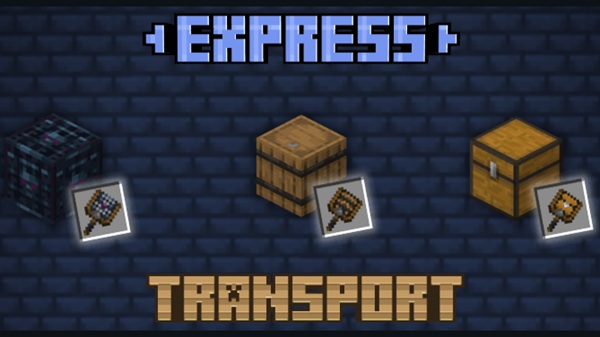
Express Transport Addon – Reliable Chest and Spawner Moves
If you’ve ever stared at a full chest or a precious mob spawner in Minecraft Bedrock and wished you could just pick it up and move it, the Express Transport Addon is made for you. Instead of breaking blocks and risking your progress, this MCPE utility addon lets you relocate key blocks safely, keeping all their data intact. In this guide, I’ll walk you through exactly how it works in-game, so you can use it confidently in your survival worlds.
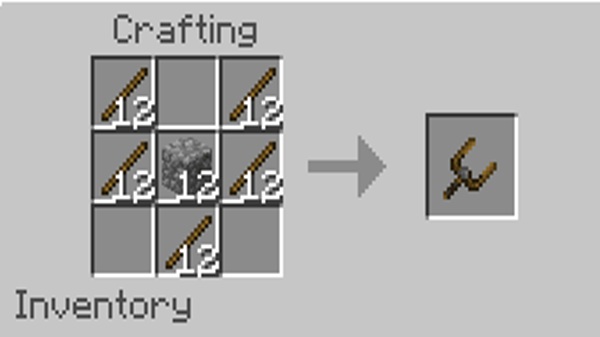
How Express Transport Addon Works In-Game
At its core, the Express Transport Addon gives you a smarter way to move containers and spawners in Minecraft Bedrock Edition. You’ll use a special item called the Carrier to capture blocks like single chests, barrels, and mob spawners, then place them somewhere else with all contents and properties preserved. Let’s break down each step so you know exactly what to do in your MCPE worlds.
Understanding the Carrier System in MCPE
The Carrier is the heart of the Express Transport Addon. Think of it as a portable shell that can hold a block and everything inside it.
When you use the Carrier on a supported block, you’re not “breaking” it in the normal Minecraft way. Instead, the addon:
-
Reads the block’s data (items, mob type, settings).
-
Stores that data inside the Carrier item.
-
Removes the original block from the world without dropping anything.
As a result:
-
Chests and barrels keep all items inside.
-
Mob spawners keep their original mob type and behavior.
-
Nothing falls on the ground or despawns by accident.
Because the Carrier is built for MCPE / Bedrock, it works smoothly with touch controls and feels natural whether you’re on mobile or Windows.
Crafting the Carrier and Support Block
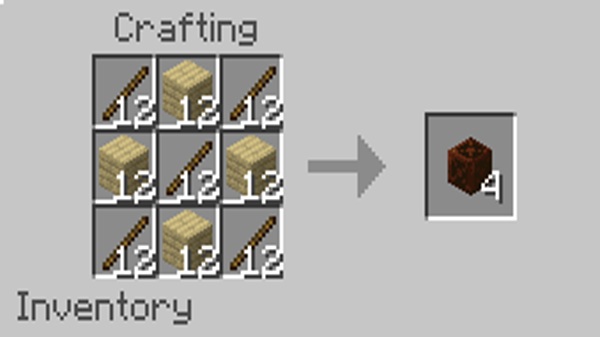
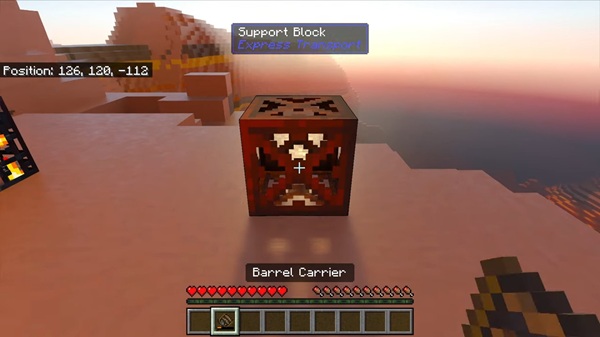
To keep things balanced in Survival, the Express Transport Addon doesn’t give you the Carrier for free. You’ll craft it using a special component: the Support Block.
The Support Block:
-
Is crafted in a normal crafting table.
-
Can be made with any wood variant (oak, birch, spruce, etc.).
-
Acts as the structural core of the Carrier recipe.
Once you have a Support Block, you combine it with other materials to craft the Carrier. It’s designed to feel like a mid-game utility item:
-
Not as cheap as basic tools.
-
Not as expensive as end-game gear.
-
Valuable enough that you’ll plan how and when to use it.
Once crafted, you can keep your Carrier in your hotbar as a permanent part of your Survival toolkit.
Recognizing Supported Blocks In-Game
The Express Transport Addon focuses on a small set of high-value, high-friction blocks in vanilla Bedrock:
-
Single chests
-
Barrels
-
Mob spawners
These are classic problem blocks in any long-term world. Moving them normally either takes forever (emptying chests) or isn’t possible at all (spawners).
A few rules to remember:
-
Only single chests are supported.
-
If you use double chests, break them into singles first.
-
-
Only vanilla blocks are supported.
-
Custom containers from other addons are not compatible.
-
-
Keeping the list focused helps the addon stay stable and reliable in big survival and SMP-style worlds.
If you’re unsure about a block, try it in a small test world before using the Carrier in your main map.
Capturing a Chest, Barrel, or Spawner Safely
Using the Carrier feels like any other MCPE interaction, just with a much better outcome.
-
Equip the Carrier
-
Put it in your hotbar and select it.
-
-
Aim at a supported block
-
Look at a single chest, barrel, or mob spawner you want to move.
-
-
Use your interact control
-
On mobile: tap or long-press the block.
-
On Windows: right-click the block.
-
If everything is set up correctly, the block will:
-
Disappear from the world.
-
Be stored safely inside the Carrier.
-
Leave no items on the ground and no broken spawner behind.
That’s what makes the Express Transport Addon feel truly “reliable”: it quietly handles all the data for you behind the scenes.
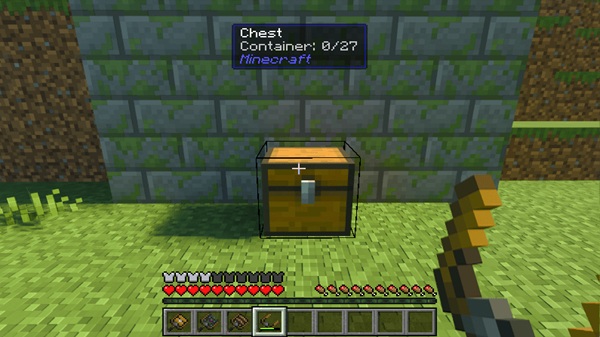
Moving Your Captured Block Across the World
Once the block is captured, the Carrier in your inventory represents both:
-
The block itself, and
-
All of its contents or mob data.
From here, you move like normal:
-
Walk, sprint, jump, swim.
-
Travel across your base, your nether tunnels, or your ice roads.
-
Use boats, horses, or any other transport setup you’ve built.
This is where the addon shines in large survival projects. You can:
-
Move your storage room from a starter hut to a mega base.
-
Shift a spawner to a more efficient mob grinder.
-
Clean up messy early-game chest spam without dozens of trips.
No more painful back-and-forth inventory runs.
Placing the Block with Contents Intact
When you reach your new location, placing the block is just as simple as capturing it.
-
Choose the new spot
-
Stand where you want the chest, barrel, or spawner to go.
-
Make sure there’s room and the placement is safe.
-
-
Equip the Carrier again
-
Select it from your hotbar.
-
-
Place the stored block
-
On mobile: tap the ground or target surface.
-
On Windows: right-click the ground or target surface.
-
The block appears:
-
Chests and barrels return with all items inside.
-
Spawners keep their original mob type and behavior, ready to use in farms or mob rooms.
From your point of view, it feels like you carefully picked up the block and gently set it down, instead of smashing it and hoping for the best.
Platform Controls – Mobile vs Windows Bedrock
Because Minecraft Bedrock Edition runs on multiple devices, the Express Transport Addon respects the standard controls on each platform.
On mobile (Android / iOS):
-
Tap or long-press with the Carrier to capture.
-
Tap the ground to place.
-
Sneak / crouch is only needed if your control layout or extra functions require it.
On Windows (Bedrock):
-
Right-click a supported block with the Carrier to capture.
-
Right-click the ground or a block face to place.
-
Sneak (Shift) works as usual for normal movement and interactions.
If you’re comfortable with basic MCPE controls, you’ll feel at home with the Carrier within a few minutes.
Best Use Cases for Everyday Survival
To see the real value of the Express Transport Addon, think about how you actually play.
Some strong use cases:
-
Storage upgrades
-
Move entire storage walls into a new room without emptying every chest.
-
-
Mob farm improvements
-
Relocate spawners into better grinder layouts and tweak their positions.
-
-
Base redesigns
-
Rebuild early bases into themed districts without losing containers.
-
-
World cleanup
-
Bring random project chests and barrels back to a main hub.
-
If you treat your world as a long-term project, this addon becomes a quiet but powerful quality-of-life mod that saves time and protects your progress.
Safety Tips and Common Mistakes to Avoid
A few simple habits will keep your experience smooth and frustration-free:
-
Check the block type
-
Use the Carrier only on single chests, barrels, and vanilla spawners.
-
-
Avoid interrupting interactions
-
Don’t force-close the game right as you capture or place a block.
-
-
Test first
-
Create a small test world and move a few blocks to get comfortable.
-
-
Backup before big moves
-
Before relocating entire storage halls or multiple spawners, make a copy of your world.
-
-
Verify your setup
-
Make sure both the Behavior Pack and Resource Pack are active.
-
Confirm your MCPE / Bedrock version matches the addon’s supported range.
-
Follow these tips and the Express Transport Addon will do exactly what its name promises: reliable chest and spawner moves that keep your Minecraft Bedrock world safer, cleaner, and easier to evolve over time.











