
Hilux Revo, Toyota 1.21+
The Hilux Revo, Toyota Addon brings a feature-rich pickup truck to Minecraft Bedrock Edition, giving you smoother travel, better utility, and a modern touch for your worlds. Explore how this addon enhances survival, building, and roleplay with its reliable performance and customizable design.
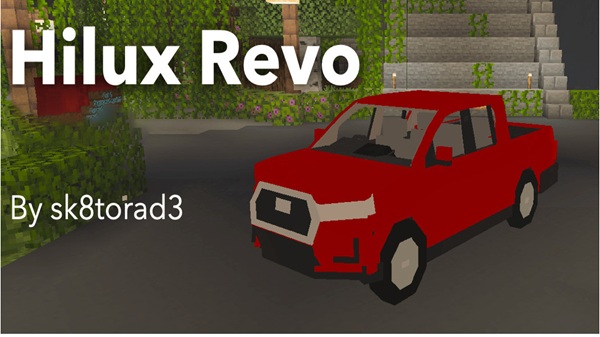
Hilux Revo, Toyota Addon – Feature-Rich Pickup for Bedrock
The Hilux Revo, Toyota Addon is a practical, feature-rich vehicle addon designed for Minecraft Bedrock Edition. It introduces a sturdy pickup truck that blends smoothly with the MCPE environment, giving you a reliable way to travel, explore, and bring modern realism into your world.
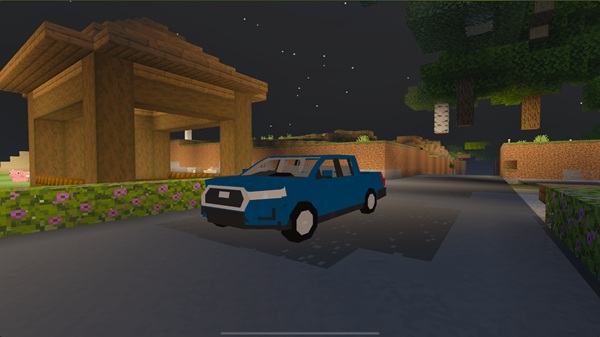
This addon is crafted with a balance of simplicity and detail, making it suitable for survival players, creative builders, and roleplay-focused communities. If you're looking for a dependable truck that doesn’t break your game’s performance, this addon is built for you.
Key Features of the Hilux Revo Pickup
This section introduces the features that define the Hilux Revo, Toyota Addon and make it stand out among MCPE vehicle addons. Each feature is designed to improve your gameplay, whether you’re building, exploring, or roleplaying.
Realistic, Minecraft-Friendly Vehicle Design
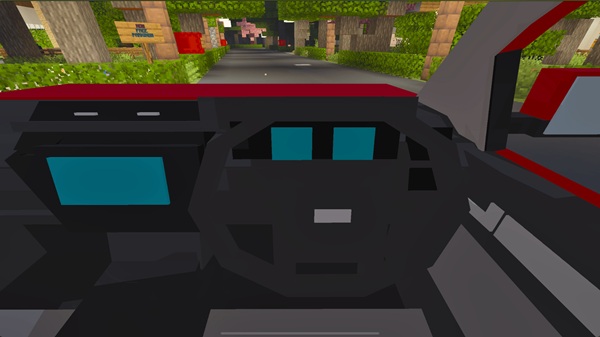
The truck features a clean, block-style model that fits naturally into the Minecraft aesthetic. Its proportions and textures make it visually appealing in modern cities, farms, survival bases, and suburban builds without feeling out of place.
Smooth and Stable Driving Mechanics
The Hilux Revo offers steady, responsive driving tuned for touch controls. It handles well across multiple terrains—grass, sand, stone, and uneven paths—while maintaining smooth physics even in large or populated worlds.
Functional Storage and Utility Options
With built-in cargo capacity, the truck becomes useful for survival gameplay. You can load materials, building blocks, farming supplies, or mining loot, reducing travel time between bases or biomes.
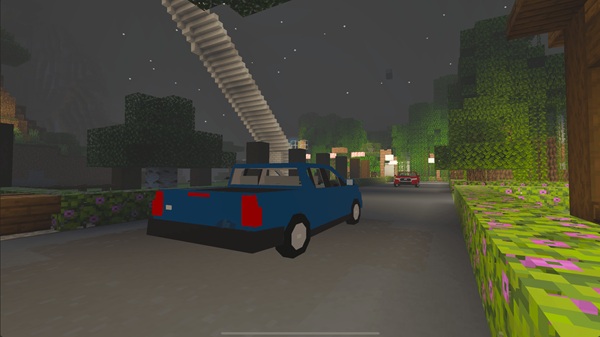
Multiple Color Variants for Customization
The addon includes several color options so you can personalize your vehicle. You might create a work fleet, match your base theme, or add variety to your city roads.
Multiplayer Compatibility and Passenger Support
You can ride with a friend thanks to the two-seat configuration. This helps with cooperative exploration, roleplay missions, or simple travel across Realms and local multiplayer worlds.
Lightweight Performance for All Devices
The behavior scripts and models are optimized for smooth performance. Whether you’re on a low-end phone or a high-end tablet, the Hilux Revo runs with minimal lag—even when multiple trucks are spawned.
Integration with Modern or Survival Builds
From garages and highways to farms and construction zones, the truck blends naturally with most build styles. Paired with shaders, it adds depth and visual realism to your world without overwhelming the blocky style of Minecraft.
How the Hilux Revo Enhances MCPE Gameplay
This section explains how the Hilux Revo, Toyota Addon adds practical value to different playstyles, helping you get more from your Minecraft experience.
Useful for Survival Exploration
The truck makes long-distance travel faster and more efficient. You can move from biome to biome, gather rare resources, or return to your base with more items in a single trip.
Perfect for Modern and City Builds
City builders can use the truck as a functional or decorative vehicle for roads, gas stations, suburbs, factories, or business districts—instantly boosting visual realism.
Ideal for Roleplay Scenarios
In roleplay worlds, the Hilux Revo works well for delivery routes, farm work, construction themes, or community missions. It supports immersive storytelling and group activities.
Adds Realism Without Breaking the Aesthetic
Unlike ultra-realistic mods that clash with Minecraft’s look, the Hilux Revo keeps a block-friendly design. This makes it blend into your world while still providing the feel of a modern pickup.
Compatibility and Performance
This section explains the versions and devices that work best with the Hilux Revo, Toyota Addon.
Supported Minecraft Versions
Optimized for MCPE/Bedrock 1.21+, with general compatibility for some 1.20 builds.
Device Support
Works smoothly on:
-
Android
-
iOS
-
Windows Bedrock Edition
-
Console versions that support external addons
Performance Expectations
The addon is lightweight and stable. It runs well in survival, creative, and multiplayer environments without affecting FPS significantly.
Tips for Getting the Most Out of the Addon
-
Use different colors to organize work fleets.
-
Build garages, parking areas, or loading docks for added immersion.
-
Pair the truck with road or city-themed builds.
-
Keep render distance moderate for smoother driving.
-
Always back up your world before installing new addons.
Credits and Player Notes
This addon is a fan-made creation inspired by a real-world pickup truck. Players are encouraged to give proper credit when showcasing builds or videos. Download the addon from safe sources and follow installation steps carefully to avoid issues.
Final Thoughts
The Hilux Revo, Toyota Addon is a flexible, reliable, and fun addition to any MCPE world. Its balance of practical features, smooth performance, and customization options makes it ideal for survival explorers, city builders, and roleplay communities. If you want a modern pickup truck that feels natural in Minecraft, this addon is an excellent choice.
How to Install the Hilux Revo Addon (MCPE / Bedrock)
Below is a simple guide to help you install and activate the addon successfully.
Using the .mcaddon File
-
Download the
.mcaddonfile. -
Open it to launch Minecraft automatically.
-
Wait for the import to finish.
-
Activate both the Resource Pack and Behavior Pack.
Enabling Required Settings
Turn on Experimental Features in your world. These settings allow addons to work properly and prevent spawn errors. Enable:
-
Holiday Creator Features
-
Additional modding features (if available)
Optional ZIP Installation Method
-
Extract the ZIP file.
-
Move resource packs into
resource_packs/. -
Move behavior packs into
behavior_packs/. -
Restart Minecraft and activate the packs.











