
Kazakhstan Road Signs 1.21+
Enhance your Minecraft Bedrock worlds with the Kazakhstan Road Signs Addon, featuring realistic Central Asian traffic signs for modern cities, survival servers, and creative highway builds.
Kazakhstan Road Signs Addon – Authentic Central Asia Roads
If you enjoy building realistic cities in Minecraft Bedrock (MCPE), the Kazakhstan Road Signs Addon offers something fresh: true Central Asian road systems recreated as functional in-game signage. Instead of generic props, you get believable road rules, highway navigation, and regional identity inspired by real Kazakhstan streets. It’s designed for players who want their map to feel lived-in, organized, and culturally unique.
What Is the Kazakhstan Road Signs Addon?
Before you start placing vehicles or painting lanes, you need signs that make your city feel real. The Kazakhstan Road Signs Addon introduces accurate road signage used across Kazakhstan into MCPE. These signs fit perfectly into SMP servers, realistic Creative builds, and survival roleplay cities where players navigate districts, highways, and rural routes.
Many versions of the addon integrate with the RRS+ system (Russian-style regional signage). This makes it possible to combine Kazakhstan signs with other nearby regions for a complete road ecosystem across a map.
Key Highlights
-
Designed for modern cities and highways
-
Works in Creative and Survival modes
-
Builds cultural realism instead of generic decoration
What Makes These Signs Authentic to Central Asia?
Roads say a lot about a place. The Kazakhstan Road Signs Addon brings details inspired by real Central Asian infrastructure, blending functional gameplay with recognizable visual style.
Real Kazakhstan Sign Designs and Colors
Real highways in Kazakhstan rely on clear visual cues:
-
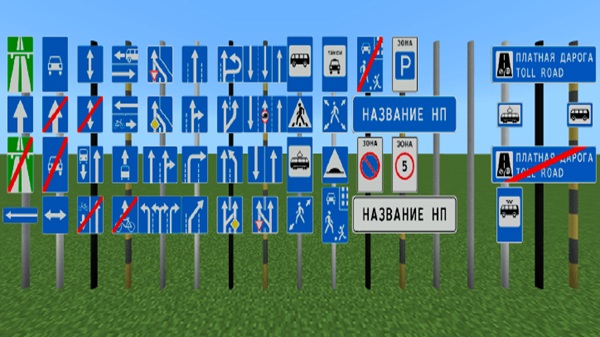
Blue directional boards for navigation
-
Red-bordered warnings for hazards
-
Bold shapes that match government standards
When placed in MCPE, these instantly feel like signs from Astana or Almaty.
Bilingual Elements and Regional Typography
In Kazakhstan, signage is commonly bilingual. The addon reflects this style through:
-
Regional font shapes
-
Familiar highway symbols
-
Layout spacing inspired by Central Asian formatting
It doesn’t just look realistic — it functions as readable guidance in your builds.
Layouts for Cities, Villages, and Steppe Highways
Kazakhstan roads shift dramatically depending on region:
-
Astana-style districts with clean, modern layouts
-
Almaty neighborhoods full of crosswalks and direction signs
-
Steppe highways linking small rural stops to large cities
This range encourages you to design diverse maps with real geographical personality.
Cultural Realism Through Purpose, Not Decoration
These signs aren’t “pretty extras.” They improve builds by:
-
Guiding traffic routes
-
Structuring downtown roads and suburbs
-
Turning creative maps into usable cities
With the right placement, your world feels immersive instead of fictional.
Key Features for Minecraft Builders
Builders get more than visuals. The Kazakhstan Road Signs Addon adds practical tools that work well on mobile and multiplayer:
-
3D signs with rotation support
-
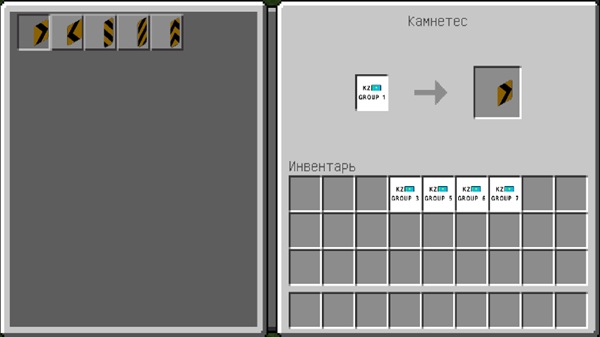
Stonecutter crafting for Survival (organized selection system)
-
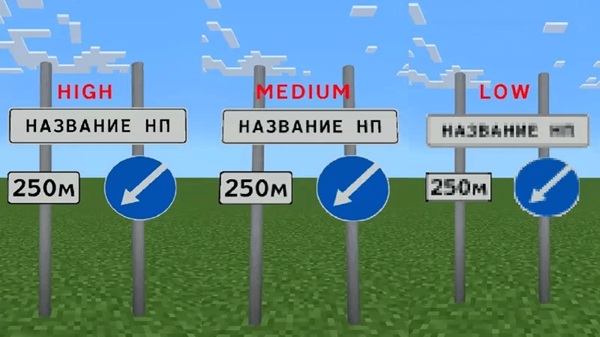
Low-lag textures optimized for phones and tablets
-
Ideal for:
-
Creative city builders
-
SMP survival towns
-
Roleplay driving and transport maps
-
It’s a solid upgrade if you want your builds to look modern without sacrificing performance.
How the Addon Works In-Game
A city builder cares about functionality. Here’s how to access signs depending on your play style.
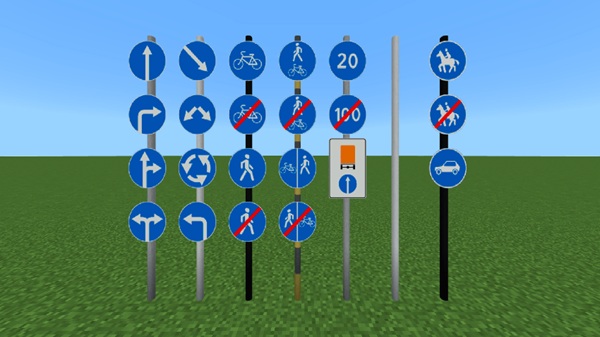
Creative Mode Access
Search using keywords like "Kazakhstan" or "Sign" and place signs on:
-
Iron bars (street poles)
-
Fences (village style)
-
Walls (warning signs near intersections)
To rotate a sign, simply crouch and interact. The exact method depends on your MCPE version but remains intuitive.
Survival Mode (Stonecutter Crafting System)
You don’t unlock hundreds of signs one by one. Instead:
-
Obtain a Group Sign Item
-
Place it in the Stonecutter
-
Pick your desired sign
-
Craft, place, and guide players
This keeps inventories clean while giving full access to the addon.
Building Tips for Realistic Kazakh Cities
You can create believable Central Asian builds by combining the addon with smart road planning:
-
Add hidden light blocks behind signs to imitate reflective paint.
-
Use signage near:
-
Schools
-
Markets
-
Bus stops
-
Speed limit zones
-
-
Match architecture styles with realistic layouts:
-
Astana: wide roads, government buildings
-
Almaty: greenery and neighborhood signage
-
Steppe routes: long highways with village signboards
-
Final Notes
The Kazakhstan Road Signs Addon helps your Minecraft Bedrock world feel culturally distinct, organized, and functional. If you love immersive architecture, road networks, and maps that tell a story, this addon gives your builds a recognizable identity inspired by real Central Asian infrastructure.
Installation Requirements (MCPE/Bedrock)
To install and activate the Kazakhstan Road Signs Addon:
-
Import the
.mcaddonor.mcpackfile by opening it with Minecraft. -
Enable Resource Pack and Behavior Pack in your world settings.
-
Turn on:
-
Holiday Creator Features
-
Molang Features
-
Some versions require an additional base pack for textures to load correctly.











