
Knowledge Pocket Wikipedia 1.21+
The Knowledge Pocket Wikipedia Addon is a built-in Minecraft Bedrock guide that helps MCPE players learn gameplay mechanics, blocks, and crafting directly inside their world, even offline.
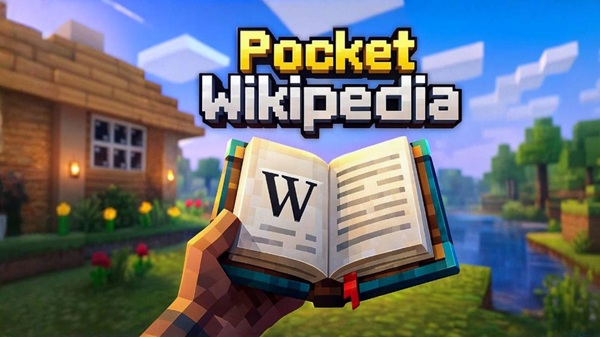
Knowledge Pocket Wikipedia Addon – Built-In Minecraft Guide
The Knowledge Pocket Wikipedia Addon is created for players who want to understand Minecraft better without breaking immersion. Instead of pausing the game to search for answers elsewhere, this addon brings useful knowledge directly into your Minecraft world, making learning feel natural and convenient.
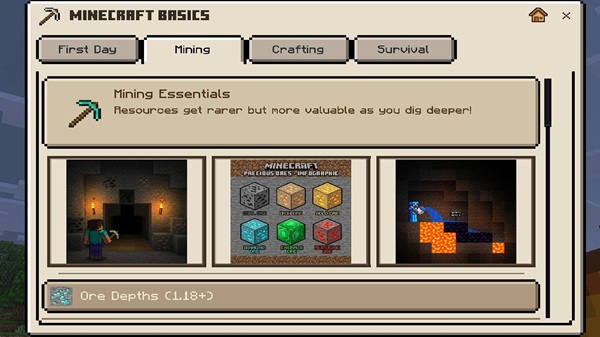
If you play on MCPE or Bedrock Edition, you already know how inconvenient it can be to switch apps on a phone or tablet. This addon solves that problem by offering a built-in Minecraft guide that works alongside your gameplay, not outside of it.
What Is the Knowledge Pocket Wikipedia Addon?
At its core, the Knowledge Pocket Wikipedia Addon is an in-game reference addon designed for Minecraft Bedrock players. It provides structured, easy-to-read information about common gameplay elements in a way that feels intuitive, especially on mobile devices.
Instead of modifying survival balance or adding powerful tools, the addon focuses on knowledge support. Think of it as a digital handbook inside Minecraft—helpful, informative, and always available when you need it. This approach makes it ideal for players who enjoy learning mechanics naturally as they play.
How the Built-In Minecraft Guide Works In-Game
This section explains how the addon functions during actual gameplay. Understanding this part helps you decide whether the addon fits your playstyle and device.
Accessing the Knowledge Pocket Inside the World
Once activated, the Knowledge Pocket can be accessed through its in-game interaction system, such as a dedicated item or simple action. You don’t need commands, external menus, or technical knowledge. Everything happens inside the world you are playing.
The interaction is designed to feel familiar, so even younger players or first-time addon users can use it comfortably.
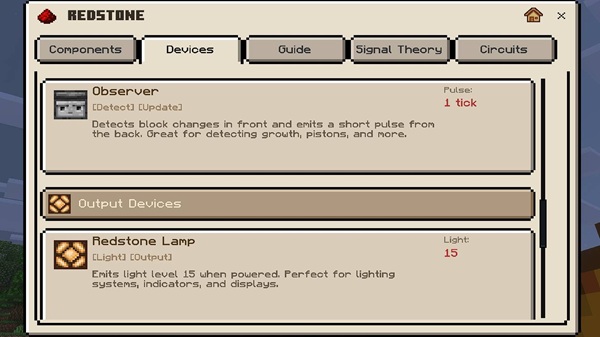
Types of Information Available in the Guide
The built-in guide focuses on essential Minecraft knowledge, including:
-
Blocks and items
-
Crafting references
-
Core gameplay mechanics
-
General explanations that help decision-making
Each entry is written clearly and avoids unnecessary complexity, making the guide suitable for beginners and casual players.
Navigation and Reading Experience on Mobile
MCPE players benefit the most from the addon’s mobile-first design. Text is readable, sections are separated clearly, and navigation feels smooth even on smaller screens. You can quickly read what you need and return to gameplay without distraction.
Using the Guide During Survival and Creative Gameplay
The Knowledge Pocket Wikipedia Addon works in both Survival and Creative modes. Whether you’re planning a build or learning mechanics step by step, the guide supports your progress without interrupting the flow of play.
Offline and Built-In Design Benefits
After installation, the addon works completely offline. All information is stored locally, which is especially useful if you play on the go or with limited internet access.
Main Features of the Knowledge Pocket Addon
This section highlights what makes the addon practical for everyday use:
-
Built-in in-game knowledge system
-
Offline access after installation
-
Interface optimized for MCPE screens
-
Lightweight and performance-friendly design
-
Compatible with Survival and Creative modes
-
Vanilla-friendly and educational focus
Each feature is designed to support learning without changing how Minecraft fundamentally works.
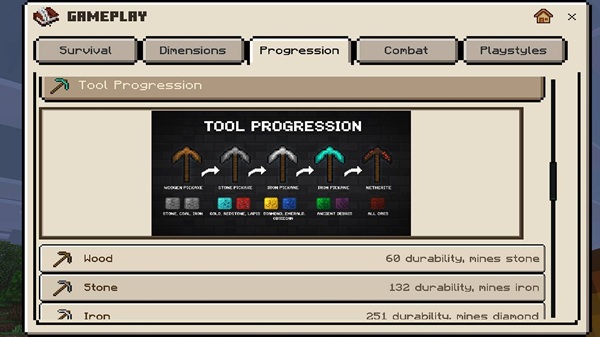
Why This Addon Is Useful for MCPE Players
Mobile players often face limitations that desktop players don’t. Smaller screens, limited multitasking, and offline play are common challenges. The Knowledge Pocket Wikipedia Addon directly addresses these issues by keeping everything inside Minecraft.
It helps you:
-
Learn mechanics at your own pace
-
Avoid leaving the game to search for answers
-
Stay focused during long play sessions
-
Enjoy Minecraft more confidently on mobile
For many MCPE players, this convenience alone makes a big difference.
Supported Versions and Compatibility
Before installing any addon, compatibility matters. The Knowledge Pocket Wikipedia Addon supports modern versions of Minecraft Bedrock Edition, including:
-
Android
-
iOS and iPadOS
-
Windows 10 & 11 (Bedrock Edition)
The addon is not designed for Java Edition. When enabled correctly, it may also work in multiplayer worlds or Realms, depending on world settings.
Performance and Stability Notes
The addon is built to be lightweight and stable. It avoids heavy systems and visual effects, helping maintain smooth gameplay on mobile devices.
It works well on:
-
Low-end phones
-
Mid-range tablets
-
Worlds with other compatible addons
For normal gameplay, performance remains consistent.
Helpful Tips for Using the Built-In Guide
To get the best experience:
-
Activate the addon before starting a new world
-
Use landscape mode for easier reading
-
Keep the addon enabled consistently
-
Treat it as a learning tool, not a shortcut
-
Avoid removing it from active worlds
These small habits help ensure long-term stability.
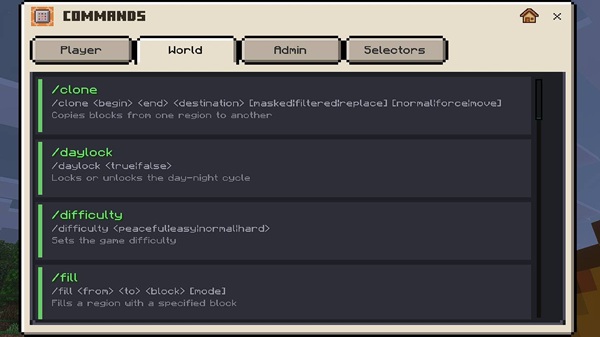
Summary: A Reliable In-Game Guide for Minecraft Bedrock
The Knowledge Pocket Wikipedia Addon offers a thoughtful way to learn Minecraft from inside the game itself. With its built-in design, offline access, and MCPE-friendly interface, it serves as a reliable guide for players who value understanding and convenience.
If you want a calmer, more informed Minecraft experience on Bedrock Edition, this addon fits naturally into your world—quietly helping while you play.
How to Install on MCPE (Android & iOS)
Installation follows standard Bedrock addon steps and is beginner-friendly:
-
Download the addon file in a supported format
-
Open the file to import it into Minecraft
-
Create a new world or edit an existing one
-
Activate the addon under Behavior Packs
-
Enable any required experimental settings if prompted
-
Enter the world and start using the guide
Most MCPE players can complete this process in just a few minutes.











