Leaderboards and Holograms 1.21+
Enhance your Minecraft Bedrock world with the Leaderboards and Holograms Addon. Track player stats in real time, create floating holograms, and fully customize leaderboards for competitive, survival, or creative gameplay. Perfect for realms, hubs, and events, this addon brings structure, engagement, and visual flair to your MCPE experience.
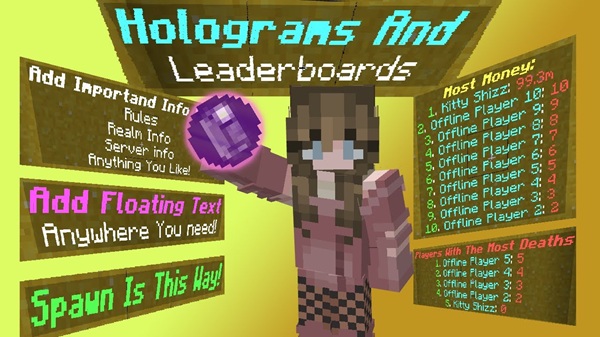
Leaderboards and Holograms Addon – Elevate Your MCPE World
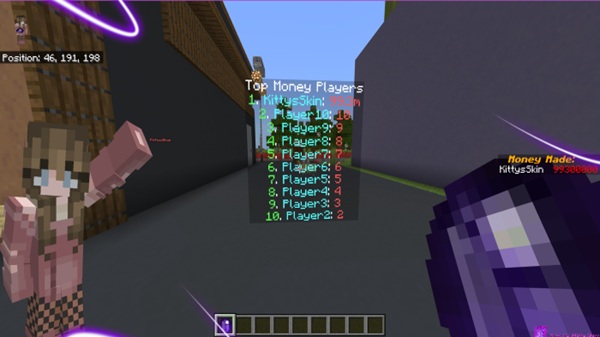
If you’re looking to enhance your MCPE world with real-time stats, rankings, and visually immersive elements, the Leaderboards and Holograms Addon is the perfect tool. Designed specifically for Minecraft Bedrock Edition, this addon transforms static scoreboards into floating holograms, allowing you to display achievements, playtime, currency, and custom objectives. Whether you run a realm, a survival server, or a creative hub, this addon helps you organize your world, engage players, and add professional polish.
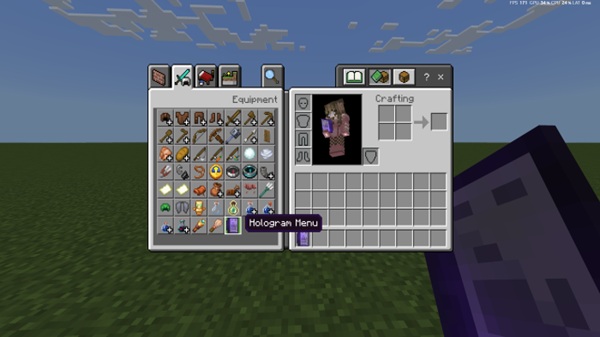
Key Features
The Leaderboards and Holograms Addon brings a mix of functionality and creativity to your MCPE world. It’s designed for both competitive and creative players, providing clear, dynamic displays that update automatically.
Real-Time Leaderboards
Leaderboards track player statistics instantly, including:
-
Wins, points, or match scores
-
Playtime or distance traveled
-
Currency balances in survival or economy worlds
-
Custom objectives you define
Because these leaderboards update in real time, you never need to refresh the world manually. This feature is ideal for friendly competition, multiplayer events, or progression tracking.
Floating Holograms
Holograms let you place floating text anywhere:
-
Spawn hubs
-
Shops or economy areas
-
Adventure maps or quest locations
These displays are non-interactive, clean, and dimension-flexible, working in the Overworld, Nether, or End. They’re perfect for instructions, labels, or decorative storytelling within your MCPE world.
Customization Options
You can adjust almost every visual aspect:
-
Text colors and fonts (bold, italic, or standard)
-
Number of players displayed on leaderboards (top 5, 10, or 20)
-
Combine holograms for layered visual effects
-
Set leaderboard titles, such as “Top Miners” or “Explorer Rankings”
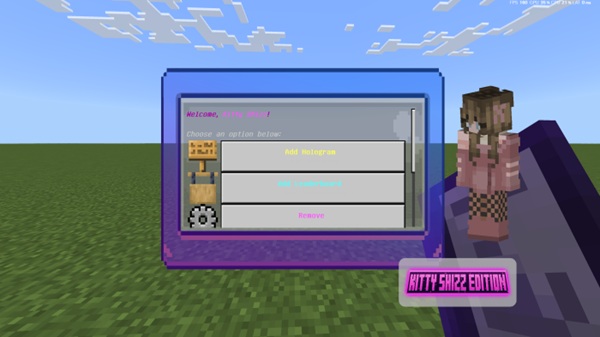
Multiplayer & Realm Support
The addon works seamlessly in:
-
Realms
-
LAN worlds
-
Dedicated Bedrock servers
All players see the same holograms and leaderboards, ensuring consistent multiplayer experiences.
Optimized Performance
-
Lightweight for mobile and low-end devices
-
Supports multiple leaderboards and holograms with minimal lag
-
Best practices: distribute displays across dimensions for optimal performance
How It Works In-Game
The Leaderboards and Holograms Addon uses Minecraft’s built-in scoreboard system combined with invisible hologram entities to display information.
Command-Based Setup
-
Create leaderboards and holograms with simple chat commands
-
Define objectives, titles, colors, fonts, and the number of players
-
No coding knowledge required
Real-Time Updates
Leaderboards automatically reflect changes as players earn points, complete tasks, or progress in-game. This ensures live feedback and engagement.
Dimension Flexibility
You can place displays in the Overworld, Nether, or End to create world-specific or multi-area leaderboards.
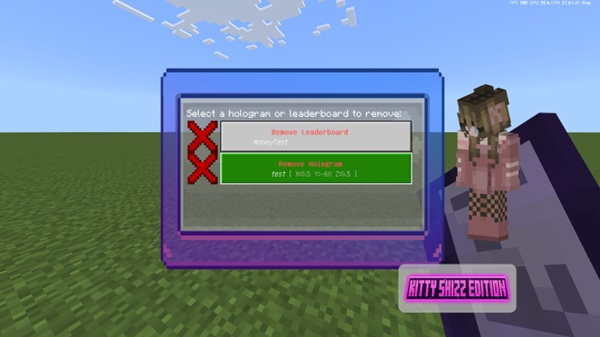
Non-Destructive Editing
Modify or delete leaderboards and holograms without affecting the underlying stats, making it easy to experiment safely.
Creative Use Cases
PvP & Competitive Play
-
Track top performers and match wins
-
Encourage friendly competition with visible rankings
Survival & Economy Worlds
-
Highlight top miners, traders, or explorers
-
Display currency and achievement stats for immersive gameplay
Creative Builds & Map Hubs
-
Label spawn points, shops, or quests
-
Use layered holograms for visual storytelling
Event Spaces
-
Track seasonal competitions or milestone achievements
-
Add holograms to mark in-game festivals or special challenges
Tips & Best Practices
-
Place leaderboards strategically to avoid clutter.
-
Layer holograms for clarity and aesthetics.
-
Keep addon priority high in pack settings.
-
Combine carefully with other addons to prevent conflicts.
-
Clear cache if holograms fail to appear.
-
Regularly back up your world for safety.
Compatibility & Requirements
-
Minecraft Bedrock Edition: 1.21+
-
Devices: Windows, Android, iOS; Realms support consoles
-
Requirements: Experimental Features enabled, Cheats ON
-
System Specs: Minimum 2GB RAM, 100–500MB storage
-
Both Resource and Behavior Packs must be active
Conclusion
The Leaderboards and Holograms Addon transforms your MCPE world into a dynamic, engaging, and visually polished environment. With real-time stats, immersive holograms, and full customization, it empowers realm owners, competitive players, and creative builders to organize, inspire, and elevate their Minecraft worlds.
Install it today and see your MCPE world come alive like never before!
Step-by-Step Installation
Windows 10/11
-
Download the
.mcaddonfile. -
Double-click to import it into Minecraft.
-
Activate Resource and Behavior Packs in your world.
-
Enable Experimental Features.
-
Load your world and start using the addon.
Android
-
Download the
.mcaddonor.mcpackfile. -
Import directly via Minecraft or manually place it in the
/behavior_packsor/resource_packsfolders. -
Enable both packs and Experimental Features.
iOS
-
Upload the addon to Files, Google Drive, or Dropbox.
-
Open the file to automatically import it.
-
Activate Resource and Behavior Packs and Experimental Features.
Tip: Always back up your world before installing or enabling experimental features.