
Life Increase 1.21+
The Life Increase Addon introduces a new survival progression system for MCPE. Earn permanent extra hearts by mining life ore, crafting upgrade items, and expanding your health through real gameplay effort.
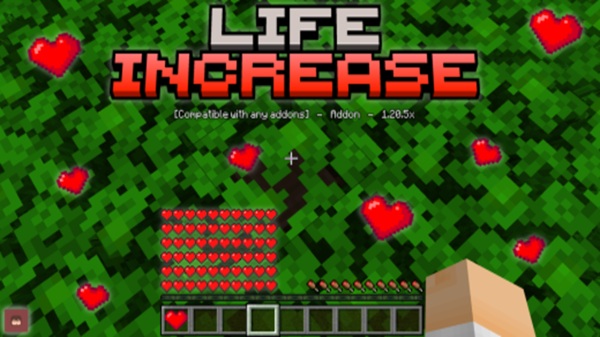
Life Increase Addon – Craft Power, Expand Your Health
The Life Increase Addon gives Minecraft Bedrock players a new way to grow stronger without using cheats. Instead of gaining temporary buffs or relying on commands, you earn extra hearts by mining, crafting, and consuming items you create yourself. The result feels like real character progression: every heart you unlock is proof of your effort, your strategy, and your survival skills in MCPE.
What Is the Life Increase Addon?
Before diving into crafting and mining, it helps to understand what the Life Increase Addon changes in the game. This addon expands your maximum health bar permanently and builds a new progression system around it.
The Life Increase Addon:
-
Increases total hearts through gameplay, not commands.
-
Creates an RPG-like health upgrade path.
-
Makes survival exploration more rewarding.
-
Works in both single-player and multiplayer worlds.
By turning health into something you earn, the addon makes every upgrade feel personal and earned, especially in long-term survival worlds.
Craft Power: How the Heart System Works
This addon centers on one simple idea: craft your power, expand your health. You mine rare ore, collect fragments, and use them to craft upgrade hearts. Each heart you create permanently increases your maximum HP.
What Are Life Fragments and How Are They Used?
Life fragments are small upgrade materials found underground:
-
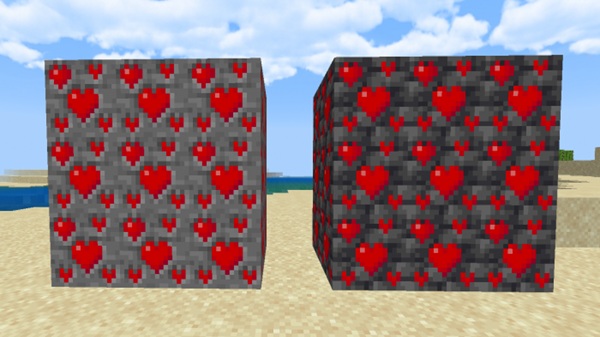
Dropped from a unique ore block.
-
Stored in your inventory like any resource.
-
Used to craft permanent health upgrades.
They’re like mini milestones. The more fragments you collect, the closer you get to your next heart.
Craftable Hearts: Turning Resources Into Max Health
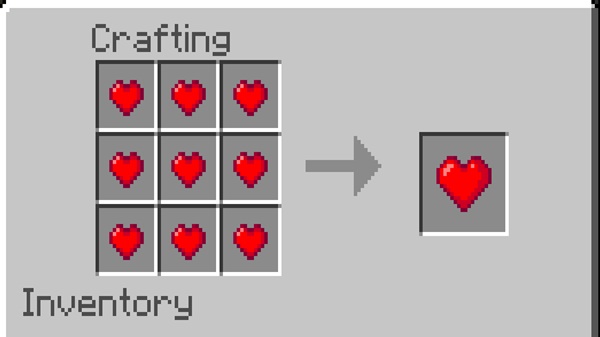
Once you have enough fragments, you can make a consumable heart:
-
Crafted using a normal crafting table.
-
Cannot be found in loot or bought—only crafted.
-
Represents the effort you put into mining.
This keeps the addon fair. No shortcuts. No freebies. You build your strength just like you build tools or armor.
Consuming Hearts to Expand Your Lifetime Health
After crafting a heart, you simply interact with it:
-
Mobile: Tap and hold
-
Console/PC: Use the interact button
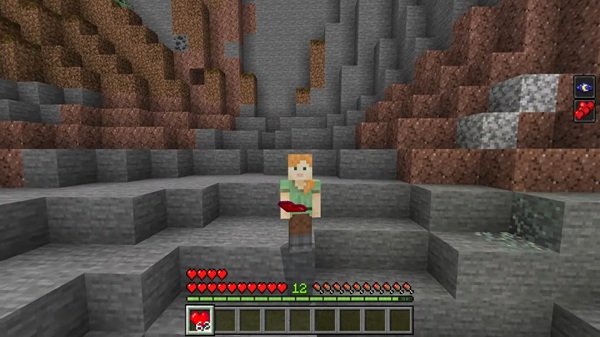
Each heart permanently adds one new heart to your health bar. Upgrades stay even after death, so you never lose your progress—even in risky adventures.
Why This System Feels Fair and Earned
-
No cheats, commands, or shortcuts.
-
You must explore, mine, and craft.
-
Balanced for SMP servers and solo worlds.
It rewards real gameplay, making each new heart feel like a trophy you worked for.
Expand Your Health: Mining & Collecting Life Ore
Life ore becomes a new reason to explore caves and dig deep. You’ll find it hidden underground at different elevations, encouraging you to search widely instead of mining in one spot.
Key points:
-
Appears naturally in survival worlds.
-
Requires the correct pickaxe to harvest fragments.
-
Rare enough to be valuable, not frustrating.
Mining feels more strategic. You aren’t just looking for diamonds anymore—you’re building your future health.
Crafting Permanent Hearts
After collecting fragments, you can turn them into upgrade hearts at the crafting table. Recipes may vary by version, but they always require multiple fragments.
Highlights:
-
Heart recipes are intentionally expensive for balance.
-
Saving fragments for bulk crafting is efficient.
-
Crafting becomes a milestone on its own.
It’s just like crafting tools or armor—you earn it, and it matters.
Survival Benefits of Permanent Health Growth
Expanding your health makes MCPE survival more flexible without removing challenge.
Advantages:
-
Reduces frustration from accidental damage.
-
Makes risky biomes and structures more accessible.
-
Lets you prepare for danger at your own pace.
-
Helps newer players learn without constant death.
You still need skill, but more hearts give you confidence to take risks and explore deeper.
Multiplayer & SMP: Rules for Fair Progression
On multiplayer servers, upgraded health becomes a social and strategic element. You can compete, cooperate, or even trade materials.
Common SMP ideas:
-
Set weekly heart limits.
-
Trade fragments or hearts.
-
Mine together for shared progress.
-
Track player hearts as achievements.
This creates a balanced ecosystem where power is earned, not handed out.
Supported Versions, Platforms & Performance
The Life Increase Addon works smoothly on:
-
MCPE/Bedrock 1.18+ to latest
-
Android, iOS, Windows 10/11, Xbox, PlayStation, Switch
Additional notes:
-
Lightweight design, optimized performance.
-
Extra hearts don’t cause lag.
-
Works well on low-end mobile devices.
Best Tips for Fast Progression
Want to upgrade faster? Use smart mining strategies.
Top tips:
-
Explore caves and strip mine at multiple Y-levels.
-
Upgrade your pickaxe to shorten mining time.
-
Save hearts for big adventures (Nether, strongholds).
-
Plan upgrades gradually so your power grows steadily.
Skill matters more than speed. The smarter you play, the faster you earn hearts.
Download, Notes & Safe Usage
For best experience:
-
Download from safe, official links.
-
Back up worlds when using experimental features.
-
Credit creators when showcasing or streaming.
-
Don’t reupload the addon without permission.
Fair use keeps the MCPE community healthy and respectful.
Final Thoughts
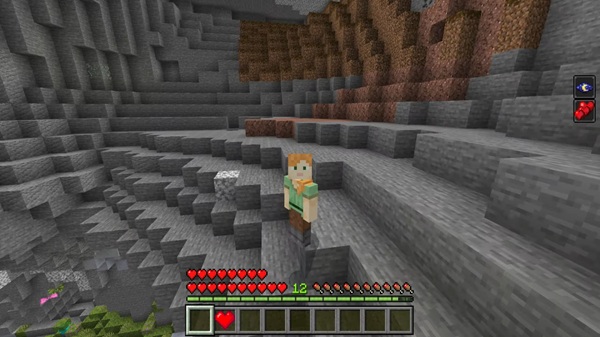
The Life Increase Addon turns health into meaningful progression. Mining ore, crafting hearts, and expanding your life bar feels like leveling up in an RPG, but inside vanilla-style Minecraft survival.
If you love survival worlds, SMP progression, or long-term gameplay, this addon gives you a unique way to grow stronger through your own effort. Every heart is a victory—one you truly earned.
Installation Guide for MCPE (Step-by-Step)
To use the Life Increase Addon in your world:
-
Download the resource and behavior packs.
-
Import the files into Minecraft.
-
Enable Experimental Features in your world settings.
-
Activate both packs under Resource Packs and Behavior Packs.
-
Start your world and begin mining for life ore.
Tip: Always enable experiments before launching the world, or the addon won’t run.











