
Lucky Foods 1.21+
The Lucky Foods Addon brings two unique lucky block variants and over a hundred random effects to Minecraft Bedrock Edition. Explore structures, test your luck, and enjoy fresh surprises that make every MCPE world feel new and exciting.

Lucky Foods Addon – Two Variants, Endless Random Effects
The Lucky Foods Addon brings a creative, unpredictable twist to Minecraft Bedrock Edition. This food-themed lucky block addon introduces two unique block variants and a massive pool of random outcomes that can transform your world in an instant. Whether you love exploring, testing your luck, or adding fun chaos to your survival adventures, this addon gives you endless reasons to jump back into MCPE and discover what happens next.

Introduction to Lucky Foods Addon
The Lucky Foods Addon reshapes the familiar Minecraft Bedrock experience by adding food-based lucky blocks that trigger random effects. These blocks are simple to use—break one, and something unexpected happens. That surprise might help you, challenge you, or simply make your world feel more alive.
This section introduces the addon’s purpose and lays the foundation for understanding the two variant system that defines its gameplay identity.
Meet the Two Lucky Block Variants
Before diving into the random effects, it’s helpful to understand the two lucky block types at the heart of the Lucky Foods Addon. Each variant behaves differently, offers its own style, and encourages exploration in unique ways.
Fruit Lucky Block
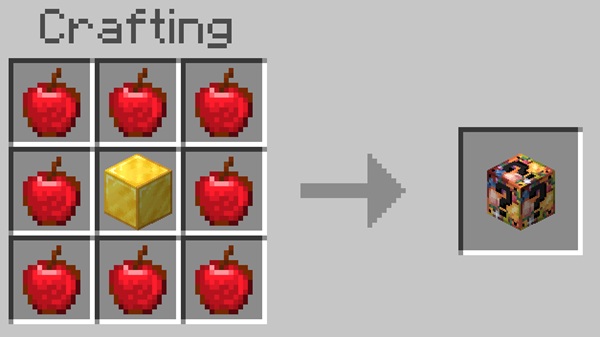
The Fruit Lucky Block is the addon’s main variant. It’s versatile, easy to recognize, and balanced for both early survival and late-game experimentation. You may craft it using specific ingredients or find it in various structures. Its effect pool includes supportive drops, quirky surprises, and unpredictable events that keep every session interesting.
Desert Lucky Block
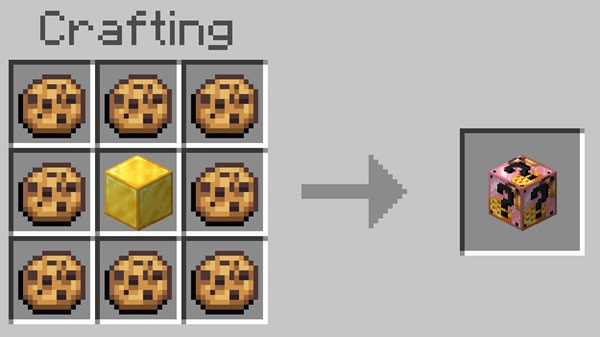
The Desert Lucky Block focuses on biome diversity. It appears in desert-themed structures and carries unique RNG behavior tailored to hot environments. With its distinct loot weighting, this variant introduces different risks, rewards, and moments that encourage you to explore beyond your usual routes.
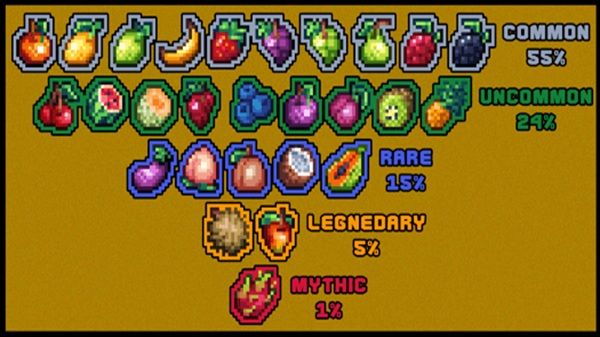
Endless Random Effects – 148+ Unique Outcomes
This addon’s biggest strength lies in its massive library of random events. Below is a breakdown to help you understand how these outcomes work and why they make gameplay so replayable.
How the Random Effect System Works
Each block pulls from a “weighted table,” meaning some outcomes are more likely than others. This system ensures variety without overwhelming you. Both variants use their own effect pools, giving each block type a unique personality.
Beneficial Outcomes Players Can Expect
You may encounter:
-
Valuable materials
-
Useful equipment
-
Temporary buffs
-
Friendly entities
These positive rolls support survival and add meaningful progression.
Neutral and Unexpected Surprise Effects
Some results exist purely for fun or flavor:
-
Decorative items
-
Light environmental changes
-
Ambient visuals
-
Harmless entity appearances
These add personality without shifting gameplay too drastically.
High-Intensity Events
Certain outcomes create fast, energetic moments requiring quick decision-making. These events add excitement without harming long-term world stability.
Rare and Ultra-Rare Effects
A small set of outcomes appear infrequently. These surprises create memorable moments and encourage consistent exploration and experimentation.
How RNG Enhances MCPE Exploration
Random effects naturally push you to revisit biomes, search structures, and gather more blocks. The unpredictability injects new life into familiar worlds.
Replayability and Content Creation Potential
The endless combination of outcomes is perfect for:
-
Challenges
-
Multiplayer games
-
Reaction-based content
-
Adventure-style playthroughs
Creators and casual players alike benefit from constant variety.
Natural Generation in MCPE World Structures
Lucky Foods Addon integrates smoothly with world generation. Fruit and Desert Lucky Blocks can appear in structures such as temples, mansions, mineshafts, villages, and more. This design encourages organic discovery and gives common structures renewed value. Each location becomes an opportunity to collect rare blocks and trigger new effects.
Crafting & Obtaining Lucky Blocks
You can obtain lucky blocks in two main ways:
Structure Looting
Many structures naturally spawn lucky blocks, rewarding exploration.
Crafting
If enabled, recipes allow you to craft blocks directly, giving you a reliable way to test their outcomes.
Both paths support different playstyles and keep gameplay flexible.
How the Addon Changes Gameplay in MCPE
Lucky Foods Addon creates a simple but powerful loop: explore → collect → break → react. This pattern adds energy to survival mode and encourages creativity. It’s excellent for casual sessions, group play, and anyone looking for unexpected moments in their world.
Compatibility, Performance & Multiplayer Support
The Lucky Foods Addon works smoothly on mobile devices, consoles, and Windows editions of Minecraft Bedrock. It runs well on lower-end devices and performs reliably in multiplayer, as long as all players have the addon enabled with the correct settings.
Pro Tips for the Best Experience
-
Break blocks in open areas to avoid surprises catching you off guard.
-
Explore structure-dense biomes for faster block discovery.
-
Try self-imposed challenges for added excitement.
-
Lower particle settings if your device struggles.
These simple adjustments make the experience smoother and more enjoyable.
Conclusion
The Lucky Foods Addon offers variety, creativity, and adventure through its two block variants and huge range of random effects. It’s a lightweight yet impactful addition to any MCPE world, whether you’re exploring, experimenting, or playing with friends. If you want more surprises and replayability in your Minecraft experience, this addon is a fantastic choice.
Installation Guide for MCPE (All Devices)
-
Download the
.mcaddonfile. -
Open it to import the Resource and Behavior Packs.
-
Enable both packs in your world settings.
-
Turn on required Experimental Features.
-
Load the world and start exploring.
If something doesn’t work, restart the game or create a fresh world with the packs enabled.











