
Magic Broom 1.21+
The Magic Broom Addon lets you explore your Minecraft Bedrock worlds from the sky with smooth, rideable brooms, multiple upgrade tiers, and easy survival progression. Discover new biomes, travel faster, and experience true aerial exploration like never before.
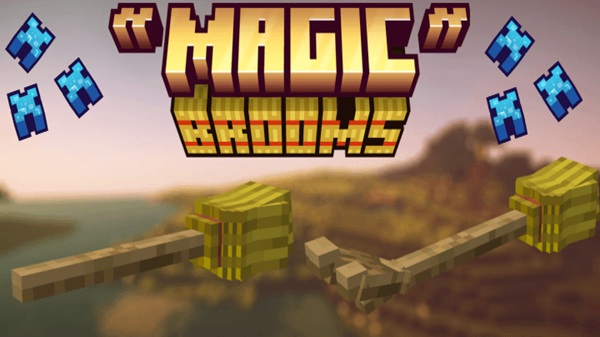
Magic Broom Addon – Explore Worlds from Above
The Magic Broom Addon offers a new way to travel, explore, and experience Minecraft Bedrock Edition. Instead of walking through forests or climbing cliffs block by block, you can glide freely across the landscape and see your world from entirely new angles. This addon gives you the chance to take to the skies early in survival, without complicated items or steep learning curves. It feels intuitive, smooth, and magical — especially if you love exploration in MCPE.
What Is the Magic Broom Addon?
This section helps you understand the foundation and purpose of the Magic Broom Addon before diving deeper into gameplay mechanics.
The Magic Broom Addon adds rideable flying brooms into Minecraft Bedrock, allowing you to travel through the air without relying on Elytras, fireworks, or portals. It’s designed to be easy for beginners to use, while still offering long-term progression and value for more experienced players. Because flight feels natural and mobile-friendly, the addon fits into a variety of playstyles.
You can use it in:
-
Survival exploration worlds
-
Creative building projects
-
Fantasy or medieval-style roleplay
-
Multiplayer adventures
It’s lightweight, stable, and performs smoothly across most mobile devices.
Main Features & Benefits
This section explores the core strengths of the addon and how it enhances your gameplay experience.
Magical Aerial Exploration
You can fly above oceans, mountains, villages, forests, and more — discovering locations faster than ever.
Smooth & Intuitive Flight Controls
Movement relies on simple directions: look up to rise, look down to descend, and move like normal using your controls.
Tiered Broom Progression System
There are multiple broom levels, helping you advance from basic early-game travel to late-game high-speed flight.
Multiple Broom Styles & Variants
Each broom material changes both the look and performance, letting you choose based on theme or power level.
Optimized for Survival and Adventure
It helps you reach resources, navigate terrain, and scout efficiently without breaking immersion.
Supports Fantasy-Themed Gameplay
Perfect for magical worlds, witch academies, enchanted forests, and medieval RP survival bases.
All Available Broom Types
This section introduces the full broom lineup so you can plan your progression path.
There are nine broom variants, each crafted using a material tier:
-
Stick
-
Coal
-
Copper
-
Iron
-
Gold
-
Diamond
-
Emerald
-
Amethyst
-
Redstone
Every upgrade improves flight speed, mobility, and responsiveness.
How Flying Works In-Game
Here’s how to use your broom effectively once you craft it.
To fly, you simply:
-
Look upward to rise
-
Look downward to descend
-
Move with your normal directional input
-
Hold attack to activate a boost
The Redstone broom also has a temporary speed dash, perfect for long-distance travel or fast escapes.
Crafting Recipes & Resource Requirements
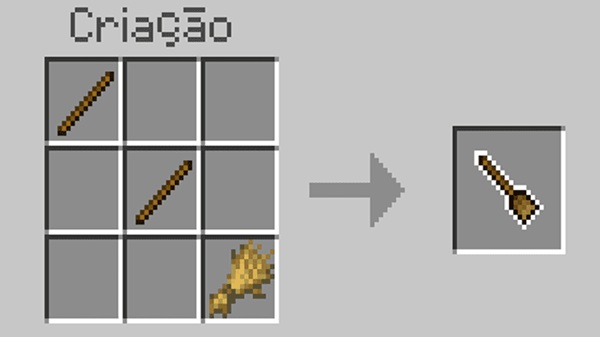
The crafting system in the Magic Broom Addon is beginner-friendly and progression-based.
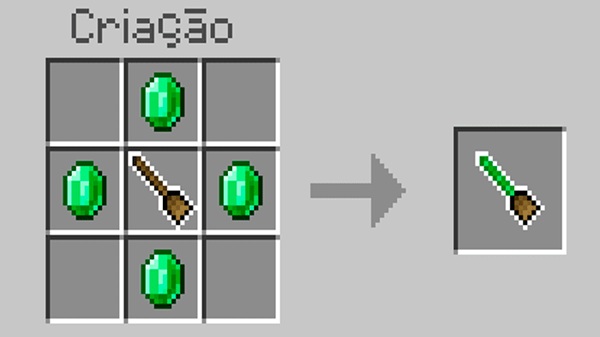
Base formula:
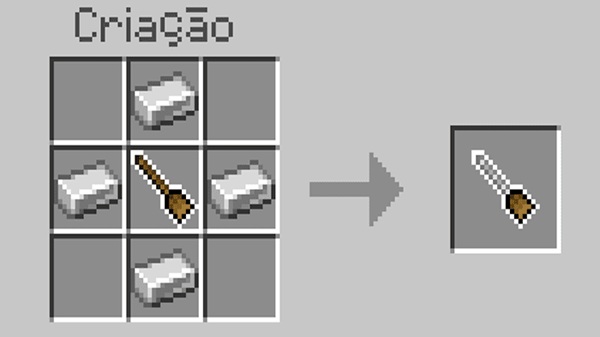
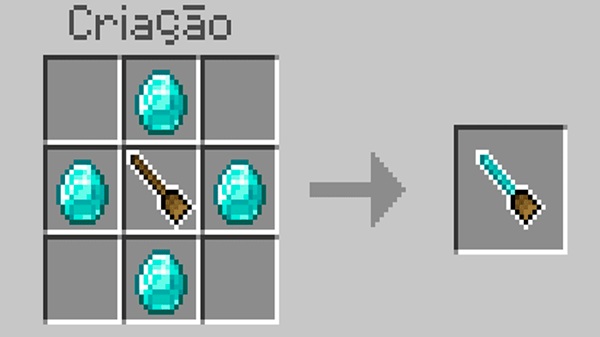
1 Wooden Broom + 4 upgrade materials
Example:
-
Wooden broom + 4 Coal = Coal Broom
-
Wooden broom + 4 Diamonds = Diamond Broom
This structure allows fast early-game access and powerful late-game upgrades.
Compatibility Details
This section helps ensure your setup runs properly from the start.
Supported MCPE versions:
-
1.19+
-
1.20+
-
1.21+
Supports:
-
Mobile devices
-
Tablets
-
Windows Bedrock
Multiplayer works as long as the host enables the addon.
Best Ways to Use This Addon
Here are the most rewarding use-cases for the Magic Broom Addon.
Exploration
Scout biomes, villages, temples, shipwrecks, and giant structures quickly.
Creative Building
View large builds from above to improve planning.
Survival Travel
Avoid mountains, lava lakes, deep caves, ravines, and long ocean crossings.
Fantasy Roleplay
Ideal for magic buildings, enchanted forests, and themed play.
Multiplayer Adventures
Group exploration becomes faster and more coordinated.
Common Issues & Solutions
A few quick fixes can resolve the most common problems.
-
Import fails → re-download + free storage space
-
Broom doesn’t fly → enable experimental settings
-
Lag appears → reduce render distance
-
Conflicts occur → disable overlapping addons
Closing Thoughts
The Magic Broom Addon adds meaning, excitement, and mobility to your Minecraft world. It’s easy to learn, satisfying to master, and rewarding to upgrade. If you enjoy exploring new terrain, building large creations, or immersing yourself in magical survival experiences, this addon will change how you play Minecraft Bedrock.
Installation Guide for MCPE
This short walkthrough helps you set up the Magic Broom Addon smoothly.
-
Download the addon (.mcaddon / .mcpack)
-
Open the file to import into Minecraft
-
Enable the Resource Pack + Behavior Pack
-
Enable required Experimental Features
-
Start your world and enjoy
It works on Android, iOS/iPadOS, and Windows Bedrock devices.











