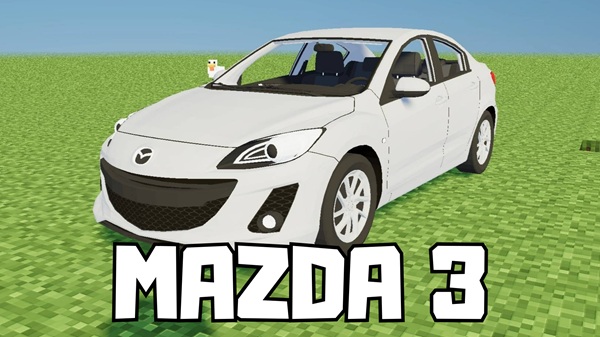
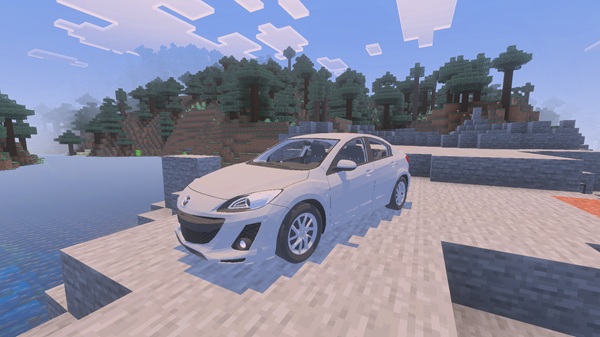
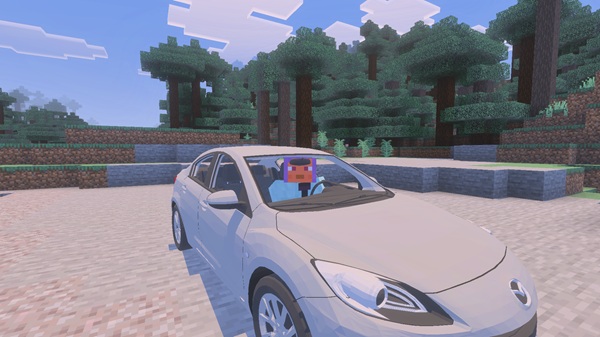
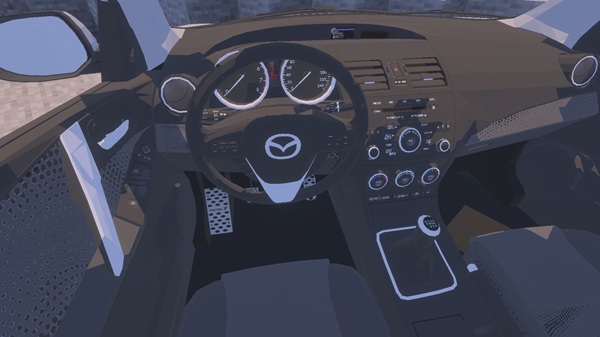
Bring realism and motion to your Minecraft world with the Mazda 3 Addon! This stunning MCPE car mod adds a detailed, fully driveable Mazda 3 to Bedrock Edition — perfect for city builds, roleplay worlds, and realistic driving experiences.
Mazda 3 Addon – Realistic City Driving for MCPE
If you’ve ever wanted your Minecraft city to feel alive, the Mazda 3 Addon is exactly what you need. Designed for Minecraft Bedrock Edition (MCPE), this addon brings a smooth, realistic, and fully driveable Mazda 3 sedan into your world. It’s perfect for players who enjoy modern builds, roleplay gameplay, or immersive city adventures.
Lightweight and beautifully optimized, the addon runs smoothly across mobile, console, and Windows 10/11 platforms — so you can enjoy real city driving without lag or complicated setups.
Main Features of the Mazda 3 Addon
The Mazda 3 Addon combines visual realism with effortless gameplay, creating one of the most immersive car experiences ever made for Minecraft Bedrock.
Realistic 3D Modeling
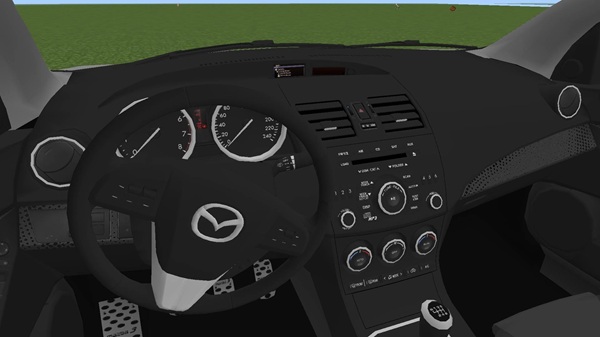
Every line, curve, and texture of the Mazda 3 has been recreated with care. The car’s headlights, taillights, and sleek profile make it look right at home in modern maps. Inside, the cabin includes a dashboard, seats, and a steering wheel — ideal for first-person driving and cinematic screenshots.
Smooth Animation and Lighting
Wheels rotate dynamically as you move, while the steering wheel syncs with your turns. The lights automatically adjust in darker environments, making night driving feel surprisingly lifelike — a rare feature among MCPE vehicles.
Realistic Handling and Controls
Driving the Mazda 3 Addon feels intuitive. Movement controls (forward, back, left, right) respond smoothly, and both touchscreen and controller users can steer comfortably. Switch between first-person for realism or third-person for cinematic cruising.
Multiplayer-Ready
Invite friends into your world and enjoy driving together. The addon supports passengers, making it perfect for roleplay maps, car meetups, or city-based servers.
Optimized for Bedrock Devices
The Mazda 3 Addon is built for performance. It delivers high visual detail with low lag — even on mid-range Android or iOS devices. It also works seamlessly on Xbox, Windows 10/11, and Nintendo Switch.
How to Use the Mazda 3 Addon In-Game
Getting started is simple — within minutes, you’ll be cruising down your custom-built streets.
Spawn the Vehicle: Find the Mazda 3 spawn egg in Creative Mode or type:
/summon mazda3
Enter and Drive: Tap or right-click the car to hop in. Move forward to accelerate, backward to brake, and use camera movement to steer.
Choose Your View: Toggle between first-person (immersive cockpit) and third-person (wider cinematic angle).
Invite a Passenger: Friends can ride along for road trips or roleplay scenarios.
Compatibility and Performance Tips
Keep your world running smoothly while enjoying full realism.
Minecraft Versions: Compatible with v1.20.40 – 1.21+ (Bedrock Edition)
Devices: Works across Android, iOS, Windows 10/11, Xbox, and Switch
Performance Tips:
Limit multiple cars in one area to prevent lag.
Restart Minecraft after installation.
Combine with realistic roads, shaders, or RTX for visual upgrades.
Creative and Roleplay Ideas
Turn your world into a living, breathing environment with the Mazda 3 Addon.
City Life Roleplay: Commute to work or park at your house for realism.
Car Events: Organize meetups, races, or photography sessions.
Cinematic Builds: Record driving scenes or create short films.
Architecture Showcase: Add the Mazda 3 to modern maps for authenticity.
Tip: Share your creations using #Mazda3AddonMCPE to connect with other creators.
Troubleshooting and Support
Car Not Spawning: Ensure both packs are enabled.
Invisible Car: Reimport or restart Minecraft.
Lag or Delays: Lower render distance.
Multiplayer Issues: All players must have the same addon version.
Addon Not Loading: Check “Experimental Gameplay” settings.
Why the Mazda 3 Addon Elevates MCPE Gameplay
The Mazda 3 Addon redefines what a car mod can do for Bedrock Edition. It adds movement, purpose, and atmosphere to your cities — turning imagination into interaction. Builders, roleplayers, and creators alike can finally experience modern driving, immersive visuals, and seamless performance all in one addon.
“This isn’t just another vehicle — it’s the missing piece that makes your Minecraft city feel alive.”
Conclusion
The Mazda 3 Addon – Realistic City Driving for MCPE gives you more than a car; it gives you an experience. From realistic 3D design to smooth driving physics, it’s built to inspire creativity and immersion.
Whether you’re exploring, building, or creating cinematic moments, this addon brings your Bedrock world to life — one smooth drive at a time.
Installation Guide for MCPE / Bedrock Edition
Installing the Mazda 3 Addon is quick and beginner-friendly:
Download the .mcaddon or .mcpack file.
Open it with Minecraft Bedrock — the import starts automatically.
Activate Packs: Go to Settings → Resource Packs and Behavior Packs to enable “Mazda 3 Addon.”
Enable Experimental Gameplay: In world settings, toggle experimental features if the car doesn’t appear.
Create or Launch Your World: Search “Mazda” in Creative inventory to spawn the car.