
Monster Farm 1.21+
The Monster Farm Addon transforms your MCPE survival world with automated resource generators that replace complex farms and reduce grinding. If you want steady mob drops, smoother progression, and a cleaner way to gather materials, this guide will show you exactly how the Ultimate Resource Forge works and how it can improve your gameplay.
Monster Farm Addon Ultimate Resource Forge
The Monster Farm Addon brings a refreshing way to gather essential resources in Minecraft Bedrock Edition. Instead of relying on large mob towers or grinding for drops, this addon lets you automate resource production through smart generator blocks. It’s simple, lightweight, and fits perfectly into any survival world—especially if you play on mobile.
What Is the Monster Farm Addon Ultimate Resource Forge?
The Monster Farm Addon introduces a system that simplifies resource farming without breaking survival balance. Before diving into the generator types, here’s what makes this forge concept so appealing.
The addon replaces traditional mob farms with compact generators that create mob drops over time. You place a block, wait a few seconds, and collect the items—no fighting mobs, no noisy machines, and no lag-heavy farms. It’s designed to support builders, explorers, and survival players who want steady materials without constant grinding.
By acting as a passive “resource forge,” the system gives you room to focus on what matters: designing your base, exploring biomes, or pushing your world’s progression forward.
Core Features of the Ultimate Resource Forge System
This section highlights the features that define how the Monster Farm Addon improves daily survival play. These core ideas guide the experience and support different playstyles.
-
Automatic drop generation based on timed intervals.
-
Survival-friendly crafting, keeping gameplay balanced.
-
Lag-free design thanks to mob-free mechanics.
-
Touchscreen-friendly layout, ideal for MCPE players.
-
Full automation support through hoppers and item sorters.
-
Flexible role in survival whether you're farming, brewing, or building.
These features make the addon practical for both new players and seasoned survival experts.
Generator Blocks and Their Resource Output
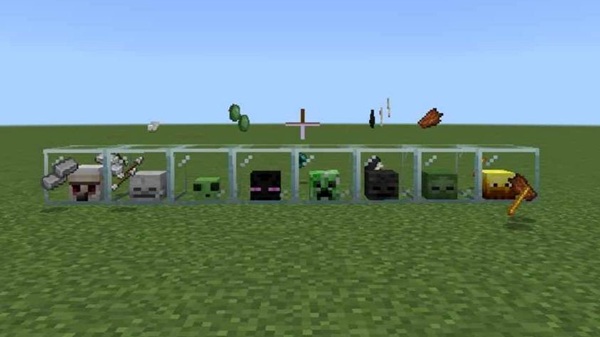
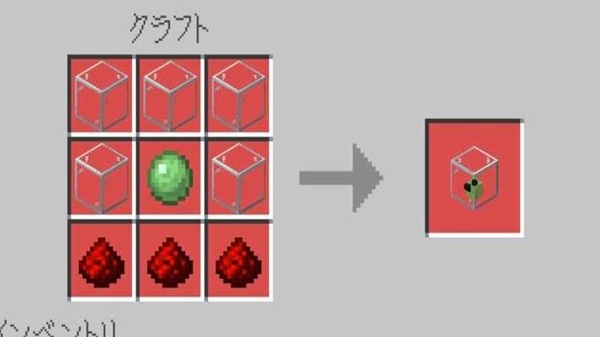
Here’s where the Monster Farm Addon truly shines. Each generator replaces an entire farm concept, giving you reliable drops in a compact space.
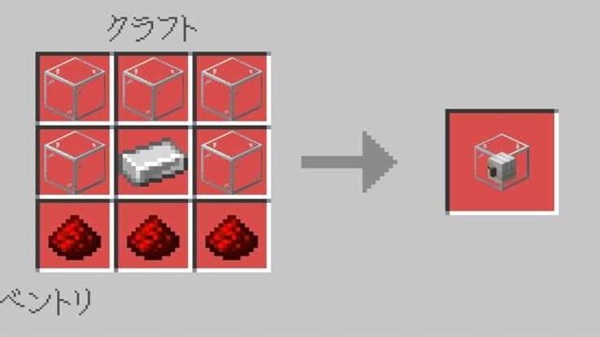
All generators output one item every 10 seconds.
Iron Generator Block
-
Produces iron ingots
-
Useful for tools, armor, and building supplies
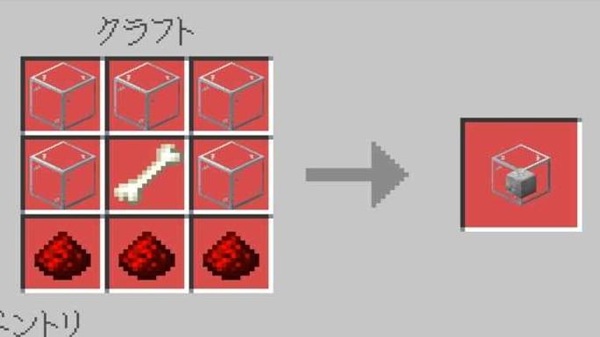
Skeleton Drop Generator
-
Bones and arrows
-
Supports farming, dyes, and archery
Slime Generator Block
-
Slime balls
-
Key for sticky pistons and automation builds
Ender Pearl Generator
-
Ender pearls
-
Useful for teleportation or late-game navigation
Creeper Drop Generator
-
Gunpowder
-
Helps with potions and mobility items
Wither Resource Generator
-
Nether-themed drops
-
Supports beacon progression
Zombie Drop Generator
-
Rotten flesh
-
Trades well with certain villagers
Blaze Rod Generator
-
Blaze rods
-
Essential for brewing stands and potion brewing
Witch Drop Generator
-
Mixed potion ingredients
-
Replaces a complex witch farm setup
This structured system helps you create storage rooms, crafting halls, or forge chambers tailored to your survival goals.
How the Ultimate Resource Forge Works in MCPE
If you’re new to generator-based addons, this section explains the simple logic behind the Monster Farm Addon.
-
Place a generator block anywhere.
-
The block activates automatically.
-
Items appear beside it at fixed intervals.
-
Add hoppers below for fully automated collection.
-
No mobs spawn, which improves stability on all devices.
This “set-and-forget” approach lets you enjoy smoother gameplay without sacrificing progression.
Compatibility & Performance
The Monster Farm Addon is designed to run smoothly across Bedrock platforms.
-
Supports Minecraft Bedrock 1.20+
-
Works on Android, iOS, Windows, and consoles
-
Lightweight and mobile-friendly
-
Stable in multiplayer if all players install the addon
-
Best used with moderate generator counts to avoid item buildup
Best Ways to Use the Ultimate Resource Forge
To get the most from the forge system, try designing dedicated spaces that enhance gameplay flow.
-
Create a resource room with labeled chests
-
Use hoppers for auto-sorting
-
Combine generators strategically for early- and late-game needs
-
Support brewing, crafting, trading, and large building projects
-
Keep generators slightly spaced to prevent item clumping
These small improvements make big differences in long-term survival worlds.
Pro Tips & Advanced Recommendations
Once you’re comfortable, these ideas help you refine your forge setup even further.
-
Organize generators by category (combat, brewing, crafting)
-
Use decorative builds like forge halls or industrial rooms
-
Keep backup copies of your world before updating Minecraft
-
Pair with light automation tools if you want deeper systems
These tips help you turn your base into a clean, efficient production center.
FAQ: Quick Answers for MCPE Players
Here are answers to common questions about the Monster Farm Addon.
Why aren’t items generating?
Make sure experiments are on and packs are active.
Does it work in multiplayer?
Yes. Everyone should have the addon installed.
Will it cause lag?
The design avoids mobs, which keeps performance stable.
Can I update safely?
Yes, but keep a backup of your world.
Conclusion
The Monster Farm Addon offers a clean and efficient way to gather essential materials without grinding or building complex farms. With its simple generator system and mobile-friendly performance, it fits smoothly into any MCPE survival world. Whether you're organizing your first base or pushing toward late-game goals, the Ultimate Resource Forge gives you a steady supply of drops—so you can build more, explore more, and enjoy more.
Installation Guide for MCPE
Setting up the Monster Farm Addon takes just a few minutes. Follow these steps to ensure everything works correctly.
How to Install
-
Download the
.mcaddonfile. -
Open it to import into Minecraft.
-
Create or edit a world.
-
Activate the Resource Pack and Behavior Pack.
-
Enable required Experimental Features.
-
Launch the world and test the generators.
Basic Troubleshooting
-
Reimport the addon if it fails to load.
-
Enable experiments to unlock custom blocks.
-
Restart Minecraft if packs don’t appear.











