
Movie Posters 1.21+
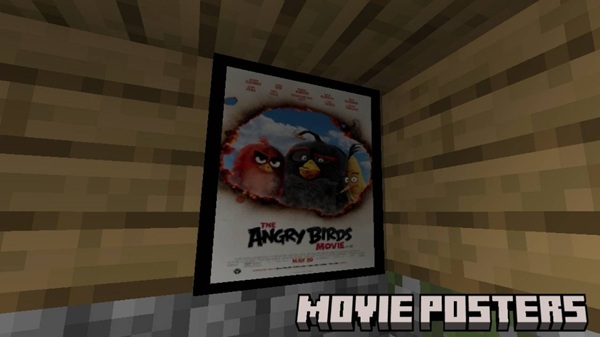
The Movie Posters Addon brings cinematic wall décor to your Minecraft Bedrock world with high-quality poster blocks, smooth performance, and an easy crafting system. Perfect for builders, roleplayers, and anyone who wants to personalize their MCPE interiors with style.
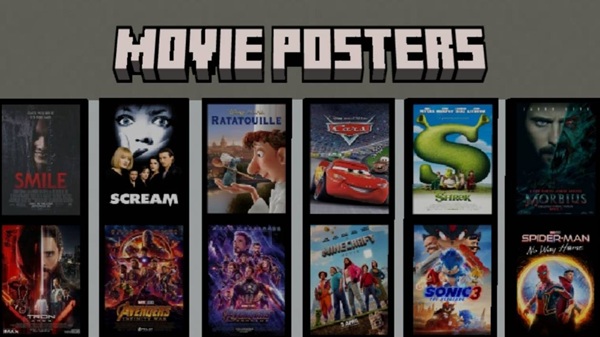
Movie Posters Addon – Premium Cinematic Wall Art Pack
If you enjoy building stylish interiors or creating immersive roleplay worlds in Minecraft Bedrock Edition, the Movie Posters Addon brings a fresh way to personalize your space. This wall art pack introduces cinematic-inspired posters that fit naturally into MCPE builds, making your rooms feel more expressive, modern, and alive.
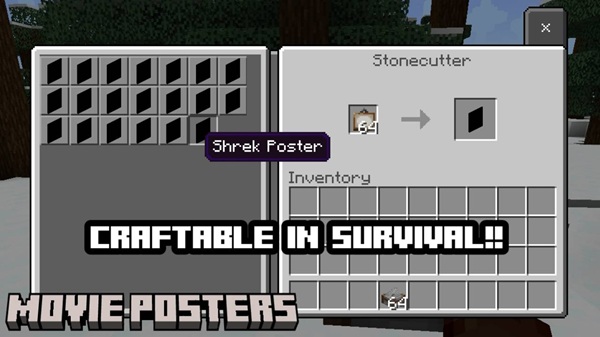
Introduction to the Movie Posters Addon
The Movie Posters Addon is designed for players who want more control over interior decoration in MCPE. It gives you a selection of clean, high-quality poster blocks that instantly enhance your builds without slowing down performance. Whether you're decorating a bedroom, designing a home theater, or adding flair to a roleplay map, this addon helps you create meaningful and visually appealing spaces.
This pack remains lightweight, user-friendly, and compatible with a wide range of devices, making it a strong choice for both casual players and experienced builders.
Key Features of the Premium Cinematic Wall Art Pack
This section highlights what makes the Movie Posters Addon valuable for MCPE builders. Each feature below helps you understand how the addon fits into different building styles and gameplay modes.
High-Quality Poster Collection
-
A curated set of poster blocks with clean, sharp textures
-
Clear visuals optimized for mobile and tablet screens
-
Suitable for modern homes, entertainment areas, and themed builds
Seamless Minecraft Integration
-
Poster blocks blend naturally with Minecraft’s color palette
-
Simple placement—just like any standard decorative block
-
No scripts or heavy behavior logic
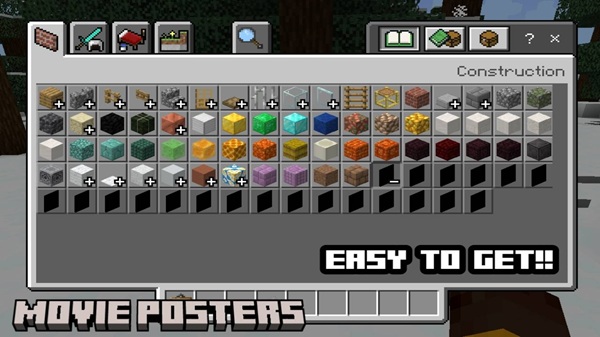
Survival and Creative Mode Friendly
-
Craft posters using the stonecutter for a smooth, vanilla-like workflow
-
Access posters instantly in Creative inventory
-
Survival players can convert paintings at any time
Lightweight and Mobile-Optimized
-
Designed to run smoothly on mid-range and older devices
-
Minimal performance impact, even in large maps
-
Great for players who build expansive cities or interior-focused worlds
Cinematic Atmosphere Enhancement
-
Turns empty walls into expressive storytelling elements
-
Ideal for studios, cinemas, apartments, and themed rooms
-
Great for screenshots, touring builds, or sharing worlds with friends
Expandable Decor Potential
-
Works smoothly alongside furniture, lighting, or modern texture addons
-
Encourages more complex and aesthetic build designs
-
Fits both realistic and stylized theme builds
Poster Crafting System (Stonecutter Method)
To keep everything simple, the Movie Posters Addon uses one of the cleanest crafting systems in MCPE. The stonecutter acts as your “poster selector,” allowing you to turn a regular painting into any poster you want.
-
Place a vanilla painting into the stonecutter.
-
Choose your favorite design from the list.
-
Convert it into a poster block and place it anywhere you like.
This makes the addon fully playable in both Survival and Creative, with no confusing recipes or GUI menus.
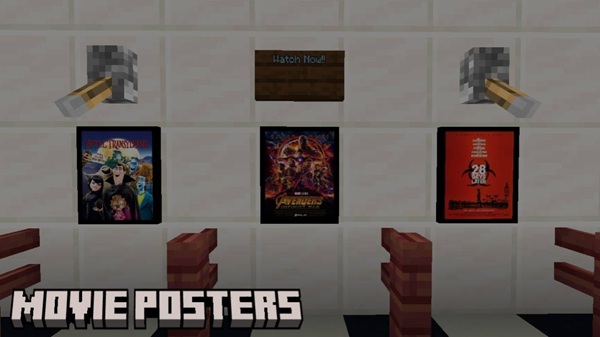
Creative Build Ideas Using the Poster Pack
If you enjoy interior design, the Movie Posters Addon opens up fun possibilities:
-
Cinemas with detailed entrances and waiting halls
-
Modern apartments and cozy bedrooms
-
Shopping streets with poster displays
-
Photo-ready roleplay rooms for creative storytelling
-
Stylish studios, cafés, or entertainment districts
These builds help your world feel more grounded, immersive, and visually dynamic.
Tips for Best Visual Results
To get the most out of this wall art pack:
-
Use soft lighting to highlight posters.
-
Place posters on uncluttered walls to maintain clarity.
-
Combine with modern or clean texture packs for stylish interiors.
-
Mix posters with furniture addons to build coherent, themed spaces.
Small adjustments make a big difference in aesthetic builds.
Troubleshooting & Common Fixes
If something doesn't look right, try these quick checks:
-
Posters missing in the stonecutter → Enable Holiday Creator Features.
-
Addon not importing → Reinstall and restart the game.
-
Conflicts → Move this pack above others in your list.
-
Incorrect crafting → Use a vanilla painting, not a custom one.
These fixes solve most player issues instantly.
Final Notes & Recommended Addon Pairings
Pair the Movie Posters Addon with clean furniture packs, modern textures, or soft lighting addons to create immersive builds. The posters blend naturally into almost any MCPE world, helping you express your style and bring your environments to life.
For long-term builds, always keep backups when using experimental features. That way your projects—and your creativity—stay protected.
Installation Guide for MCPE / Bedrock Edition
A smooth installation ensures the Movie Posters Addon works correctly across different devices. Follow the steps below for your platform.
Android / iOS
-
Download the
.mcaddonfile and tap it to import. -
Launch Minecraft and wait for the import confirmation.
-
Activate the Resource Pack and Behavior Pack.
-
Enable Holiday Creator Features in your world settings.
Windows 10/11
-
Double-click the
.mcaddonfile to load it into Minecraft. -
Open your world settings and activate both packs.
-
Enable the required experiments to ensure poster crafting works.
Important Setup
-
Experimental features must be turned on.
-
Backups may be created automatically when enabling experiments.
-
Ensure all packs are active before entering your world.
Compatibility & Device Requirements
The Movie Posters Addon is built for Minecraft Bedrock 1.20–1.21+, supporting a wide range of MCPE devices.
Compatible Platforms:
-
Android
-
iOS
-
Windows 10/11
-
Consoles (when addon imports are supported)
Recommended Specs:
-
Minimum: 2GB RAM
-
Recommended: 4GB RAM or more
-
Best performance on 64-bit devices
Because the addon uses lightweight textures, it loads quickly and performs reliably even on older phones.











