
One-Way Ghost Blocks 1.21+
Discover how the One-Way Ghost Blocks Addon transforms Minecraft Bedrock (MCPE) by letting you build hidden passages, secret bases, and illusion walls that look solid yet remain passable from one side. Perfect for builders, creators, and survival players who love creativity and mystery.
One-Way Ghost Blocks Addon – Build What Others Can’t See
If you’ve ever wished you could slip through a wall, build a hidden base, or craft an optical illusion inside Minecraft Bedrock Edition (MCPE), the One-Way Ghost Blocks Addon turns that fantasy into reality. This lightweight but powerful tool lets you create blocks that look completely solid from one side yet remain passable from the other.
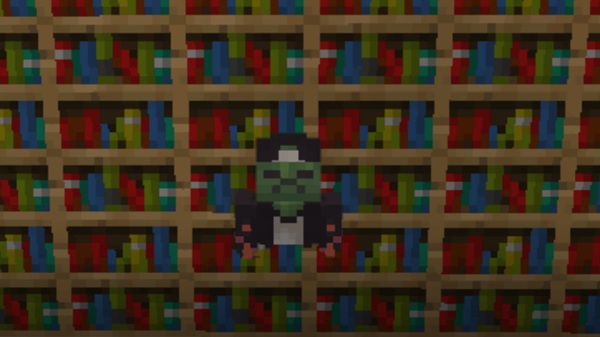
With it, every builder can transform simple structures into creative puzzles, stealthy passages, or cinematic effects — a new way to build what others can’t see while keeping Minecraft’s familiar vanilla style intact.
What Is the One-Way Ghost Blocks Addon?
Before diving into features, it helps to understand what makes this addon special.
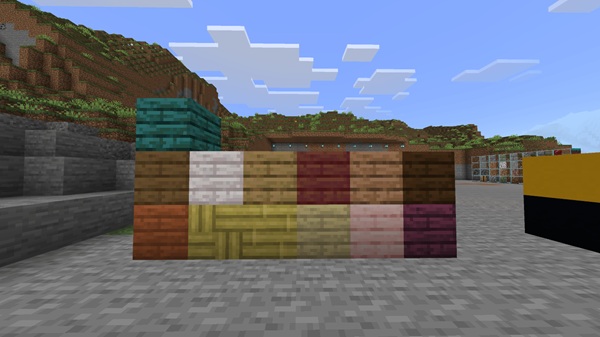
The One-Way Ghost Blocks Addon introduces more than 90 one-way transparent blocks that behave like regular materials such as stone, glass, and wood but remove collision from one direction. Created for Minecraft Bedrock / MCPE, it enhances creativity without changing core gameplay.
You can use it in Creative Mode to design secret passages or in Survival Mode to conceal rooms and treasures. Because it’s resource-pack compatible and fully optimized for mobile and Windows devices, it blends naturally with any world and theme.
Main Features – Hidden Power, Visible Creativity
The One-Way Ghost Blocks Addon combines technical precision with imaginative freedom. Here’s what makes it stand out for MCPE builders and mapmakers alike.
Each block has one solid face and one invisible, pass-through face. Stand on the visible side, and it feels like stone; approach from behind, and you glide through as if it were air. This simple system fuels endless illusions — hidden doors, trap-free mazes, or one-way escape routes.
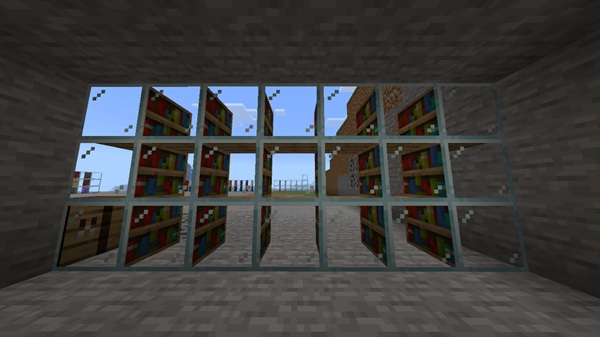
Choose from over 90 variants that mirror default Minecraft materials. Whether you’re working with cobblestone, oak, glass, or deepslate, every texture aligns perfectly so your secret stays unseen in any biome.
Crafting is balanced for survival play. Combine:
- 1 Glass Pane
- 2 Lapis Lazuli
- 1 Amethyst Shard
The recipe is quick to learn and repeat, ensuring that even survival players can craft illusion blocks without commands or mods.
Ghost blocks automatically inherit your world’s active resource-pack textures, maintaining color accuracy and realism. Whether you prefer a clean vanilla look or high-definition visuals, everything stays consistent.
Designed with MCPE’s mobile environment in mind, the addon runs smoothly on Android, iOS, Windows 10/11, and Realms. Even on low-end devices, frame rates remain stable when using multiple addons simultaneously.
Ghost blocks integrate naturally with Redstone. Use pistons, pressure plates, or observers to reveal walls or timed doorways. It’s a dream feature for puzzle creators and advanced builders who enjoy functional illusions.
How It Works In-Game – The Science of Illusion
Understanding how the One-Way Ghost Blocks Addon behaves in-game helps you design smarter builds.
From one direction, a ghost block is solid; from the opposite, it’s invisible and walk-through. Lighting interacts realistically — torches and lanterns cast soft glow through the transparent side, adding depth and atmosphere.
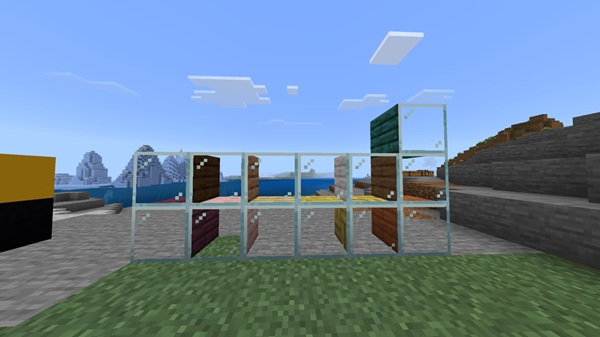
Experiment with camera angles and light placement to perfect the illusion. Builders often use ghost blocks for secret libraries, underground observation halls, or cinematic hallways that reveal new perspectives as players move.
Bring imagination to life with these practical ideas for your world.
Turn any wall or floor into a disguised doorway — ideal for secure storage or private creative spaces.
Design one-way tunnels, fake walls, or secret checkpoints that challenge explorers without complex commands.
Create invisible viewing panels to monitor farms or Redstone systems safely.
Use light and shadow to craft futuristic corridors, museum exhibits, or magic-themed builds that astonish visitors.
Compatibility and Performance
| Category | Details |
|---|---|
| MCPE Versions | 1.19 – 1.21 (latest supported) |
| Platforms | Android, iOS, Windows 10/11, Consoles |
| Realms Support | Yes – enable experiments on host |
| Texture Packs | Fully compatible |
| Performance | Lightweight; smooth even on low-end devices |
The addon remains stable across updates and pairs well with most Bedrock gameplay enhancements.
Tips, Tricks, and Best Practices
- Check orientation: confirm which side is solid before closing a build.
- Control lighting: place torches inside hidden rooms to prevent leaks.
- Mark entrances subtly: a unique carpet or plant can remind you where to walk through.
- Combine with Redstone: triggers make ghost walls dynamic and fun.
- Keep a layout map: note hidden areas for easier navigation later.
Why Builders Love This Addon
Players adore the One-Way Ghost Blocks Addon because it adds creative depth without breaking Minecraft’s vanilla feel. It turns everyday building into discovery — encouraging stealth, storytelling, and design mastery. Whether you’re crafting puzzles, cinematic builds, or secret shelters, it lets you express imagination in entirely new ways.
Conclusion – Redefine What’s Possible in Bedrock
The One-Way Ghost Blocks Addon isn’t just another building mod; it’s a doorway to invention. By merging simplicity, performance, and illusion, it empowers you to explore unseen possibilities in Minecraft Bedrock Edition.
Every hidden room, glowing hallway, and one-way passage reminds you why Minecraft remains the ultimate canvas for creativity — now, you truly can build what others can’t see.
How to Install on Minecraft Bedrock (MCPE)
Installing the addon is quick and consistent across devices.
Mobile (Android / iOS)
- Download the
.mcaddonfile. - Tap to open it directly in Minecraft.
- Wait for import confirmation.
- Enable both Behavior and Resource Packs in your world settings.
- Turn on experimental options: Holiday Creator Features, Custom Blocks, GameTest Framework.
Windows 10 / 11
- Double-click the
.mcaddonfile to import. - Confirm the import in Minecraft.
- Activate both packs under your world settings.
Realms / Multiplayer
Import on the host device first. Add it under the Realm’s Behavior Packs list. Once saved, all invited players will automatically download the addon when joining.











