The Open Blocks Elevators Addon gives you a fast, clean, and customizable way to move vertically in Minecraft Bedrock Edition. Learn how this advanced travel system works, how to install it, and how to use its features to upgrade your survival or creative builds.
Open Blocks Elevators Addon – Advanced Vertical Travel System
The Open Blocks Elevators Addon gives you a fast, simple, and customizable way to travel vertically in Minecraft Bedrock Edition. If you’ve ever wished you could jump between floors without ladders or slow elevators, this addon turns that idea into a smooth, practical tool for your world. Whether you build survival bases or large creative structures, it adds a level of convenience that quickly becomes essential.
Overview of the Open Blocks Elevators Addon
This section introduces the purpose of the addon and how it changes your Minecraft experience before diving into the details.
The Open Blocks Elevators Addon is a vertical teleportation system designed for MCPE players who want cleaner builds and faster navigation. Using simple elevator blocks, you can travel instantly between floors with one jump—no redstone, no pistons, and no complex mechanics. It’s inspired by classic Java elevator mods but rebuilt to run smoothly on Bedrock.
Core Features and Functional Highlights
Here’s where the addon shines. Each feature adds flexibility, organization, or ease of use to your world.
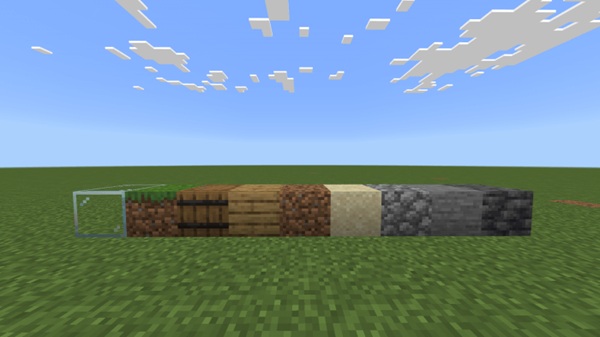
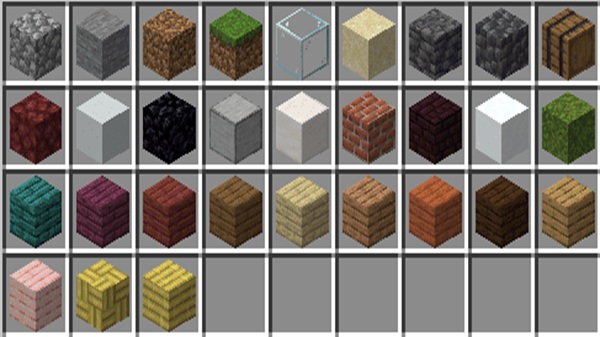
Sixteen Color-Coded Elevators
The addon includes 16 elevator colors, letting you organize travel routes. Only blocks of the same color connect, so you can separate areas like farms, storage rooms, and living spaces.
Camouflage Options
You can disguise an elevator to match surrounding blocks. This is great for hidden entrances or clean modern designs.
Directional Facing
When you arrive at a destination elevator, you can set which direction your player faces. It keeps movement natural and avoids awkward placements.
Long Vertical Range
Elevators can connect across large height differences, making them perfect for towers, deep mines, or multi-layer bases.
Works Through Solid Blocks
Teleportation still works when floors or ceilings are between elevators. This helps keep your designs uninterrupted.
Survival-Friendly Crafting
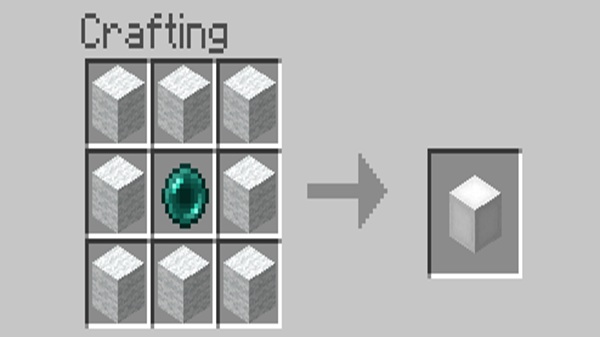
Most versions use wool and an ender pearl—simple ingredients you can gather early in survival.
Zero Redstone Required
Everything works automatically. You just place the elevator blocks and use them.
Multiplayer Support
Works in shared worlds as long as everyone has the addon enabled.
How the Elevator System Works In-Game
Using the elevators feels natural and intuitive, even for new players. This section explains the basics.
Move Up
Stand on an elevator and jump to teleport upward.
Move Down
Crouch (sneak) and jump to travel downward.
Vertical Alignment
Elevators must line up on the same X and Z coordinates to work.
Color Rules
Colors act as separate networks, preventing accidental teleportation to the wrong floor.
Block Behavior
You can build floors between elevators without breaking the system.
Compatibility and Requirements
The addon is designed for stability, but certain settings must be met.
Works with MCPE 1.19, 1.20, and 1.21+
Supports Android, iOS, Windows, and consoles
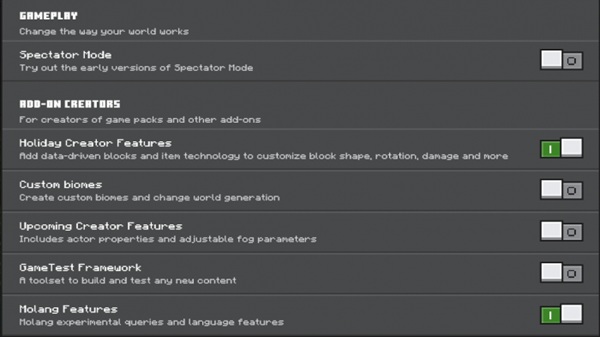
Requires experimental gameplay options
Compatible with most addons that don’t modify teleport mechanics
All players must enable it for multiplayer
Best Use Cases in MCPE Worlds
This addon works well in almost any world, but a few situations really bring out its strengths.
Multi-level survival bases
Large creative builds like towers or malls
Underground bunkers and cave systems
Sky islands and elevated platforms
Adventure maps with vertical movement
Multiplayer hubs and community towns
Tips and Advanced Techniques
Small adjustments can make your elevator system smoother and more organized.
Use colors to separate areas of your base
Hide elevators with camouflage for cleaner builds
Adjust exit direction to guide player movement
Keep level spacing reasonable on low-end devices
Recheck alignment if an elevator fails
Make sure all players install it for multiplayer
Why This Addon Enhances MCPE Gameplay
Fast travel makes every part of your world more enjoyable.
The Open Blocks Elevators Addon saves time, encourages vertical building, and helps you organize your base without clutter. It works for beginners and experienced players alike, providing a mobile-friendly version of a popular Java mechanic.
Final Thoughts
The Open Blocks Elevators Addon is one of the simplest ways to upgrade your world’s movement system. It blends convenience, customization, and ease of use in a way that fits every playstyle. If you want a cleaner base, faster navigation, or a way to bring more vertical creativity into your builds, this addon is a strong choice for any MCPE player.
Installation Guide for MCPE
Most players want a fast and simple setup. Here’s a clear, mobile-friendly breakdown.
Download the Addon
Choose the version matching your MCPE update. .mcaddon bundles are the easiest to import.
Android Installation
Tap the file and let Minecraft import it. Use a file manager only if needed.
iOS/iPadOS Installation
Open the file in your Files app and share it to Minecraft.
Windows Installation
Double-click the .mcaddon file to start import.
Enable Experimental Settings
Activate Holiday Creator Features, Custom Biomes, and similar toggles.
Apply Behavior & Resource Packs
Turn them on in your world settings before you start playing.