
Ore UI Utilities 1.21+
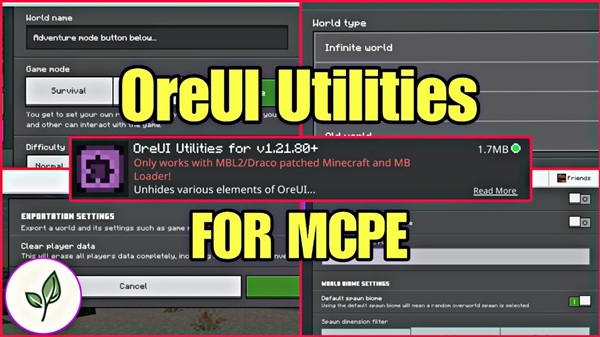
The Ore UI Utilities Addon gives Minecraft Bedrock players more creative control, smarter world setup tools, and a cleaner interface. If you build maps, design custom worlds, or love experimenting in MCPE, this addon streamlines your workflow and helps you create more efficiently.
Ore UI Utilities Addon Ultimate Creative Control
The Ore UI Utilities Addon gives Minecraft Bedrock players a smarter, cleaner, and more efficient way to create worlds. If you enjoy building, designing maps, or testing new ideas, this addon helps you take control of the setup process. By improving menus, adding world presets, and unlocking useful creative tools, it helps you shape your worlds exactly the way you want them.
What Is the Ore UI Utilities Addon?
Before exploring the features, it’s helpful to understand what the Ore UI Utilities Addon actually brings to the MCPE experience. This SAPO section connects you to the deeper breakdown below.
The Ore UI Utilities Addon is a user interface enhancement for Minecraft Bedrock Edition. Instead of changing gameplay, it upgrades the menus you use to create new worlds. You get a cleaner layout, added presets, better navigation, and tools normally hidden behind commands or advanced settings. The goal is simple: give you more control with less effort.
Players who benefit most include:
-
Creative builders who want clean worlds
-
Map makers needing structured setups
-
Technical players testing mechanics
-
Content creators aiming for consistency
-
Anyone who builds more than they survive
If you want more freedom and organization when starting a world, this addon supports your entire creative workflow.
Core Features That Deliver Ultimate Creative Control
These features form the heart of the Ore UI Utilities Addon. Each one is designed to simplify creation, speed up projects, and help you build worlds your way.
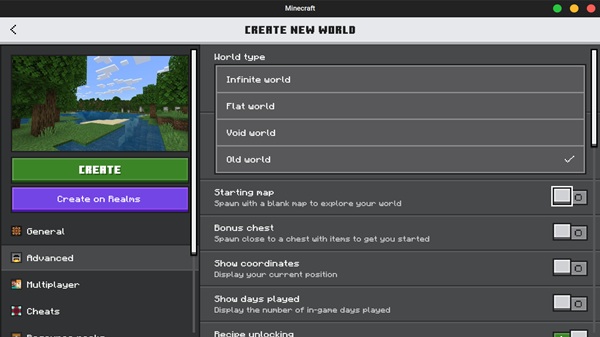
Advanced World Preset Options
-
Void Worlds: Create an empty world in one tap—ideal for large builds, floating structures, or redstone testing.
-
Legacy 256×256 Worlds: Use a smaller, classic world format for challenge maps or compact projects.
-
Specialized World Types: Switch between presets instantly without typing commands.
Streamlined World Creation Tools
-
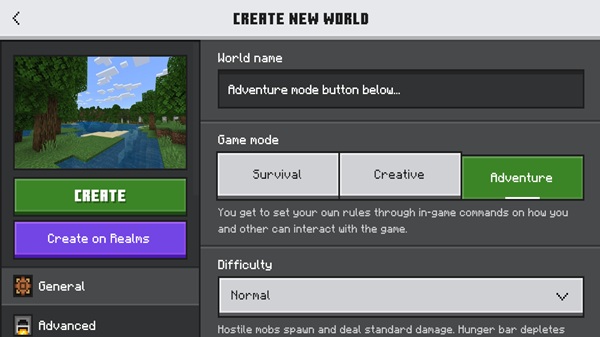
Adventure Mode Button: Start a new world already set to Adventure Mode.
-
Organized Tabs: A layout that groups related options, eliminating clutter.
-
Fast Prototyping: Perfect for creators who start multiple worlds daily.
Precision Spawn Configuration
-
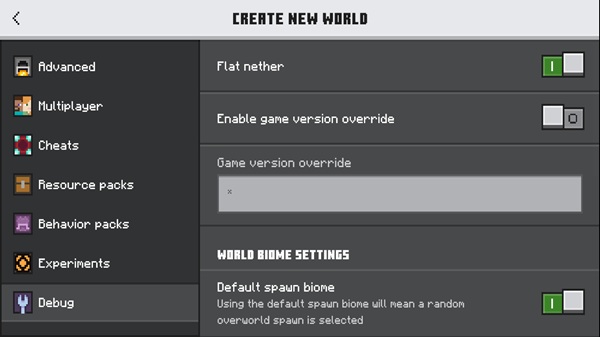
Custom Spawn Location: Choose where players spawn before generating the world.
-
Dimension Selection: Begin in the Overworld, Nether, or End.
-
Better Control: No need for commands or respawn anchors afterward.
Developer-Inspired Debug Utilities
-
Debug Menus: Access creative-friendly options normally unavailable in vanilla UI.
-
Testing Tools: Check structures, mechanics, and world settings quickly.
-
Efficient Iteration: Change setups without recreating worlds repeatedly.
Integrated UI Enhancements
-
OreUI Styling: Cleaner presentation and better readability.
-
Streamlined Navigation: Faster access to important settings.
-
Creator-Focused Layout: Less clicking, more building.
One-Tap World Export Functionality
-
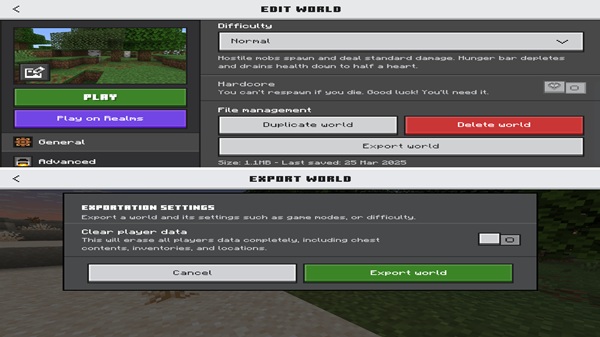
Easy Backups: Export worlds directly from the Edit World screen.
-
Creator Support: Save project versions or share maps quickly.
-
No File Browsing Required: Everything is handled in-game.
Efficient Creative Workflow Improvements
-
Reduce Repetition: Skip repeated steps like changing game modes or adjusting presets.
-
Faster Setup: Load into building sessions quicker.
-
Consistent Templates: Great for long-term projects or series builds.
How This Addon Changes the MCPE Creative Workflow
If you build often, you know how time-consuming world setup can be. Here’s where the Ore UI Utilities Addon truly changes the experience.
With cleaner menus and more presets, you start worlds faster and with more precision. You can maintain consistent templates for maps or creative projects and test ideas without rebuilding worlds repeatedly. Tasks that used to require commands or external tools now happen inside the interface. The result is a smoother, more intuitive creative process.
Compatibility Overview
This connects you to device and version details to ensure everything runs smoothly.
Supported MCPE Versions
Compatibility depends on the addon version, so always check that it matches your current game build.
Platform Compatibility
-
Works reliably on Android and Windows Bedrock Edition
-
Some platforms may limit UI modifications
Addon Conflicts
-
Avoid stacking multiple UI overhauls
-
Texture packs usually work fine if they don’t modify creation menus
Best Use Cases for Players
Not every player uses the Ore UI Utilities Addon the same way. Here’s how it fits different playstyles.
Creative Builders
-
Clean templates
-
Large structure planning
-
Flat, empty starting spaces
Map Makers & Designers
-
Adventure Mode setup
-
Exporting project versions
-
Legacy map templates
Technical Players & Testers
-
Debugging
-
Redstone and command testing
-
Controlled worlds for experiments
Content Creators
-
Consistent worlds for videos
-
Shareable downloads
-
Faster recording preparation
Tips to Maximize Creative Control
-
Keep UI packs lightweight
-
Use Void Worlds for major builds
-
Export often to stay safe
-
Test presets before building
-
Create different world templates for different projects
Frequently Asked Questions
Does the addon affect survival?
No. Only UI changes are applied.
Is it safe for old worlds?
Yes. World data remains untouched.
Do other players need it in multiplayer?
No. Only your interface changes.
Why aren’t features showing?
Check your MCPE version and UI conflicts.
Final Thoughts: Why This Addon Elevates MCPE Creativity
With the Ore UI Utilities Addon, you gain a more organized, customizable, and creator-friendly interface. It removes friction, speeds up world setup, and puts real control in your hands. Whether you’re building your next mega-base or designing a downloadable adventure map, this addon supports your vision from the very first click.
Installation Guide for Minecraft Bedrock Edition
Installing the Ore UI Utilities Addon is simple. This quick SAPO section leads you into the steps below.
Requirements
-
Correct MCPE version
-
Android or Windows Bedrock
-
Enough storage for importing resources
Installation Steps
-
Download the appropriate
.mcpackfile. -
Open the file to begin automatic import.
-
Wait for the “Import Successful” message.
-
Activate it under Settings → Global Resources or World Settings.
-
Restart Minecraft so UI elements load properly.
Troubleshooting Tips
-
Disable conflicting UI packs
-
Match the addon version to your MCPE version
-
Clear old resource caches when needed











