
Security Cameras 1.21+
The Security Cameras Addon brings modern, functional surveillance tools to your MCPE worlds. Easily place cameras, monitor every area with a tablet, and elevate your builds with immersive, realistic features designed for creative players.
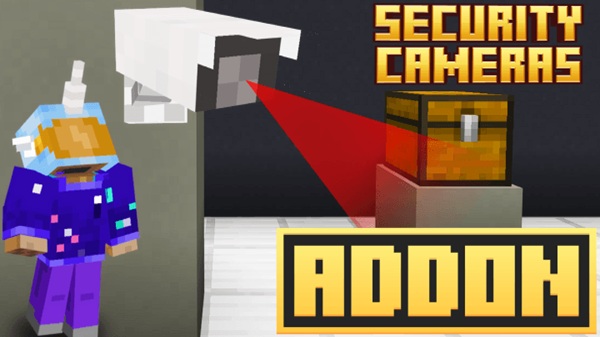
Security Cameras Addon – Modern Tools to Elevate Your Builds
If you love modern building in Minecraft Bedrock Edition, the Security Cameras Addon is one of the most practical tools you can add to your world. It brings you functional surveillance cameras, an intuitive viewing tablet, and a set of features that make bases, cities, labs, and roleplay environments feel far more dynamic. Whether you build alone or with friends, this addon helps you create smarter spaces that are easier to monitor and more fun to explore.
Introduction to the Security Cameras Addon
The Security Cameras Addon gives your Minecraft world a layer of interaction that decorative blocks alone can’t provide. Instead of placing static props, you get working cameras, real-time feeds, customizable names, and flexible controls that fit smoothly into both casual and advanced builds. This addon is especially useful if you enjoy modern architecture, futuristic themes, or creative storytelling.
As you explore the addon, you’ll notice how naturally it fits into MCPE’s gameplay rhythm — simple enough for beginners, yet powerful enough for experienced builders looking to improve their world’s functionality.
Key Features That Elevate Your Builds
This addon includes several tools that improve the way your builds look and function. Each feature is easy to learn and even easier to apply in your own worlds.
Controllable and Still Camera Modes
You can choose between two camera types depending on your needs:
-
Controllable Cameras let you rotate your view, making them great for scanning big rooms or outdoor areas.
-
Still Cameras stay locked on specific coordinates, ideal for entrances, narrow corridors, or hallways where a fixed view is more useful.
Custom Camera Naming System
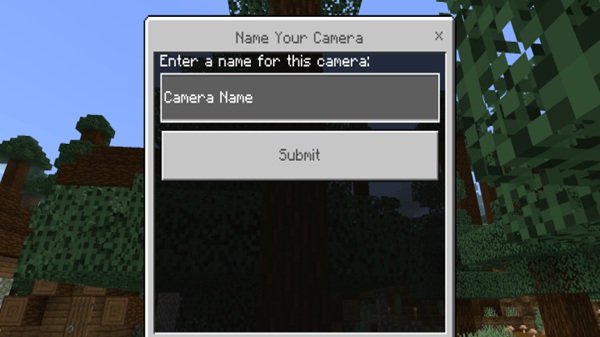
Every camera can be named when installed. This is especially helpful in large builds, where labels like Main Entrance, North Wing, or Storage Level help you quickly identify where each feed is located.
Public and Private Camera Access
When placing a camera, you choose whether it's:
-
Public — viewable by anyone in your world
-
Private — viewable only by you
This system is great for shared builds or multiplayer survival worlds where players organize different areas.
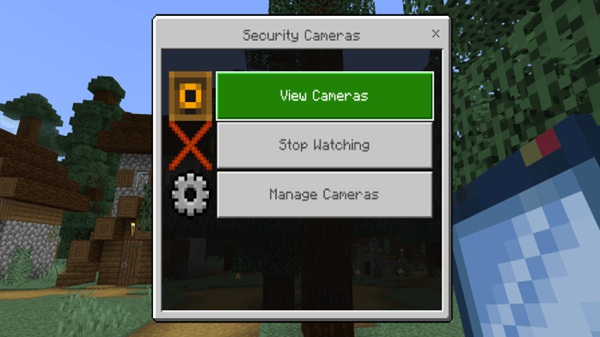
Tablet-Based Camera Viewing Interface
The tablet acts as your control center. With a simple tap, you can:
-
Access all cameras
-
Switch feeds instantly
-
Stop watching
-
Manage existing cameras
Its clean interface works smoothly on touch devices, making it ideal for mobile players.
Build-Friendly Camera Placement
Cameras fit well on walls, ceilings, corners, or custom structures. Their design complements modern houses, underground labs, futuristic bases, city streets, and any build that benefits from a high-tech look.
Performance-Friendly Design for Mobile
You can use multiple cameras without major lag, especially when placed responsibly. This keeps the addon accessible to users on all kinds of devices, from entry-level phones to high-end tablets.
Modern Tools for Advanced MCPE Building
These tools unlock new possibilities for world-building. Many creators use the Security Cameras Addon to enhance:
-
Smart homes and realistic interiors
-
Research centers or high-tech facilities
-
Large cities with active streets and rooftops
-
Adventure maps with interactive observation rooms
-
Shared bases where players monitor different sections
You can easily integrate these features into your usual building style. They add personality and depth without forcing you to change how you play.
How the Addon Works in Gameplay
This addon keeps things simple while still giving you powerful options.
Crafting Recipes
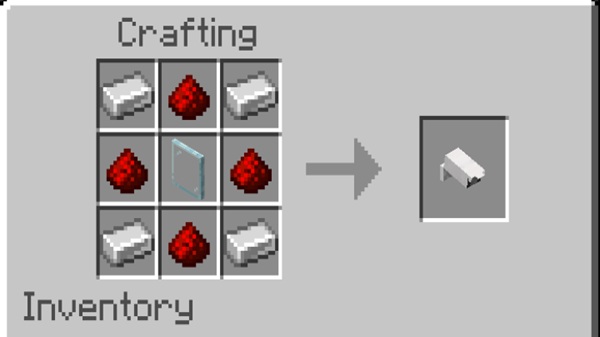
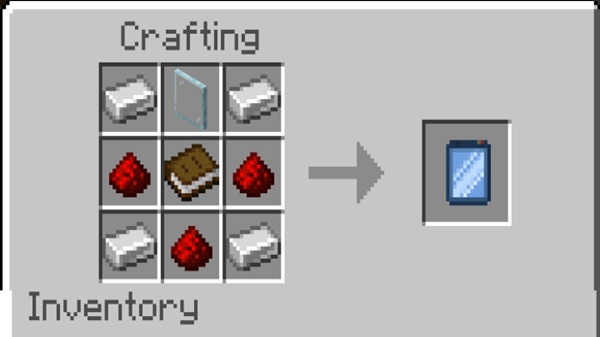
You’ll craft two important items:
-
Security Camera — made with iron, redstone, and glass
-
Tablet — made with iron, redstone, glass, and a book
These recipes use common materials, making the addon feel naturally balanced.
Placing and Naming Cameras
Once you place a camera block, a menu appears where you:
-
Enter a name
-
Select controllable or still mode
-
Set visibility (public or private)
-
Confirm
The camera becomes active right away.
Using the Tablet
Holding the tablet opens the viewing interface. You can browse all cameras, swap views, or stop watching with a single tap.
Managing Your Camera Network
Rename or delete cameras directly through the tablet. This helps you keep everything organized as your world expands.
Compatibility & Device Support
This addon works on:
-
MCPE/Bedrock 1.20+
-
Android, iOS, and Windows
-
Multiplayer worlds and Realms (if all players install the addon)
Performance varies depending on how many cameras you place and your device’s hardware, so spacing them out is recommended.
Building Tips to Maximize the Addon’s Impact
To get the most out of the Security Cameras Addon, try:
-
Placing cameras at entrances, corners, and high vantage points
-
Mixing still and controllable modes for better coverage
-
Creating a dedicated control room with your tablet
-
Avoiding too many cameras in one small area
-
Combining this addon with modern build themes for a unified look
These small choices can transform simple buildings into visually rich environments.
Creative Inspiration & Use Cases
Players often use this addon to bring their worlds to life in creative ways:
-
Modern homes with realistic indoor and outdoor monitoring
-
Urban builds with cameras on streets, rooftops, and plazas
-
Labs where observation feels meaningful
-
Adventure maps that use cameras as clues
-
Shared bases where team members check different rooms
These ideas spark new possibilities and encourage more interactive builds.
Final Thoughts
The Security Cameras Addon is a powerful tool for MCPE players who enjoy building smarter, more immersive worlds. Its simple controls, flexible camera system, and mobile-friendly performance make it easy to adopt in any playstyle. Whether you're designing modern houses or full adventure maps, this addon elevates your projects and helps you express your creativity with confidence.
Installation Guide for MCPE (Bedrock Edition)
Installing the Security Cameras Addon is simple:
-
Download the
.mcpackor.mcaddonfile. -
Open the file to import it into Minecraft.
-
Enable the Behavior Pack and Resource Pack in your world settings.
-
Turn on Experimental Features if required.
-
Start your world and begin placing cameras.
This process works on Android, iOS, and Windows devices. Using the latest version of MCPE ensures the best experience.











