
Sleeping Coffins 1.21+
Bring atmosphere and strategy to your Minecraft nights with the Sleeping Coffins Addon. Replace plain beds with gothic coffins, enjoy immersive animations, unlock Night Vision buffs, and experience rare Blood Moon events that make survival in MCPE more exciting.
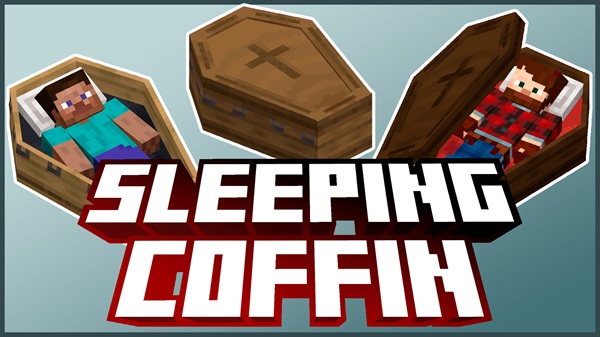
Sleeping Coffins Addon – Gothic Beds with Night Buffs
In Minecraft Bedrock Edition (MCPE), beds serve a simple purpose: they skip the night and reset your spawn point. But after countless nights, the experience feels too plain. The Sleeping Coffins Addon changes this routine by turning beds into gothic-style coffins with immersive sleeping mechanics. Instead of just lying down, you’ll close a creaking lid, hear atmospheric sounds, and even unlock special buffs during the night.
This addon is more than decoration. It adds style, roleplay potential, and new survival twists that make your nights feel alive again.
The Sleeping Coffins Addon introduces both visual upgrades and gameplay enhancements that set it apart from vanilla beds. Below are the highlights that players will notice right away.
- Crafted from Oak, Spruce, Birch, Jungle, Acacia, and Dark Oak.
- Each coffin features detailed gothic textures and a hinged lid.
- Perfect for castles, crypts, or moody bedroom builds.
- Smooth animation when you enter the coffin.
- Atmospheric sound effects like creaking wood and faint wind.
- A big step up from the plain, silent vanilla bed mechanic.
- Sleeping during a full moon grants Night Vision for 120 seconds.
- Helps with nighttime exploration, caving, or mob hunting.
- Adds strategic depth to when and where you choose to rest.
- Roughly one in 25 nights becomes a Blood Moon.
- The sky tints crimson for a dramatic effect.
- Hostile mobs grow slightly stronger, creating survival challenges.
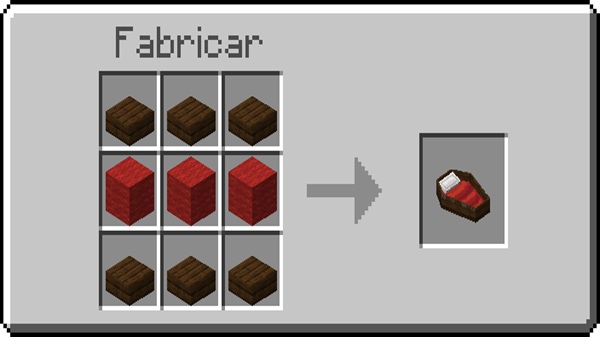
- Recipe: 6 planks + 1 iron ingot at the crafting table.
- Accessible early in survival, so you can swap beds quickly.
Sleeping Coffins keep the core mechanics of beds but add new layers of immersion and challenge. Here’s how they work once installed:
- Crafting – Place three planks across the top row, one iron ingot in the center, and three planks across the bottom.
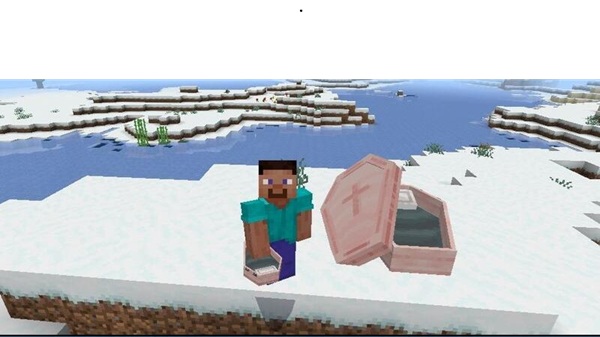
- Placing & Using – Tap or right-click the lid to open, then enter to sleep.
- Respawn & Buffs – Sets your spawn point just like a bed. On full moon nights, you wake with Night Vision.
- Blood Moon Twist – On rare nights, the coffin reveals crimson skies outside, while mobs spawn tougher than usual.
This balance of roleplay immersion and survival strategy makes every night different.
The Sleeping Coffins Addon is designed to run smoothly across a wide range of devices.
- Supported Versions: Minecraft Bedrock 1.17 and above.
- Platforms: iOS, Android, Windows 10/11, Xbox One.
- Modes: Works in both single-player and Realms.
- Performance: Optimized visuals and lightweight coding keep it friendly for low-end devices. Even Blood Moon effects are kept minimal to avoid lag.
Beyond sleeping, this addon opens creative opportunities for builders, roleplayers, and survival fans.
- Build Ideas – Place coffins in crypts, haunted castles, gothic mansions, or themed bedrooms.
- Roleplay Value – Perfect for fantasy or spooky adventures, especially when paired with dark-themed texture packs.
- Survival Strategy – Always secure the room around your coffin. During Blood Moons, mobs are tougher and more dangerous if you spawn unprotected.
- Addon Combos – Combine with other atmosphere-focused addons to create immersive roleplay worlds.
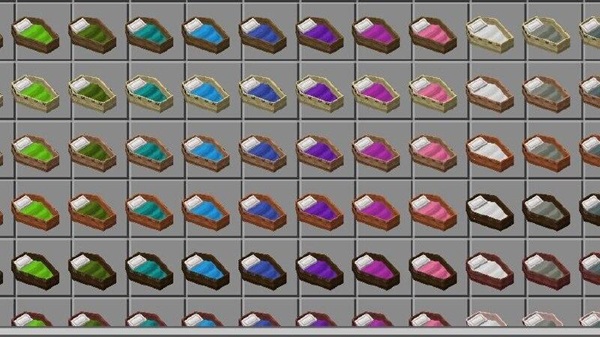
The Sleeping Coffins Addon proves that even the simplest mechanic—sleeping—can be transformed into a unique experience. By offering gothic beds, immersive animations, Night Vision buffs, and rare Blood Moon events, it appeals to every type of player:
- Builders gain stylish furniture.
- Roleplayers get immersive tools for storytelling.
- Survival fans face new nighttime challenges.
If you’re looking for an addon that makes your nights in Minecraft Bedrock Edition more atmospheric and rewarding, this one is worth adding to your world. Sleep differently—and respawn in style.
Installation Guide for Minecraft Bedrock
Installing the Sleeping Coffins Addon is quick and works on both mobile and console platforms.
-
Download Files – Obtain the
Sleeping_Coffins_Behavior.mcpackandSleeping_Coffins_Resource.mcpack. -
Import into Minecraft – Tap the files to launch Minecraft. Wait for the confirmation pop-up.
-
Activate in World Settings –
- Under Behavior Packs, select “Sleeping Coffins” and click Activate.
- Under Resource Packs, select “Sleeping Coffins” and click Activate.
-
Restart or Reload World – Re-enter your world to apply the addon and start crafting coffins.











