
The Laster 1.21+
Discover The Laster Addon, a unique MCPE mob that pretends to fall before attacking again. Learn how its fake-death behavior, chase mode, and trophy rewards make survival more intense, strategic, and rewarding.

The Laster Addon – Smart Enemy That Fakes Defeat
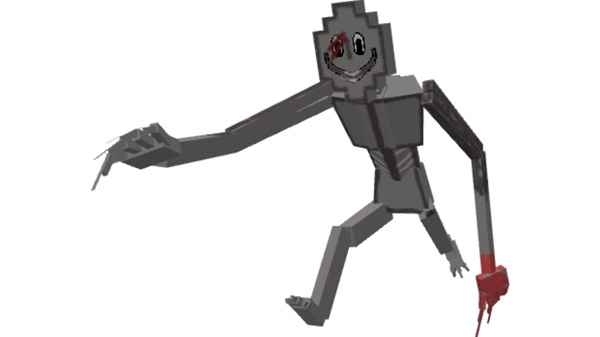
If you’re looking for a smarter, more unpredictable enemy in Minecraft Bedrock Edition, The Laster Addon is built to shake up your survival routine. This custom mob introduces deceptive combat behavior that forces you to slow down, think, and react like a real strategist. Instead of being another hostile creature that rushes and falls in seconds, the Laster tricks players with an unusual tactic: fake death before a real fight begins.

This single mob adds tension, replayability, and trophy-worthy rewards—all without heavy modpacks or complicated installations. If you enjoy survival challenges, strategic combat, and collectible loot, this addon fits perfectly into your world.
Meet the Laster: The Mob That Pretends to Fall
Before fighting it, it’s worth understanding the personality of this mob. The Laster doesn’t act like most hostile creatures. Its design encourages you to stay alert and approach combat with caution rather than rushing in for quick hits.
What Makes the Laster Different From Normal Hostile Mobs
Unlike zombies or skeletons, the Laster uses deception instead of simple attacks. It doesn’t behave predictably, so you can’t win by spamming hits. You need timing, patience, and awareness to avoid being surprised.
How the Fake-Death Behavior Works
During combat, the Laster will suddenly collapse as if it has been defeated. Its body drops, creating a believable illusion of defeat. However, the mob is still alive and waiting. Moving closer or turning your back can trigger its reawakening.
Why the Laster Uses Deception as a Combat Strategy
This mechanic forces players to think before looting or walking away. Instead of fights being quick and mindless, they become interactive events where you observe enemy behavior and react at the right moment.

When Does the Laster Actually Go Down for Good?
Only after entering its chase mode does the Laster truly die. Players must confirm defeat using safe tactics—especially ranged attacks or simply waiting to see if the mob reacts. Once fully defeated, it becomes safe to collect rewards.
Fake-Death to Chase Mode: How Its Smart AI Works
The fake fall is only phase one. Once triggered, the Laster enters its chase mode, a more aggressive stage where it moves faster, deals more damage, and pursues you with greater persistence. Think of it like a mini-boss encounter: the first moment is the bait, and the real challenge comes after.
This clever AI means you must prepare gear, maintain distance, and stay aware of your surroundings. The Laster Addon rewards careful planning and punishes careless rushing, making combat feel tactical instead of repetitive.
Stats & Rewards: Strength, Damage, and Trophy Drops
The Laster fits perfectly into mid-game progression, offering a threat strong enough to respect but still manageable with the right preparation.
Combat Stats
| Attribute | Value |
|---|---|
| HP | 300 (chase mode) |
| Damage | 8 per hit |
| Fall Damage | Takes normal environmental damage |
| Animation | Custom falling animation |
Trophy Rewards
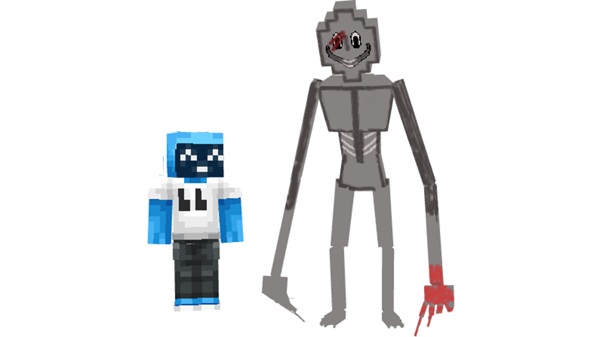
Defeating the Laster may drop a collectible head, letting you display proof of your victory. Players love mounting these trophies in bases, challenge rooms, or mob museums. This creates a rewarding loop: hunt, defeat, display.
Survival Strategy: How to Beat a Mob That Fakes Defeat
To survive an enemy that pretends to die, patience matters more than brute force. Use gear, timing, and distance to your advantage.
Useful Tips:
-
Test fake deaths with ranged weapons before approaching
-
Use iron-tier or higher gear, especially in survival worlds
-
Healing items help counter sudden chase attacks
-
Avoid rushing toward the fallen body immediately
-
Use cliffs, water, or traps to weaken it safely
In multiplayer, communication is essential. One player might think the fight is over, but another can save them by double-checking. This makes The Laster Addon a fun choice for realms, challenge maps, and survival servers.
Compatibility & Device Performance Tips
-
Works with Minecraft Bedrock 1.20–1.21
-
Supported on Android, iOS, Windows, Xbox, PlayStation, Switch
-
Lightweight and optimized; only one custom mob added
-
For low-end devices, reduce render distance or avoid stacking too many mob-based addons
Why Players Love The Laster Addon
Players enjoy how this addon transforms ordinary encounters into memorable battles. Every fight becomes a small story with suspense, risk, reward, and excitement. Trophy collectors love showing the mob’s head, while survival players enjoy finally taking down an enemy that “doesn’t stay down.”
Whether you're playing alone or with friends, this mob adds emotional gameplay moments you’ll want to talk about afterward.
Final Thoughts + Download Information
The Laster Addon fits perfectly into survival worlds where strategy matters more than spam clicking. It’s challenging without being overwhelming, fun without being random, and rewarding without requiring expensive gear. Before you install it in a long-term world, make a backup—then test your skills against a mob that refuses to fall easily.
Download The Laster Addon and discover whether your victories are real… or only pretend.
Installation Guide for MCPE (Mobile + PC)
Installing The Laster Addon is simple and works smoothly across Bedrock-supported devices.
Android & Windows
-
Download the
.mcaddonfile. -
Open it to import automatically.
-
Go to World Settings → Behavior Packs.
-
Activate The Laster Addon.
-
Enable Experimental Settings before playing.
iOS
-
Import using cloud storage or supported apps, then repeat the same in-game activation steps listed above.
Troubleshooting
-
Re-import the addon if it doesn’t appear.
-
Ensure Minecraft is updated.
-
Make sure experimental features are enabled, or the mob won’t function properly.











