
TNT Dynamite Throwable Weapons & Equipment 1.21+
The TNT Dynamite Throwable Weapons & Equipment Addon adds precise, throwable TNT tools to Minecraft Bedrock Edition, giving MCPE players better control, balance, and mobile-friendly explosive gameplay.
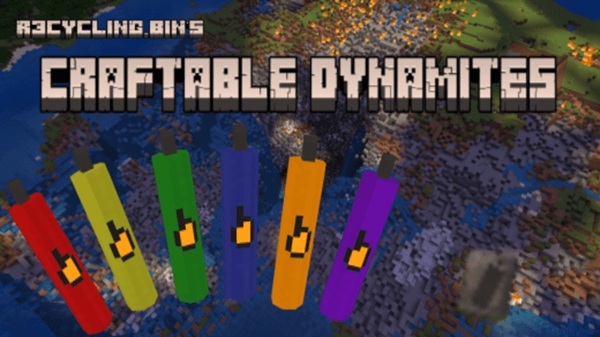
TNT Dynamite Throwable Weapons & Equipment Addon – Precision TNT
The TNT Dynamite Throwable Weapons & Equipment Addon brings a smarter and more controlled way to use explosives in Minecraft Bedrock Edition, with a clear focus on MCPE gameplay. Instead of placing TNT blocks and waiting for timers, this addon introduces throwable TNT tools that let you act quickly, aim better, and stay in control.
If you’ve ever misjudged TNT placement on a mobile screen or damaged your own base by mistake, this addon was clearly made with you in mind. Precision, balance, and ease of use define the experience, making explosive gameplay feel more intentional rather than chaotic.
Key Features at a Glance
This section highlights what you get right away from the TNT Dynamite Throwable Weapons & Equipment Addon, especially if you want quick answers before downloading.
-
Throwable TNT items with instant activation
-
Multiple TNT variants with unique behaviors
-
Designed for controlled and predictable use
-
Optimized for MCPE touch controls
-
Works in both Survival and Creative modes
-
Balanced explosion effects
-
Stable performance across Bedrock platforms
These features aim to enhance gameplay without replacing Minecraft’s core mechanics.
Precision TNT Explained
Before diving into individual TNT types, it’s important to understand what “Precision TNT” actually means in the context of Minecraft Bedrock and MCPE.
What “Precision TNT” Means in Minecraft Bedrock
Precision TNT focuses on accuracy, timing, and predictability. You throw TNT toward a chosen spot instead of placing a block and stepping away. This small change creates a big difference in how confidently you interact with the world.
How Precision TNT Differs from Vanilla TNT
Vanilla TNT depends on redstone or manual ignition, which can feel slow or awkward on mobile. The TNT Dynamite Throwable Weapons & Equipment Addon replaces that process with direct action, reducing setup time and mistakes.
Control and Accuracy on Mobile Devices
On MCPE, touch controls demand simpler interactions. Throwable TNT lets you aim naturally, similar to throwing snowballs, which feels intuitive even on smaller screens.
Explosion Behavior and Consistency
Each TNT variant follows consistent rules for blast size and effect. This reliability helps you plan actions, especially in survival worlds where errors can be costly.
Balance and Fair Gameplay Design
The addon avoids extreme power scaling. TNT remains useful, not overwhelming, fitting naturally into standard Bedrock survival progression.
When Precision TNT Is Most Useful
-
Clearing targeted areas
-
Handling groups of mobs
-
Adventure maps and challenges
-
Situations where accuracy matters more than raw power
Types of TNT & Equipment Included
This section introduces the tools you’ll be working with and how each one fits into different gameplay situations.
-
Standard Throwable TNT for everyday use
-
Incendiary TNT variants that interact with the environment
-
Winged or extended-range TNT for longer throws
-
Supporting equipment that improves handling
Instead of one “best” option, each type encourages thoughtful choice based on your goal.
How It Works In-Game (MCPE Gameplay)
Understanding how the addon behaves in real gameplay helps you decide if it fits your world.
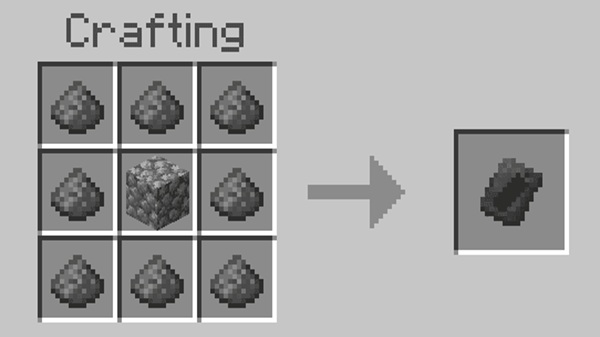
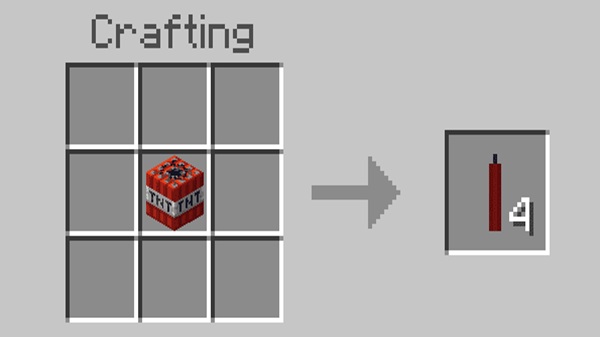
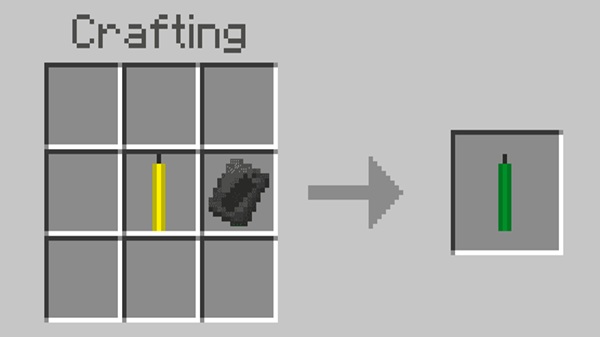
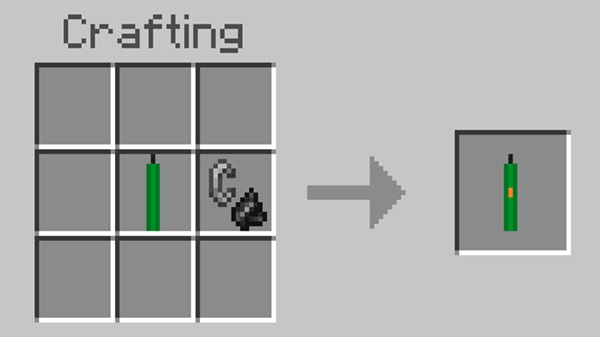
Players can access TNT items through Creative mode or crafting, depending on configuration. Once equipped, usage is straightforward:
-
Tap to throw the TNT
-
Detonation occurs on impact or after a short delay
-
Explosion strength depends on the TNT type
-
Behavior stays consistent across uses
Both Survival and Creative modes are fully supported, making testing easy before long-term use.
Practical Use Cases
This section connects features to real gameplay situations MCPE players commonly face.
-
Controlled terrain clearing
-
Managing groups of mobs efficiently
-
Supporting custom adventure maps
-
Sandbox experimentation
-
Tactical survival problem-solving
The addon rewards players who plan their actions instead of rushing.
Compatibility & Performance Notes
This section helps you avoid common technical issues.
-
Designed for Minecraft Bedrock Edition
-
Compatible with versions 1.20 – 1.21+
-
Works on Android, iOS, Windows, and consoles
-
Older devices may experience lag with heavy use
-
Avoid mixing with other TNT-altering addons
Moderate use ensures smoother performance, especially on mobile devices.
Player Tips for Best Results
Short, practical advice can make a big difference in long-term enjoyment.
-
Test TNT types in Creative mode first
-
Match TNT variants to specific tasks
-
Back up important worlds regularly
-
Use in private or single-player worlds for control
-
Keep Minecraft updated for stability
These habits help you get the most out of the addon without frustration.
Who This Addon Is Best For
The TNT Dynamite Throwable Weapons & Equipment Addon is ideal if you:
-
Play mainly on MCPE
-
Prefer controlled and accurate gameplay
-
Enjoy survival with practical tools
-
Like testing mechanics in Creative mode
-
Build custom maps or challenges
If you want TNT without complexity, this addon fits naturally.
Final Summary
The TNT Dynamite Throwable Weapons & Equipment Addon – Precision TNT refines explosive gameplay for Minecraft Bedrock Edition by focusing on control, balance, and mobile-friendly design. It gives MCPE players a reliable alternative to traditional TNT mechanics while preserving the feel of vanilla gameplay. Used thoughtfully, it enhances creativity, strategy, and confidence in every world you play.
Installation Guide (MCPE / Bedrock)
Installing the TNT Dynamite Throwable Weapons & Equipment Addon is simple, even if you’re new to addons.
-
Import the
.mcaddonor.mcpackfile -
Open Minecraft to complete installation
-
Activate the Behavior Pack in world settings
-
Enable experimental options if required
-
Create or load your world
Always confirm the pack is active before playing.











