Vanilla RTX 1.21+
Vanilla RTX Addon enhances Minecraft Bedrock Edition with realistic lighting, reflections, and RTX-style visuals while preserving the classic vanilla look and gameplay MCPE players love.

Vanilla RTX Addon – Realistic RTX Visuals, Classic Vanilla Feel
If you enjoy vanilla Minecraft but wish the world looked more alive, Vanilla RTX Addon was created for you. This visual addon enhances lighting, reflections, and material depth in Minecraft Bedrock Edition (MCPE) while keeping gameplay, textures, and mechanics fully vanilla.
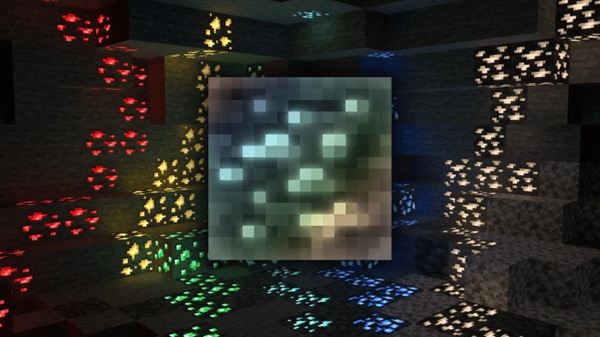
Many players hesitate to install shaders or resource packs because they fear drastic changes or performance issues. Vanilla RTX Addon takes a different approach. It improves how light behaves in the world—how it reflects, glows, and spreads—without altering blocks, mobs, or progression. Survival still feels like Survival. Creative still feels familiar. The difference is subtle, but once you notice it, it’s hard to go back.
This addon is especially popular among MCPE and Bedrock players who want a modern visual upgrade that respects Minecraft’s original design.
What Makes Vanilla RTX Addon Different
Vanilla RTX Addon stands out because it focuses on balance. Instead of chasing flashy effects, it improves visuals in a way that feels natural and consistent with vanilla Minecraft. The following points explain why it feels familiar rather than “modded.”
Designed to Preserve the Vanilla Look
The addon does not replace default textures. Grass still looks like grass. Stone still looks like stone. What changes is how these blocks interact with light. Sunlight spreads more naturally, shadows feel softer, and surfaces respond realistically depending on their material.
Visual Improvements Without Gameplay Changes
Vanilla RTX Addon is purely visual. It does not add new items, blocks, mobs, or mechanics. Your farms, redstone machines, and survival strategies work exactly as before. This makes it safe to use in long-term worlds.
RTX-Style Lighting Built on Vanilla Materials
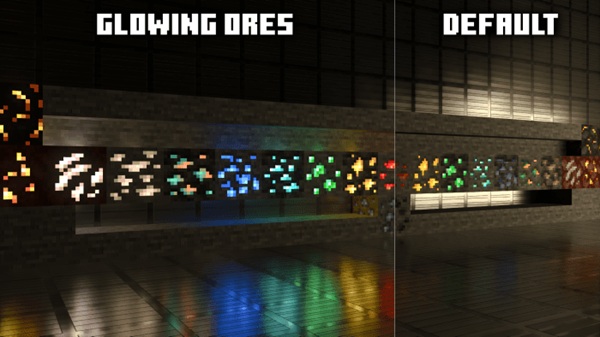
The addon uses PBR (Physically Based Rendering) data. In simple terms, this tells the game how rough, smooth, or reflective a block should look. For example, polished blocks reflect more light, while darker blocks absorb it. These changes are subtle but noticeable during gameplay.
Why It Feels Natural Instead of “Modded”
Instead of drawing attention to itself, the lighting blends into the environment. You notice the atmosphere before the effects. Caves feel deeper. Interiors feel warmer. Builds feel more complete.
Made for Bedrock and MCPE Players
Vanilla RTX Addon is designed for Minecraft Bedrock Edition, including mobile platforms. Stability, compatibility, and ease of use are prioritized, which matters when playing on phones or tablets.
Core Visual Features
This addon focuses on quality over quantity. Its main visual improvements include:
-
Natural lighting with smoother shadow transitions
-
Realistic reflections on water, glass, and polished blocks
-
Emissive effects for certain blocks, such as light sources and ores
-
Improved depth using PBR material properties
-
Consistent visuals across biomes and builds
Together, these features improve immersion without overwhelming the player.
How It Feels In-Game (MCPE Experience)
In Survival mode, exploration feels more atmospheric. Entering a cave at night feels different when light spreads naturally from torches or glowing blocks. Bases feel more welcoming, especially after sunset.
In Creative mode, Vanilla RTX Addon truly shines. Builders notice how interiors feel more realistic with proper lighting and reflections. Glass structures, modern houses, and city builds benefit the most.
The key point is this: the game always feels like vanilla Minecraft—just visually refined.
Supported Versions & Device Expectations
Before installing, it’s important to understand compatibility. This helps avoid confusion later.
-
Edition: Minecraft Bedrock / MCPE
-
Supported Versions: 1.20 and newer
-
Platforms: Android, iOS, Windows 10/11 (Bedrock)
Devices with RTX-capable hardware can display advanced visual effects. On non-RTX devices, the addon may still load, but visuals will be limited. Performance depends on your device, especially on mobile.
Performance & Compatibility Tips
To get the best experience on MCPE, keep these tips in mind:
-
Lower render distance for smoother performance
-
Avoid combining it with other shader or PBR resource packs
-
Adjust graphics settings gradually
-
Close background apps on mobile devices
-
Test the addon on a copy of your world first
These steps help maintain stable performance, especially on mid-range devices.
Who This Addon Is Best For
Vanilla RTX Addon is a great choice if you are:
-
A vanilla Minecraft fan who values familiarity
-
A builder focused on interiors and realistic designs
-
A survival player who enjoys atmosphere
-
An MCPE user looking for a safe visual upgrade
-
Someone who prefers subtle realism over extreme effects
If you enjoy Minecraft as it is but want it to look better, this addon fits naturally.
Final Thoughts: Why It Keeps the Vanilla Feel
Vanilla RTX Addon doesn’t try to reinvent Minecraft. Instead, it improves how the game looks while respecting what makes it special. Lighting feels more realistic, materials feel more alive, and the world feels more immersive—without changing how you play.
For MCPE and Bedrock players who want a modern visual upgrade that still feels like vanilla Minecraft, Vanilla RTX Addon delivers exactly that.
How to Install Vanilla RTX Addon on MCPE
Installing Vanilla RTX Addon is straightforward:
-
Download the addon in .mcpack format
-
Open the file to import it into Minecraft
-
Create a new world or edit an existing one
-
Go to World Settings → Resource Packs
-
Activate Vanilla RTX Addon
-
Enable enhanced graphics options if supported
If the pack does not appear immediately, restart the game and check again.