
Veinminer Key 1.21+
The Veinminer Key Addon is a practical quality-of-life upgrade for Minecraft Bedrock/MCPE that helps you mine ore veins faster while keeping full control over gameplay. Designed for mobile survival players, it reduces repetitive mining without breaking balance.

Veinminer Key Addon – Faster Mining with Full Control
Mining is a core part of survival gameplay in Minecraft Bedrock Edition, especially on mobile where every tap counts. If you have ever spent long minutes breaking ore block by block, you already know how tiring it can feel. The Veinminer Key Addon was created to reduce that friction. It helps you gather resources faster while keeping you fully in control of when the feature is active. No forced automation, no constant effects—just a smarter way to mine when you choose.
This addon fits naturally into MCPE survival worlds, focusing on comfort, balance, and player choice rather than shortcuts.
What Is the Veinminer Key Addon in MCPE?
Before diving into features, it helps to understand what this addon actually changes in your world and why it feels different from other vein mining tools.
The Veinminer Key Addon is a quality-of-life addon that lets you mine connected blocks, such as ore veins, in one action instead of breaking each block individually. It uses a special item called the Vein Key to control when vein mining is enabled.
Unlike always-active vein miners, this addon stays inactive by default. When the key is not in use, mining behaves exactly like vanilla Minecraft. This makes the addon easy to manage on mobile devices where precision matters.

Why Faster Mining Needs Player Control on MCPE
Mining faster sounds great, but speed alone is not enough on mobile. Control is what keeps survival gameplay enjoyable and safe.
Common Mining Frustrations on Mobile
Mobile players often face the same issues:
-
Repetitive tapping during long mining sessions
-
Hand fatigue after extended play
-
Slower progression when gathering large amounts of ore
-
Accidental block breaks near builds or cave walls
These problems can turn mining into a chore instead of a rewarding part of survival.
Why Always-On Vein Mining Can Be Risky
Some vein mining addons remain active at all times, which is not ideal for MCPE:
-
Touch controls make it harder to stop instantly
-
Mistakes can destroy unwanted blocks
-
Precision mining becomes difficult near structures
The Veinminer Key Addon avoids these risks by putting control first.
How the Veinminer Key Addon Works In-Game
This section explains how the addon delivers faster mining without removing your control over the game.
The Vein Key Item and Its Purpose
The Vein Key is a dedicated item used only to manage vein mining. By separating this function from tools like pickaxes, the addon ensures that vein mining never activates by accident.
You always know when the feature is in use.
Activating Vein Mining Through the In-Game Toggle
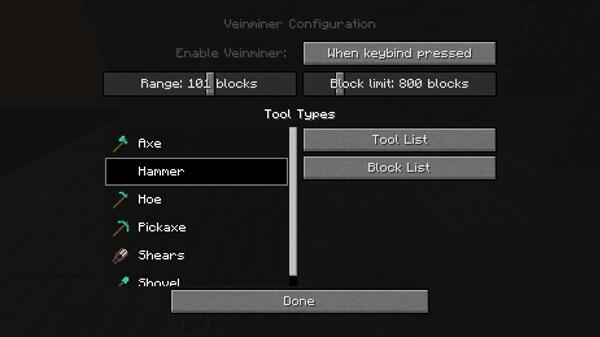
Holding the Vein Key opens a simple in-game interface. From there, you can:
-
Enable vein mining when you need it
-
Disable it instantly when you are done
The clear toggle design works well on touch screens and avoids confusion.

What Happens When Vein Mining Is Active
When vein mining is enabled:
-
Breaking one block mines all connected blocks of the same type
-
Ore veins clear much faster
-
Tool durability and drops follow normal survival rules
You gain speed without changing how survival mechanics work.
Automatic Deactivation and Safety Timing
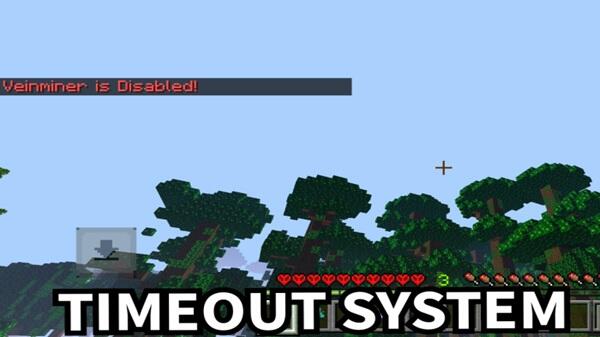
To protect your world, vein mining automatically turns off after a short time. This feature:
-
Prevents accidental overuse
-
Encourages focused mining sessions
-
Reinforces the idea of “full control”
Normal Mining Behavior When the Addon Is Disabled
With the feature turned off:
-
Mining works exactly like vanilla Minecraft
-
No background effects remain active
-
Your tools behave normally
The addon never interferes when you are not using it.

Key Features That Support Faster Mining with Control
Here are the main features that make the Veinminer Key Addon practical for MCPE survival.
Efficient Vein Mining for Ores and Resources
The addon reduces the time needed to collect common survival materials, helping you progress faster without changing game balance.
Manual Activation Only When Needed
Vein mining activates only when you choose to enable it. This gives you confidence and precision during mining sessions.
Survival-Friendly Mechanics
-
Normal tool durability
-
Standard item drops
-
No creative-only effects
Everything stays consistent with survival gameplay.
Compatibility and Performance on MCPE
Knowing where the addon works best helps you avoid issues later.
Supported Minecraft Bedrock Versions
The Veinminer Key Addon is built for recent Bedrock versions. Using a matching version ensures stability and proper behavior.
Device Compatibility
Supported platforms include:
-
Android
-
iOS
-
Windows 10 / 11 (Bedrock Edition)
Console support depends on platform limitations.
Performance Considerations for Mobile Players
-
Lightweight design
-
Minimal impact on FPS
-
Best used selectively on low-end devices
Responsible use keeps performance smooth.
Tips for Using Veinminer Key Addon Responsibly
Smart habits make the addon more enjoyable:
-
Activate vein mining only for large veins
-
Disable it near builds or redstone
-
Keep enough inventory space
-
Back up important worlds
These small steps protect your survival progress.
Who This Addon Is Best For
The Veinminer Key Addon is ideal for:
-
Survival players who value efficiency
-
Mobile players tired of repetitive tapping
-
Builders who need resources faster
-
Long-term worlds focused on balance
It may not suit players who prefer fully automated gameplay.
Final Thoughts: Faster Mining Without Losing Control
The Veinminer Key Addon delivers exactly what its name promises: faster mining with full control. By combining manual activation, safety timing, and survival-friendly mechanics, it fits naturally into MCPE worlds.
If you want to reduce mining fatigue while keeping your survival experience balanced and comfortable, this addon is a practical quality-of-life upgrade worth trying.
Photos
How to Install Veinminer Key Addon on MCPE
Installing the addon is straightforward, but it is important to follow each step carefully.
Importing the Addon into Minecraft Bedrock
The addon is usually provided as a .mcaddon file. Opening the file automatically imports it into the game.
Enabling Behavior Packs
After importing:
-
Open your world settings
-
Activate the addon under Behavior Packs
This step is required for the addon to function.
Experimental Gameplay Requirements
The addon needs experimental features enabled:
-
Turn on experiments before entering the world
-
Experimental settings cannot be removed later
-
Back up your world before enabling
Your comment











