
Villager Minion 1.21+
The Villager Minion Addon for MCPE/Bedrock lets you capture villagers into portable cages, place them anywhere, and trade without building huge halls. Learn key features, setup tips, installation steps, and compatibility notes for smoother villager management.

Villager Minion Addon: Portable Cages, Zero Trading Chaos
The Villager Minion Addon is a smart, compact utility created for Minecraft Bedrock Edition and MCPE players who want simpler villager management. It transforms villagers into portable entities you can capture, place, and trade with anywhere. No more boats, rails, or escaped villagers—just clean, controlled, and organized trading.
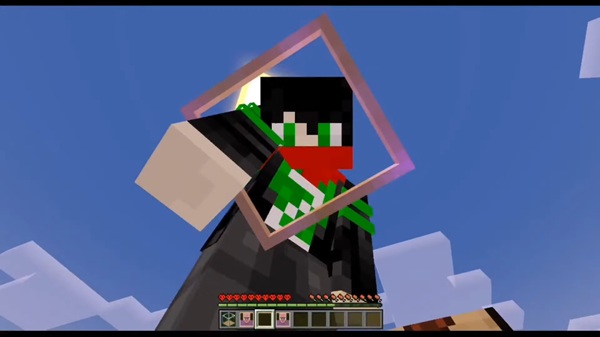
Designed for both casual survival players and creative builders, this addon blends functionality, convenience, and performance, ensuring a smoother experience on mobile and Bedrock devices alike.
What Problem It Solves
Every MCPE player knows the frustration of moving villagers—whether it’s hauling them across rivers, losing them to mobs, or trying to fit dozens of them into cramped trading halls.
The Villager Minion Addon removes this pain by giving you full control. Instead of chaotic setups, you can neatly store villagers inside portable cages, turning the most stressful part of villager management into a quick, one-tap process.
This addon also solves common problems like:
-
Escaping villagers that wander or despawn.
-
Unorganized trades scattered across multiple buildings.
-
Laggy villager halls overloaded with entities.
With its compact system, the Villager Minion Addon is perfect for mobile players who prefer efficiency without sacrificing gameplay depth.
Key Features
The heart of the Villager Minion Addon lies in its clean mechanics and intuitive design. These features ensure that everything— from capturing to trading—feels natural and purposeful.
Portable Villager Cages
Capture any villager and store them safely in a cage block. Each cage acts as a mini trading station, letting you organize and access trades easily inside your base or anywhere in your world.
Empty Cage → Captured Villager System
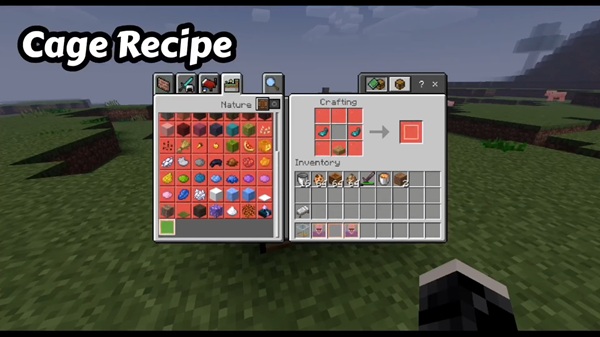
Craft an Empty Cage, approach a villager, and interact (tap or right-click). The villager instantly transforms into a Captured Villager item, allowing you to relocate them wherever you need.
Placeable Cage Block Trading Station
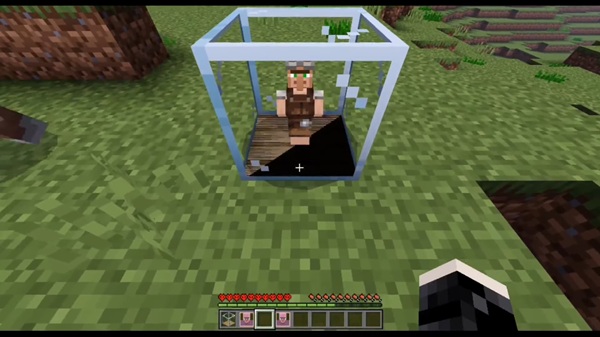
Place the Captured Villager like a normal block to display them inside a detailed cage. It’s both decorative and functional—ideal for compact survival bases or mobile-friendly worlds.
Two-Side Interaction Design
A simple but genius mechanic:
-
Bottom side: Opens the trading interface.
-
Top side: Releases the villager.
This prevents accidental releases and keeps gameplay intuitive.
Trade Reset on Capture/Release
When captured or released, villagers refresh their trades. This makes it easier to find ideal offers, especially when searching for rare enchantments like Mending or Silk Touch.
Custom Librarian Support
Version 1.5 introduces a special Librarian Villager with fixed-cost enchanted books for 30 emeralds. It’s a reliable way to complete your enchanting library without grinding.
Multiplayer and Realms Compatibility
The addon runs smoothly in multiplayer and Realms, ensuring synchronized villager behavior across players.
In-Game Guide and Visual Improvements
Updated versions include an in-game tutorial and a more refined cage model that fits Minecraft’s default style seamlessly.
How It Works In-Game
The Villager Minion Addon keeps its gameplay loop simple and satisfying. Here’s how it all connects.
Step 1: Craft or Obtain an Empty Cage
Craft an Empty Cage early in survival using basic materials. It’s your key tool for capturing villagers.
Step 2: Capture a Villager
Interact with a villager using the Empty Cage—right-click on PC or long-press on mobile. The villager becomes a Captured Villager item.
Step 3: Place the Cage
Place the captured villager anywhere. The cage appears with your villager safely inside, ready to trade.
Step 4: Trade and Manage
Interact with the bottom side of the cage to open the trade menu.
Break the top side to release the villager if needed (trades reset automatically).
This mechanic saves time and space while keeping your survival world organized.
Best Ways to Use It (MCPE-Friendly Ideas)
The Villager Minion Addon adapts perfectly to mobile and Bedrock playstyles. Try these ideas:
-
Compact trading hubs: Line up cages in rows for easy access.
-
Organized villager rooms: Color-code cages or add profession signs.
-
Outpost traders: Keep one or two cages in each base for convenience.
-
Dedicated librarian stations: Store enchanted book traders for quick access.
-
Multiplayer markets: Share villagers with friends for cooperative trading.
Each setup saves time, reduces clutter, and improves the overall performance of your MCPE world.
Compatibility & Requirements
-
Minecraft Version: Bedrock 1.21 or newer.
-
Supported Devices: Android, iOS, Windows, Xbox, PlayStation, Nintendo Switch.
-
Multiplayer: Works in Realms and private servers.
-
Performance Tip: Space out cages to minimize lag, especially on older mobile devices.
Because it’s a lightweight addon, the Villager Minion Addon performs efficiently even on mid-range phones and tablets.
Tips, Warnings, and Best Practices
-
Trade safely: Always interact with the bottom side to avoid releasing villagers.
-
Back up your world before enabling experiments or major updates.
-
Keep both packs active—disabling one may cause visual glitches.
-
Organize by profession to quickly locate specific traders.
-
Use lighting around cages to prevent mobs from interfering.
These small habits help maintain stability and keep your trading systems running smoothly.
Troubleshooting (Fast Fix Section)
Addon not importing: Reinstall the file or restart Minecraft.
Invisible cages or villagers: Ensure the Resource Pack is active.
No trading interface: Interact from the bottom of the cage.
Addon not working in Realms: All players must have the addon enabled.
Lagging: Reduce the number of active cages or lower render distance.

Recap: Why Players Love It
The Villager Minion Addon combines creativity and practicality in a way few addons do. It:
-
Eliminates villager transport frustration.
-
Keeps worlds organized and compact.
-
Makes trading accessible from anywhere.
-
Runs smoothly on MCPE devices.
It’s the ideal addon for anyone who wants to enjoy stress-free trading and organized gameplay without losing the charm of Minecraft survival.
Installation Guide (Bedrock/MCPE)
Installing the Villager Minion Addon is straightforward and beginner-friendly.
-
Download the
.mcaddonfile to your device. -
Tap or open it with Minecraft to trigger the import.
-
Wait for the “Import Successful” notification.
-
In your world settings:
-
Enable both Behavior and Resource Packs.
-
Activate Experimental Features if required.
-
-
Save and launch your world — you’re ready to play.
For manual setup on PC, place the addon files into your behavior_packs and resource_packs folders under the games/com.mojang directory.











