
War of The Worlds 1.21+
The War of The Worlds Addon brings a polished sci-fi expansion to MCPE, featuring detailed entities, enhanced worldbuilding, and optimized performance for mobile players. This guide covers all the key features, installation steps, compatibility notes, and tips to help you get the best experience from this Prime Sci-Fi Expansion Set.
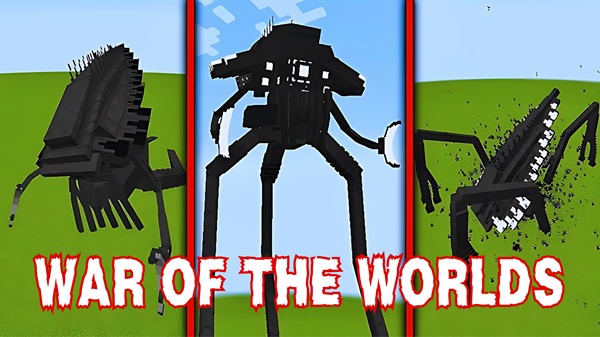
War of The Worlds Addon: Prime Sci-Fi Expansion Set
The War of The Worlds Addon reimagines your Minecraft Bedrock world with a polished sci-fi theme that feels immersive, atmospheric, and surprisingly smooth on mobile devices. The Prime Sci-Fi Expansion Set brings refined visuals, cleaner animations, and a world filled with alien-inspired structures and machines. If you love exploration, futuristic builds, or survival gameplay with a twist, this addon gives you a fresh way to experience MCPE.
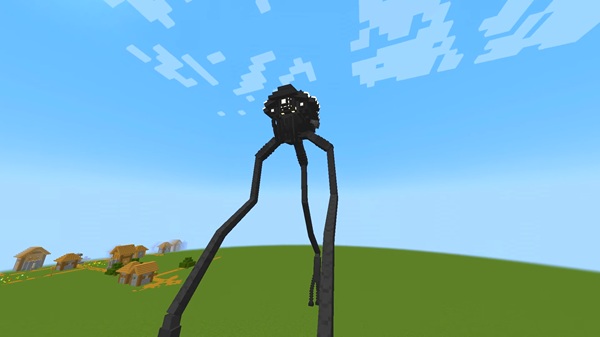
Introduction to the Prime Sci-Fi Expansion Set
This upgraded version of the War of The Worlds Addon enhances the original concept with better models, improved world integration, and expanded atmospheric details. You’ll notice the difference the moment you spawn into a new world: the landscapes feel deeper, the structures more mysterious, and the overall mood more cinematic.
Below is a closer look at what makes this expansion special and how it transforms your gameplay experience.
Core Features of the War of The Worlds Addon
The Prime Sci-Fi Expansion focuses on three pillars: advanced entities, enhanced world generation, and smooth performance. Together, these features bring a futuristic environment that fits naturally into MCPE while still offering plenty of new things to discover.
High-Detail Sci-Fi Entities & Machines
-
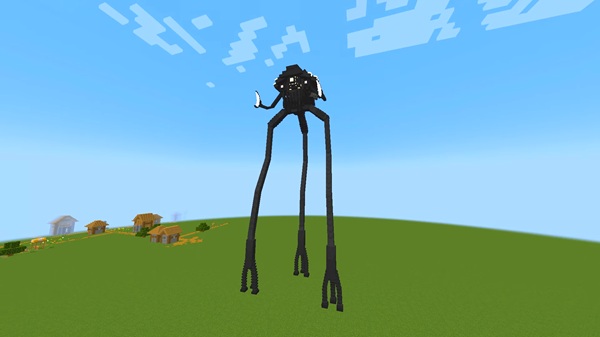
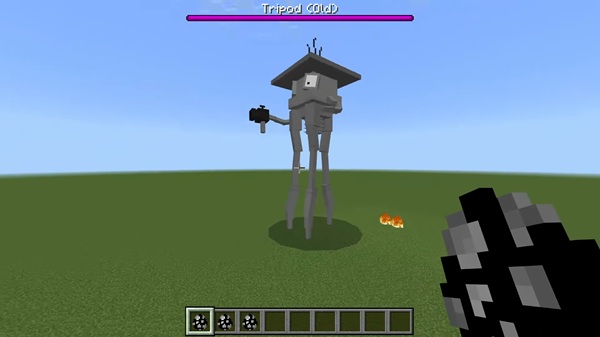
Multiple tripod-inspired machines with distinct shapes
-
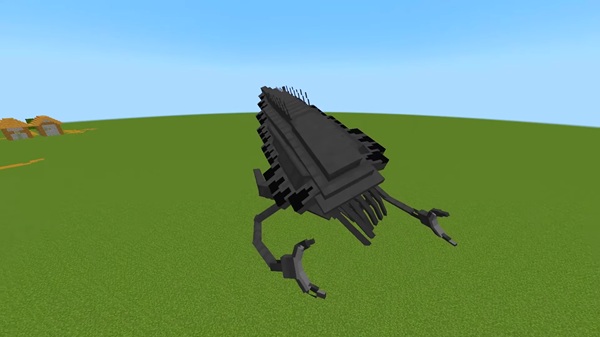
Additional automated units that add life to the world
-
Smooth animations and ambient effects
-
Models optimized for mobile performance
These entities serve as the backbone of the addon's sci-fi identity.
Enhanced World Generation & Environmental Updates
-
Red vegetation and alien plants that change biome atmosphere
-
Themed structures that appear naturally in the world
-
Subtle terrain modifications for environmental storytelling
-
Visual cues that guide exploration
These additions help every biome feel more dynamic and story-driven.
Immersive Sound & Visual Effects
-
Futuristic ambient audio
-
Custom animation cycles
-
Particle effects that reinforce the sci-fi theme
-
Refined textures for consistency
Perfect for players who enjoy cinematic gameplay or recording content.
Player-Interactive Features
-
Collectible machine scraps and components
-
Useful drops from various sci-fi units
-
Items suitable for survival progression or creative projects
These features add progression without overwhelming new players.
Survival and Creative Mode Enhancements
Survival Mode:
-
Encourages resource management
-
Creates new exploration patterns
-
Adds replay value through unique encounters
Creative Mode:
-
Access to all sci-fi assets for builds
-
Great for map makers and content creators
-
Helps you design futuristic bases or themed cities
Performance and Optimization Features
-
Balanced spawn rates
-
Light, mobile-friendly geometry
-
Smooth integration across existing MCPE settings
-
Suitable for mid-range devices
What Makes This the “Prime” Edition
-
Refined visuals and world elements
-
Better biome variety
-
Improved performance behavior
-
A more complete and cohesive sci-fi identity
This edition represents the most polished version of the addon.
Advanced Sci-Fi Entities & Machines
The addon’s advanced machines bring personality and tension to your world. These aren’t just decorative models—they move, animate, and react in ways that make exploration more engaging. Whether you’re discovering them in survival or placing them in creative mode, these entities help define the tone of the Prime Expansion.
Enhanced Worldbuilding & Environmental Changes
The War of The Worlds Addon reshapes landscapes with new plants, themed structures, and atmospheric visuals. You’ll find areas that look untouched and others that feel transformed by alien influence. These worldbuilding improvements are ideal for players who enjoy storytelling, roleplay, and visually rich worlds.
Player Experience & Gameplay Flow
This addon blends creativity and adventure into a smooth experience.
Survival Mode Experience
-
Encourages long-term exploration
-
Adds variety without overwhelming difficulty
-
Creates memorable encounters with new entities
Creative Mode Experience
-
Perfect for building futuristic scenes
-
Great toolset for making machinima
-
Supports thematic map creation
Compatibility & Performance Recommendations
-
Works best on MCPE 1.20–1.21+
-
Recommended: 2GB RAM or higher
-
Ideal settings:
-
Render Distance: 8–12
-
Smooth Lighting: On
-
Mob Spawning: Enabled
-
Tips for Getting the Best Experience
-
Use a new world for the full visual effect
-
Pair with subtle shaders (if your device can handle it)
-
Explore multiple biomes for variety
-
Build futuristic bases to match the environment
-
Reduce render distance when using multiple heavy addons
Troubleshooting & Common Questions
Addon not showing up: Restart the game and re-import the file.
World features missing: Re-enable Experimental Features.
Lag or performance drops: Lower render distance or reduce addon count.
Multiplayer: All players must install the same file version.
Why This Expansion Set Stands Out
The War of The Worlds Addon delivers a clean, immersive, and atmospheric sci-fi experience that feels right at home in MCPE. With polished visuals, strong worldbuilding, and balanced gameplay, it’s a great choice for survival fans, builders, and creators looking for a futuristic twist.
Installation Guide for MCPE/Bedrock
-
Download the
.mcaddonfile. -
Open it to import into Minecraft.
-
Enable both Behavior and Resource Packs.
-
Activate Experimental Features.
-
Load the world and start playing.











