
Weapons+ 3D 1.21+
Weapons+ 3D Addon enhances Minecraft MCPE with balanced, fully modeled 3D weapons designed for survival gameplay. Enjoy improved visuals, vanilla-style progression, and smooth mobile performance without breaking game balance.
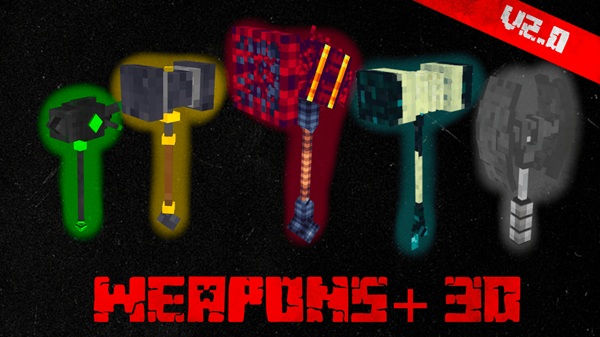
Weapons+ 3D Addon – Balanced 3D Weapons for MCPE
If you enjoy Minecraft on mobile but feel that vanilla weapons look flat and outdated, Weapons+ 3D Addon is designed exactly for you. This Minecraft Bedrock (MCPE) addon enhances combat visuals by adding fully modeled 3D weapons, while keeping gameplay balanced and familiar. Instead of changing how Minecraft works, it improves how weapons look and feel during everyday survival play.
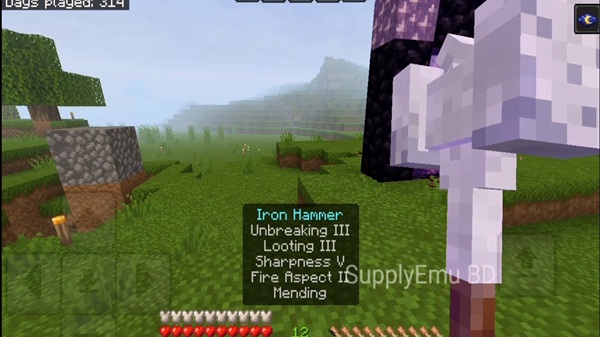
The main goal of Weapons+ 3D Addon is simple: deliver better-looking weapons without disrupting progression, performance, or stability. Everything is built around a vanilla-plus approach, meaning the addon blends naturally into Minecraft Bedrock Edition and feels like it belongs there. Whether you play short survival sessions or long-term worlds, this addon fits smoothly into your experience.
Key Features at a Glance
Before diving into details, it helps to understand what makes Weapons+ 3D Addon stand out. The features below highlight how the addon improves visuals, balance, and usability while remaining friendly for MCPE devices.
Fully Modeled 3D Weapons
Weapons+ 3D Addon replaces flat item visuals with true 3D weapon models. Each weapon has visible depth when held, dropped, placed in item frames, or viewed in third-person. The models follow Minecraft’s art style, so they feel consistent with blocks, tools, and armor already in the game.
Balanced Damage for Survival Gameplay
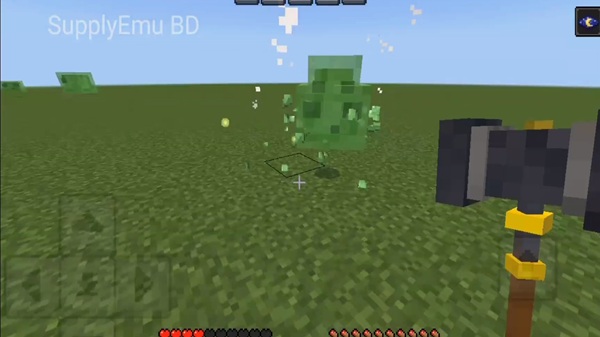
Balance is a core focus of Weapons+ 3D Addon. Weapon damage is carefully adjusted to match Minecraft’s natural difficulty curve. You gain variety and progression without removing challenge, making combat feel rewarding but fair in survival mode.
Survival & Creative Mode Support
You can access all weapons directly in Creative Mode for testing or previews. In Survival Mode, weapons are craftable using familiar materials and standard crafting tables. Recipes align with vanilla progression, so upgrades feel earned rather than forced.
Enchantment Compatibility
All weapons support standard Minecraft enchantments, such as Sharpness, Looting, Knockback, Unbreaking, and Mending. This means you can customize your weapons using systems you already understand, without learning anything new.
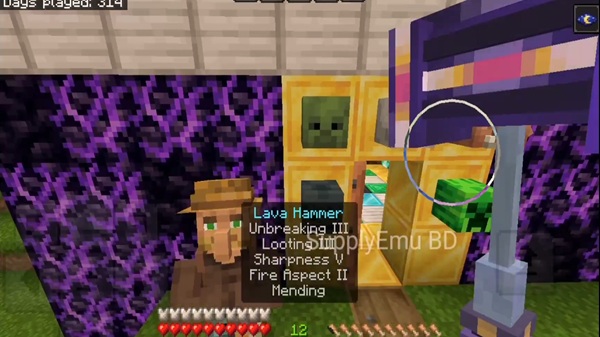
Optimized for MCPE Performance
Weapons+ 3D Addon is optimized for mobile performance. The models are lightweight, helping maintain smooth gameplay on most Android and iOS devices, even in active survival worlds.
Weapon Design & Balance Philosophy
Understanding how weapons are designed helps explain why this addon feels natural in gameplay. Weapons+ 3D Addon follows Minecraft’s original progression logic rather than replacing it.
Weapons are divided into clear tiers that mirror vanilla materials. Early-game weapons are accessible and useful, mid-game options provide noticeable upgrades, and late-game weapons reward long-term progression without becoming overpowered. This structure keeps combat engaging across all stages of survival.
Because balance is preserved, enchantments remain meaningful, mobs stay challenging, and multiplayer worlds remain fair. The visual improvements enhance immersion, but the combat rhythm stays familiar.
How the Addon Works In-Game
Once installed, Weapons+ 3D Addon integrates quietly into your world. There are no extra menus, abilities, or complex systems to manage.
In Creative Mode, all weapons appear in the inventory, allowing quick previews. In Survival Mode, you craft weapons using standard recipes and materials. During combat, weapons behave like normal Minecraft tools, following the game’s existing mechanics. Enchanting works through enchantment tables and anvils, just like vanilla swords.
This simplicity makes the addon easy to use, even for players installing their first MCPE addon.
Compatibility & Performance Information
Weapons+ 3D Addon is designed for Minecraft Bedrock Edition (MCPE) and works across mobile and Bedrock-supported platforms.
Performance Notes
-
Lightweight models optimized for mobile
-
Minimal impact on FPS
-
Suitable for low-to-mid range devices
Multiplayer & Realms
-
Works in multiplayer worlds
-
Compatible with Minecraft Realms
-
Avoid combining multiple weapon addons to prevent conflicts
The addon follows standard Bedrock addon structure, helping ensure stability and consistent behavior.

Tips for the Best Experience
A few simple habits can improve your experience with Weapons+ 3D Addon:
-
Progress through weapon tiers naturally
-
Use enchantments to extend weapon usefulness
-
Combine with shaders or texture packs for visual enhancement (optional)
-
Enable addons one at a time to test compatibility
-
Back up your world before installing new addons
These steps help keep long-term survival worlds stable and enjoyable.
Who This Addon Is For
Weapons+ 3D Addon is ideal for players who want:
-
Better-looking weapons in MCPE
-
Balanced survival gameplay
-
Mobile-friendly performance
-
Vanilla-style enhancements
It is not intended for players seeking extreme power scaling, experimental systems, or complex mod mechanics.
Final Thoughts
Weapons+ 3D Addon offers a clean and reliable way to upgrade weapon visuals in Minecraft MCPE. By focusing on 3D models, balanced gameplay, and mobile optimization, it improves immersion without changing how Minecraft is meant to be played.
If you want your survival combat to look better while staying fair, stable, and familiar, Weapons+ 3D Addon is a strong addition to your MCPE world.
nstallation Guide for MCPE (Android & iOS)
IInstalling Weapons+ 3D Addon on MCPE is beginner-friendly and uses standard Bedrock addon formats.
-
Download the
.mcaddonor.mcpackfile. -
Open the file with Minecraft to import it automatically.
-
Open World Settings and activate:
-
Resource Pack
-
Behavior Pack
-
-
Create a new world or apply the addon to an existing one.
-
Enter the world and confirm the weapons appear correctly.
For best results, new worlds are recommended, but many players also use the addon successfully in existing saves.











