
Wuthering Waves Addon 1.21+
The Wuthering Waves Addon brings enhanced 3D weapons, smoother combat, and upgraded movement to MCPE. Discover a faster, more modern way to fight, explore, and enjoy your Bedrock world.
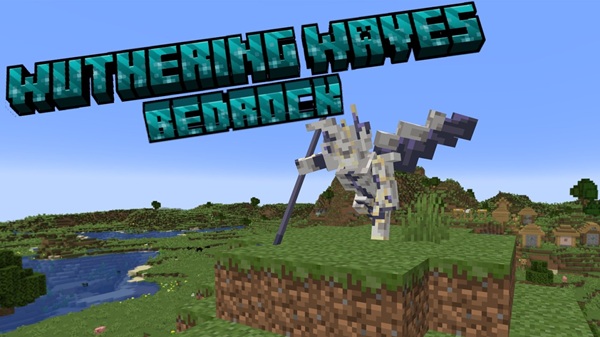
Wuthering Waves Addon Enhanced 3D Weapon System
The Wuthering Waves Addon brings a refreshing combat upgrade to Minecraft Bedrock Edition, especially if you enjoy fast action, clean animations, and modern 3D weapon designs. This addon blends MCPE’s familiar world with expressive attacks, smoother movement, and stylish visual feedback — giving you a more dynamic and satisfying way to explore and battle.
Overview of the Wuthering Waves Addon Enhanced 3D Weapon System
The Wuthering Waves Addon transforms classic MCPE combat with high-quality 3D weapons, fluid animations, and smart mobility tools. Below, you’ll see how this system elevates every swing, combo, and movement technique.
Before diving into each weapon or mechanic, let’s explore how the addon reimagines your general gameplay experience — from the basics of combat feel to the layered systems that support advanced actions.
What the Addon Improves
-
More expressive weapon motion
-
Faster, smoother combo attacks
-
Better mobility across terrain
-
Useful tools like Echo buffs and target lock
-
Intuitive controls built for mobile players
The goal is simple: make your fights feel modern, readable, and satisfying.
High-Quality 3D Weapons Included in the Addon
This addon’s weapon system is its biggest attraction. The 3D models offer clean silhouettes, polished textures, and attack styles that feel instantly different from default Minecraft tools.
Each weapon has its own personality, rhythm, and animation style. If you enjoy experimenting or switching playstyles, this section helps you choose the one that fits you best.
Weapon Design Philosophy and Visual Style
-
Smooth, readable 3D geometry
-
Lightweight effects for mobile performance
-
Anime-inspired influences without overwhelming visuals
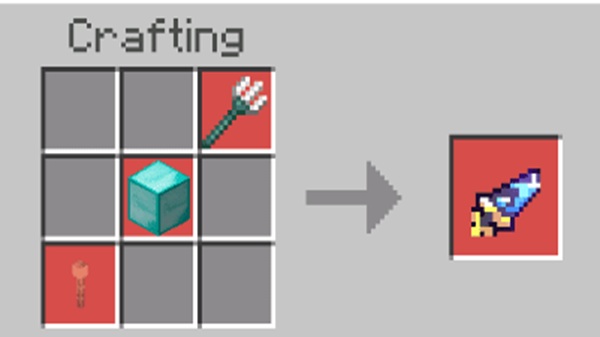
Blazing Brilliance — Multi-Combo Speed Blade
Great for players who love mobility. Its light attacks chain quickly, offering fast response time in close-quarters combat.
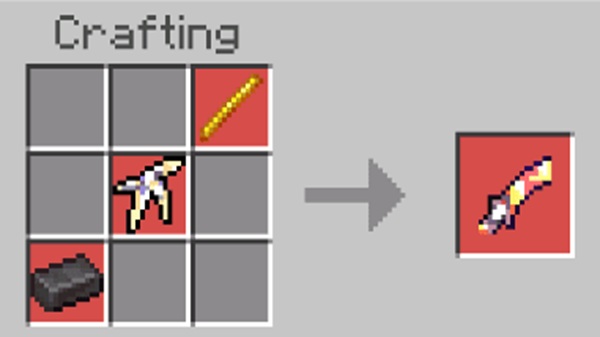
Lustrous Razor — Precision and Timing
This blade rewards accuracy. Each strike feels intentional and clean, making it ideal for players who enjoy controlled, technical offense.
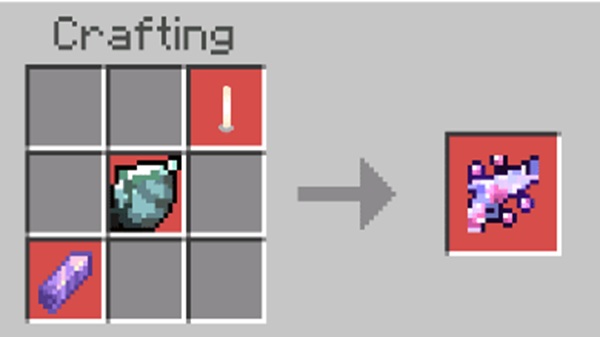
Stellar Symphony — Heavy but Elegant
Designed for players who prefer impact. Its charged attacks add satisfying weight and visual flair without slowing gameplay too much.
Secondary and Support Weapons
The addon includes additional weapons to support utility roles or alternative fighting styles.
Custom Attack Animations
Every weapon has:
-
Light combos
-
Charged attacks
-
Skill animations
-
Burst-style abilities
Special Effects and Particles
Subtle trails, glow bursts, and impact flashes enhance clarity while staying friendly for mid-range devices.
Normal, Skill, and Burst Modes
-
Normal: Standard combos
-
Skill: Stronger attacks with cooldowns
-
Burst: Temporary enhanced states
Immersion Through 3D Models
Improves combat readability, increases visual satisfaction, and gives MCPE a more cinematic feel.
Best Choices for Playstyles
-
Speed players → Blazing Brilliance
-
Precision focus → Lustrous Razor
-
Heavy hitters → Stellar Symphony
-
Exploration → Secondary weapons
Enhanced Combat Animations and Ability Mechanics
The combat system emphasizes flow. Attacks connect smoothly, and each weapon transitions naturally between combo variations.
Here’s how the addon refines your attacks, timing, and overall combat feel.
Basic Combo Flow
Fast, stable animations designed to work well on touchscreen controls.
Heavy and Charged Attacks
Hold to release stronger strikes. Bigger hit ranges but narrower timing windows.
Skill and Burst Abilities
Cooldown-based attacks for strategic windows of power.
QTE System and Weapon Switching
Quick-time activators let you trigger bonus moves. Switching weapons is instant, keeping combat fluid.
Movement and Exploration Upgrades
This addon doesn’t stop at weapons — it elevates how you move through the MCPE world.
Movement abilities make adventuring smoother and faster, turning every biome into a playground.
Wall Running
Short vertical sprints for parkour-style escapes and climbs.
Ladder Sprint Enhancements
Faster vertical travel helps you clear structures quickly.
Grapple Tool
Reach cliffs, towers, or distant platforms instantly.
Stamina-Based Movement
Only specific actions consume stamina, keeping exploration balanced but free-flowing.
Echo Tools, Target Lock & Utility Features
These support tools make combat smarter and exploration clearer.
Think of this section as your “assist kit” — features that improve awareness and control.
Echo Summoning
Summon temporary boosts for offense or defense.
Target Lock
Keeps your focus steady, especially during fast movement.
Sensor Tool
Helps locate interactables or hidden objects during exploration.
Preset Gear System and Character Switching
Switch characters without losing your setup.
Each preset helps you swap between roles instantly, making your combat more flexible.
Auto-Equip Presets
Assign weapons per character for faster transitions.
Seamless Role Switching
Swap between mobility, offense, or support styles mid-fight.
Loadout Strategies
Prepare specialized builds for different enemies or environments.
MCPE Compatibility and Device Support
The addon works smoothly on most modern mobile devices, but here are a few notes for optimal use.
Supported MCPE Versions
Works best on 1.21+.
Device Performance
Mid-range phones recommended for stable FPS.
Multiplayer
All players must install matching versions.
Helpful Tips and Best Practices for Players
Use these tips to get the smoothest, most enjoyable experience.
Beginner Weapons
Start with faster blades like Blazing Brilliance.
Movement Tactics
Combine grappling, wall running, and jumps for creative routes.
Best Settings
Higher FPS and balanced render distance help combat responsiveness.
Combat Flow
Light → heavy → skill combos create a smoother loop.
Final Thoughts
The Wuthering Waves Addon reshapes how combat feels in MCPE, offering smooth animations, expressive 3D weapons, and fun movement tools. It’s a great choice for players who want a fresh, modern experience without losing Minecraft’s familiar charm.
How to Install the Wuthering Waves Addon on MCPE
Easy installation keeps you playing without complications.
Follow this quick setup list to ensure everything loads correctly.
1. Download the File
Choose the .mcaddon or .mcpack version.
2. Import into MCPE
Tap the file to auto-import.
3. Activate Packs
Enable both Behavior and Resource Packs.
4. Enable Experimental Features
Turn on:
-
Holiday Creator Features
-
Custom Items
-
Molang Features











