Christmas Cosmetics 2025 1.21+
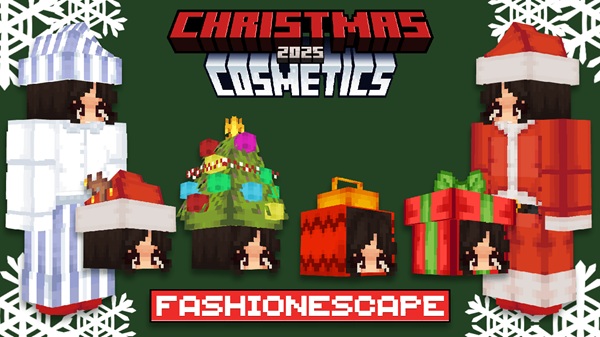
The Christmas Cosmetics 2025 Addon adds cozy 3D holiday wearables to Minecraft Bedrock Edition (MCPE), letting you customize your character with festive outfits designed for survival, roleplay, and seasonal worlds.
Christmas Cosmetics 2025 Addon – Cozy 3D Holiday Wearables
The Christmas Cosmetics 2025 Addon is a festive cosmetic addon for Minecraft Bedrock Edition (MCPE) that lets you customize your character with cozy, holiday-themed 3D wearables. Instead of adding new mobs or changing gameplay systems, this addon focuses on one thing players truly enjoy: looking good while playing.
If you like seasonal survival worlds, roleplay servers, or simply want your character to match snowy landscapes and winter builds, the Christmas Cosmetics 2025 Addon fits naturally into your Minecraft experience—especially on mobile devices.
Introduction: Cozy Holiday Style for MCPE
Minecraft worlds often feel more immersive when your character matches the environment. That’s where the Christmas Cosmetics 2025 Addon shines. Built specifically for MCPE and Bedrock players, it adds festive wearables that feel warm, playful, and visually rich without being complicated.
These cosmetics use custom 3D models, meaning they extend beyond flat textures and sit naturally on your character. The addon stays lightweight, easy to use, and friendly for casual players—perfect for mobile gameplay, family-friendly worlds, and relaxed multiplayer sessions.
What Makes This Addon Special
At its core, the Christmas Cosmetics 2025 Addon is designed to enhance visual identity, not power or progression. It focuses on simplicity, comfort, and compatibility.
This approach makes it especially appealing to MCPE players who want customization without learning complex systems or managing heavy modpacks.
Key highlights include:
-
Custom 3D geometry instead of flat overlays
-
Clean integration with existing player skins
-
No impact on core gameplay balance
-
Designed with Bedrock and mobile limitations in mind
The result is an addon that feels natural in almost any world.
Included Holiday Wearables
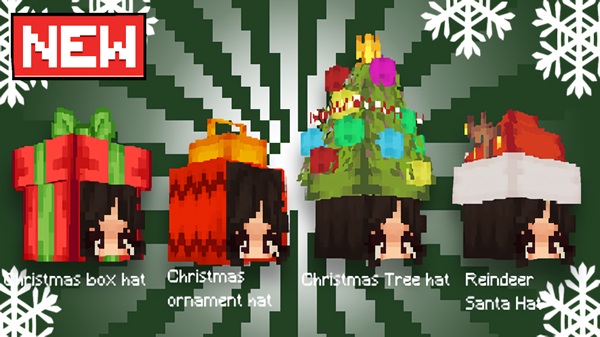
One of the strengths of the Christmas Cosmetics 2025 Addon is its variety. It offers multiple festive options so players can express different holiday styles.
Under this section, you’ll find:
-
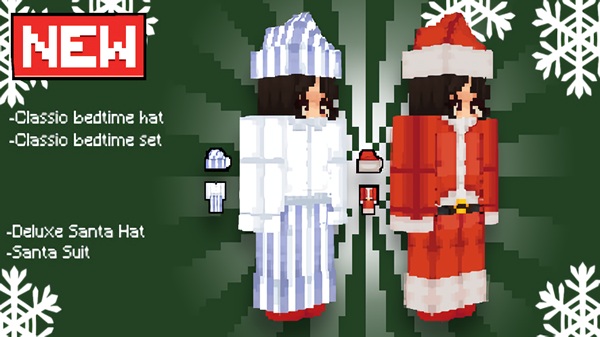
Santa-inspired outfits and hats for classic holiday looks
-
Cozy winter clothing, including sweaters and warm accessories
-
Novelty head cosmetics, designed to add personality and fun
-
A balanced mix of cute, cozy, and playful designs
These wearables work equally well for roleplay, seasonal builds, or casual survival gameplay.
How the Cosmetics Work In-Game
Understanding how the addon works in-game helps players feel confident using it, especially on MCPE. The system is intentionally simple and survival-friendly.
Stonecutter-Based Cosmetic Crafting
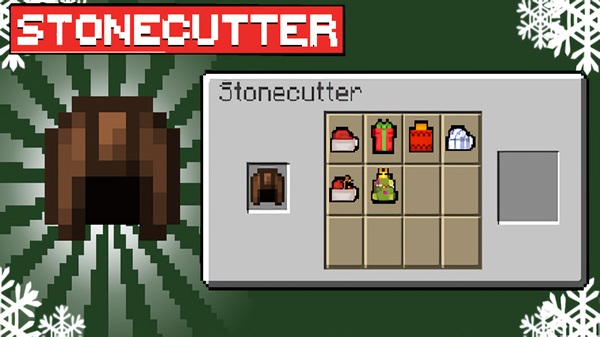
All cosmetics are crafted using the Stonecutter instead of the Crafting Table. This keeps crafting menus clean and avoids conflicts with other addons.
For MCPE players, this means:
-
One clear crafting location
-
No cluttered recipe book
-
Easy access to all cosmetic options
Required Base Items for Crafting
To create cosmetics, you’ll usually need:
-
A Leather Helmet, or
-
A custom cosmetic base item included with the addon
This light requirement encourages exploration without forcing long or repetitive grinding.
Equipping the Holiday Wearables
Once crafted, cosmetics are easy to use:
-
Equipped in helmet or chestplate slots
-
Visually replace or overlay armor models
-
Simple drag-and-drop controls suited for mobile screens
You can switch outfits quickly depending on the situation.
Survival Gameplay Balance
The Christmas Cosmetics 2025 Addon is designed with balance in mind:
-
No powerful combat advantages
-
Protection levels similar to basic armor (if present)
-
Safe for survival exploration and multiplayer
This ensures fairness while still allowing visual expression.
Visual Appearance in Third-Person & Multiplayer
Cosmetics are fully visible when:
-
Playing in third-person view
-
Joining multiplayer worlds or Realms
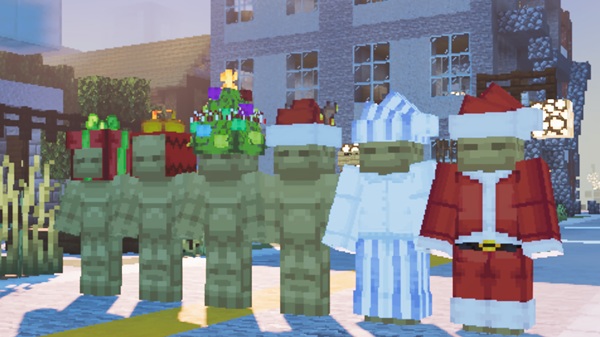
As long as resource packs are accepted, other players will see your festive wearables clearly—great for social play and events.
Using the Addon in Different Playstyles
This addon adapts easily to different ways of playing Minecraft.
You can enjoy it in:
-
Survival worlds while exploring snowy biomes
-
Roleplay servers with holiday-themed characters
-
Creative builds for screenshots and showcases
-
Multiplayer sessions with coordinated outfits
Because it doesn’t change mechanics, it fits naturally into existing worlds.
Compatibility & Performance
The Christmas Cosmetics 2025 Addon is:
-
Made for Minecraft Bedrock Edition (MCPE)
-
Compatible with modern Bedrock versions
-
Supported on Android, iOS, and Windows Bedrock
-
Lightweight and suitable for mobile performance
-
Usable in multiplayer and Realms with proper settings
It’s a safe choice for players concerned about performance.
Helpful Tips & Common Fixes
If something doesn’t work as expected:
-
Confirm both packs are enabled
-
Adjust pack priority if using other cosmetic addons
-
Restart the world after enabling experiments
-
Check version compatibility if textures are missing
Most issues are resolved with these simple checks.
Final Thoughts: Who This Addon Is For
The Christmas Cosmetics 2025 Addon is ideal for:
-
Players who enjoy cozy, seasonal visuals
-
MCPE users looking for simple customization
-
Roleplayers and holiday map builders
-
Casual multiplayer groups and families
-
Creators who want festive character designs
If you want to add warmth and personality to your Minecraft world—without complexity—this addon delivers exactly that.
How to Install on MCPE (Mobile-Friendly)
Installation is straightforward and designed for mobile users.
-
Download the
.mcaddonfile -
Import it into Minecraft
-
Create or edit a world
-
Activate both:
-
Resource Pack
-
Behavior Pack
-
-
Enable required experimental options (Add-on Capabilities)
-
Restart the world if needed
These steps work on Android and iOS.