Location Diary 1.21+
Discover the Location Diary Addon, a must-have MCPE tool that lets you save, organize, and revisit all your Minecraft locations. Perfect for bases, farms, and landmarks, it makes exploration and building effortless in Bedrock Edition.
Location Diary Addon – Never Forget Your Minecraft Spots
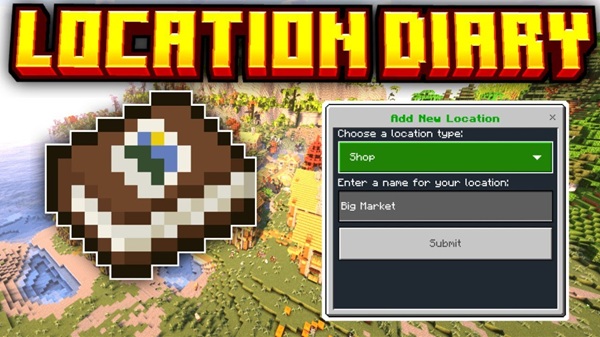
Losing track of important locations in Minecraft can be frustrating. Whether it’s a distant base, a hidden farm, or a secret resource spot, remembering coordinates can take away from the fun of exploration. The Location Diary Addon solves this problem by giving you a simple, in-game system to save, organize, and revisit all your locations. Designed specifically for MCPE and Bedrock Edition, this addon helps you explore confidently, manage multiple projects, and keep your Minecraft world organized.
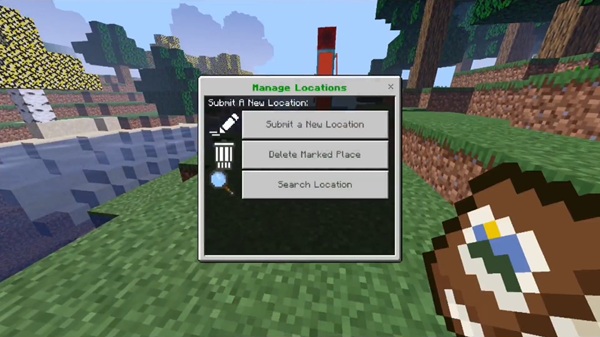
Key Features of the Location Diary Addon
The Location Diary Addon is built for convenience and clarity, combining practical tools with an easy-to-use interface. Below is a quick overview of the features that make it an essential addition to your MCPE world.
Players need an efficient way to track bases, farms, and landmarks, and the Location Diary Addon delivers. From naming locations to teleporting, each feature enhances exploration and organization.
Save and Name Locations
-
Record any location in the world instantly.
-
Assign descriptive names such as “Main Base” or “Nether Farm.”
-
Eliminates the need for external notes or memorized coordinates.
Categorize Locations
-
Organize spots by type: bases, farms, landmarks, or resource sites.
-
Helps players manage large worlds and quickly find locations.
Teleportation Function
-
Teleport instantly to any saved location in Survival or Creative mode.
-
Reduces long travel times and streamlines exploration.
-
Always check chunks are loaded before teleporting to ensure safe arrival.
Coordinate Viewing
-
View X, Y, Z coordinates without leaving your current spot.
-
Useful for planning builds or sharing locations with friends in multiplayer.
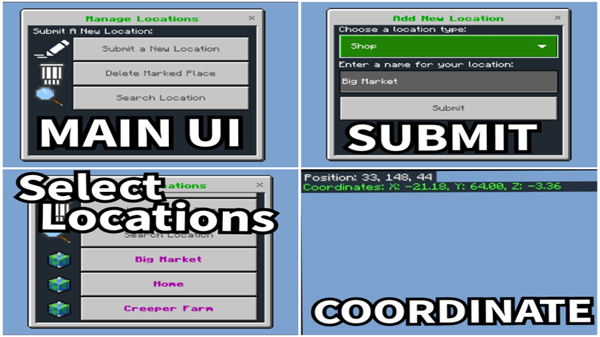
Location Management
-
Delete, rename, or recategorize outdated locations to keep the diary organized.
Achievement-Friendly Design
-
Fully compatible with MCPE achievements (v1.6.5+).
-
Players can enjoy the addon without affecting their progression.
How It Works In-Game
Using the Location Diary Addon is intuitive and designed for mobile-friendly gameplay.
With a simple crafting recipe and easy interface, saving and revisiting locations becomes second nature, whether you’re in Survival or Creative mode.
Obtaining the Diary
-
Survival Mode: Craft using Compass + Book & Quill.
-
Creative Mode: Access directly from the creative inventory.
Step-by-Step Usage
-
Craft or obtain the diary.
-
Travel to the location you want to save.
-
Open the diary interface.
-
Submit the location (coordinates are automatically captured).
-
Name and optionally categorize the spot.
-
Access saved locations anytime to view or teleport.
-
Delete or edit locations as needed to maintain organization.
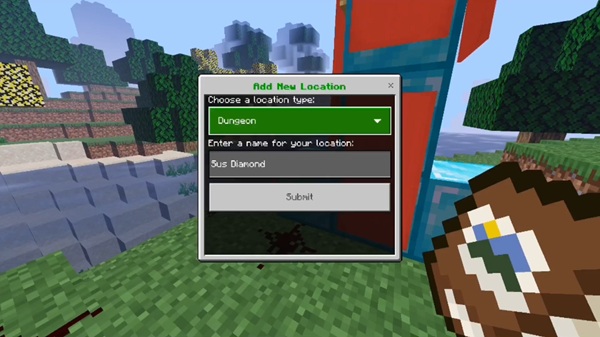
Compatibility Information
The addon is designed to work across most modern MCPE platforms while supporting multiplayer and Realm gameplay.
-
Minecraft Versions: 1.20.x – 1.21.100+
-
Supported Platforms: Android, iOS, Windows 10/11, Xbox, Nintendo Switch (limited)
-
Multiplayer & Realms: Personal diaries for each player; seamless in local multiplayer and servers
-
Experimental Features Required: Custom items, creative features, holiday creator features
Tips & Best Practices
-
Naming Conventions: Use type + purpose (e.g., Base_Main, Farm_Cane).
-
Regular Audits: Delete unused or outdated locations to reduce clutter.
-
Teleport Safely: Always ensure chunks are loaded and avoid hazards.
-
Back Up Data: Optional external backups protect your locations.
-
Mobile Optimization: Use landscape mode and adjust UI scale for comfort.
Troubleshooting Common Issues
-
Addon Not Appearing: Verify experimental features and import status.
-
Teleportation Problems: Confirm location was saved and chunks are loaded.
-
Lost Data: Check you are in the correct world and maintain backups.
-
Achievements Disabled: Ensure version 1.6.5+ is installed with no conflicts.
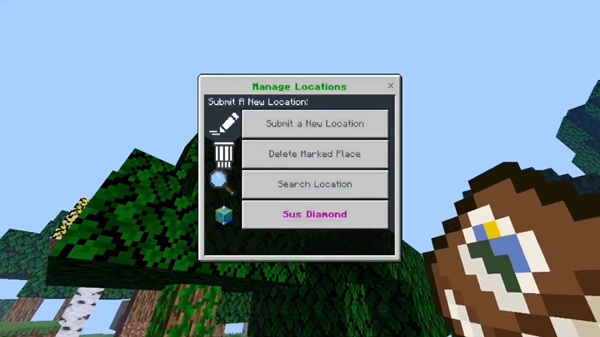
Conclusion
The Location Diary Addon is a must-have utility for MCPE players who want to save, organize, and revisit locations effortlessly. It makes exploration safer, travel faster, and world management simpler. Whether building multiple bases, exploring biomes, or coordinating multiplayer adventures, this addon ensures you never forget your Minecraft spots and enjoy a more structured and stress-free experience in Bedrock Edition.
Installation Guide
Installing the Location Diary Addon is simple and requires only a few steps.
Ensuring proper installation is crucial to fully enjoy all the features without glitches. Follow these steps to get started quickly.
-
Download the Addon File: Obtain the
.mcaddonfile from a trusted source. -
Enable Experimental Gameplay: In your world settings, enable all experimental features.
-
Import the Addon: Tap (mobile) or double-click (Windows) the file to add it to Minecraft.
-
Activate the Addon: Navigate to Settings → Manage Packs → Behavior Packs and toggle it ON.
-
Verify Installation: Craft or access the diary and test saving a location.