Entity Tag 1.21+
Entity Tag Addon is a lightweight Minecraft Bedrock addon that helps you label and identify entities with clarity and purpose. Designed for MCPE players, it improves organization, reduces confusion, and keeps gameplay smooth and familiar.
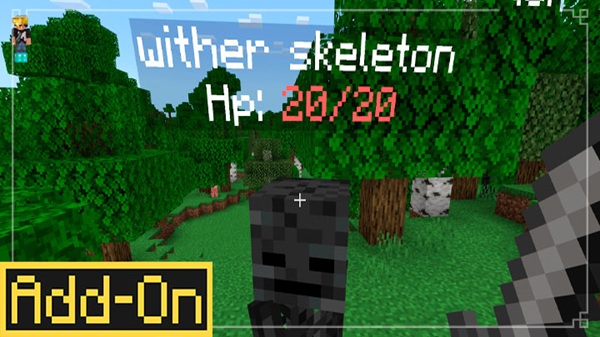
Entity Tag Addon – Clean Entity Labels with Purpose
Managing entities in Minecraft Bedrock can quietly become one of the most frustrating parts of long-term gameplay. As your world grows, pets, villagers, mobs, and custom NPCs start blending together—especially on MCPE, where screen space is limited. Entity Tag Addon was created to solve that exact problem in a simple, thoughtful way.
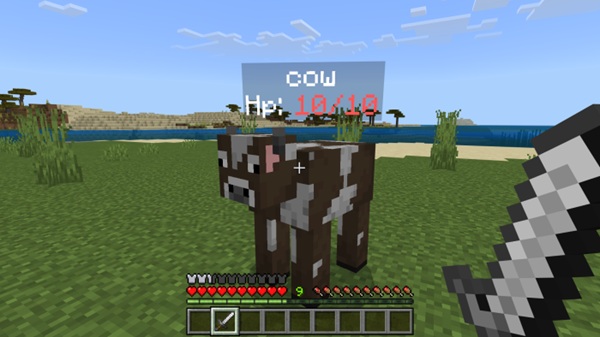
Instead of adding complexity, Entity Tag Addon focuses on clean entity labels with purpose. It helps you identify, organize, and manage entities clearly, while keeping gameplay smooth and familiar. If you enjoy structure, clarity, and lightweight addons, this tool fits naturally into your Minecraft Bedrock experience.
What Is Entity Tag Addon?
Before exploring features or installation, it helps to understand what Entity Tag Addon is meant to do and why it exists. This section gives you a clear, practical overview so you know exactly what to expect before using it.
A Simple Explanation for MCPE Players
Entity Tag Addon is a Minecraft Bedrock addon that allows you to label entities in your world. These labels make it easier to recognize important mobs, pets, or NPCs during normal gameplay. The addon is designed to work smoothly on MCPE, without overwhelming you with options or settings.
You don’t need advanced knowledge to use it. If you can play Minecraft, you can use this addon comfortably.
What Problem Does This Addon Solve?
In busy worlds, many entities look identical. On mobile devices, this becomes a real issue. You might lose track of a pet, confuse villagers, or struggle to manage crowded areas. Entity Tag Addon solves this by giving entities clear and readable tags, reducing confusion and helping you stay organized.
How Entity Tags Work in Minecraft Bedrock
Entity tags are applied through simple in-game interactions provided by the addon. Once an entity is tagged, it becomes easier to identify while moving, building, or exploring. The system stays within Bedrock mechanics and avoids complicated commands unless you choose to use them.
Designed for Clean and Purposeful Gameplay
Every feature in Entity Tag Addon serves a purpose. Instead of adding many extras, it focuses on one goal: clear entity identification. This design keeps gameplay clean and avoids clutter.
Who Should Use Entity Tag Addon?
-
Players who enjoy organized survival worlds
-
Creative builders and roleplay map makers
-
SMP and cooperative players
-
MCPE users who prefer lightweight addons
-
Anyone who values clarity over complexity
Why Clean Entity Labels Matter in MCPE
MCPE players face different challenges than desktop players. Smaller screens, touch controls, and crowded areas make clarity more important than ever. Clean entity labels help you instantly recognize what matters without stopping gameplay.
Purposeful labeling improves long-term world management. It reduces mistakes, saves time, and keeps your focus on building, exploring, and enjoying Minecraft rather than sorting through confusion.
Core Features (Focused, Not Overloaded)
This section highlights what the addon offers, without unnecessary extras. Each feature exists to support clarity and smooth performance on Bedrock and MCPE.
-
Custom Entity Tags – Assign meaningful labels to entities
-
Easy Identification – Recognize important mobs instantly
-
Survival & Creative Support – Works in both modes
-
Lightweight Design – Optimized for mobile devices
-
Vanilla-Friendly – Respects normal Minecraft gameplay
By keeping features focused, Entity Tag Addon remains reliable and easy to maintain.
How It Works In-Game
Understanding how the addon feels during actual gameplay is important. This section explains that experience without diving into technical details.
Once installed, you interact with entities using the addon’s system and apply tags naturally. Tagged entities remain easy to recognize as you move around your world. The addon blends into normal gameplay, making it suitable for beginners and experienced players alike.
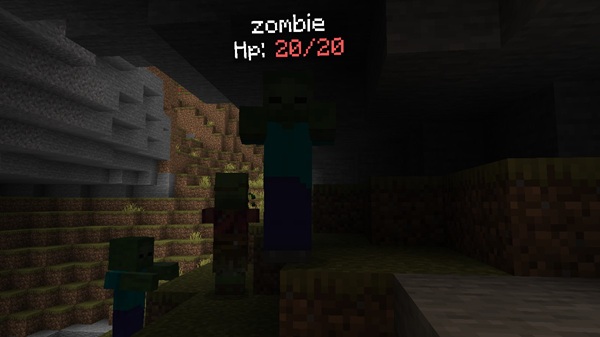
Practical Use Cases
Entity Tag Addon becomes most valuable when used intentionally. Here are some common and effective ways players use it:
-
Pets & Companions – Easily identify animals you care about
-
Roleplay & NPCs – Label characters in story-driven worlds
-
SMP Worlds – Help players recognize shared entities
-
Farms & Builds – Keep systems organized and readable
-
Creative Projects – Add meaning and structure to entities
In each case, tags are used with purpose rather than decoration.
Compatibility & Performance
This addon is built with stability and performance in mind, especially for mobile players.
-
Compatible with modern Minecraft Bedrock versions
-
Works on MCPE (Android & iOS), Windows Bedrock, and consoles
-
Optimized for mobile performance
-
Minimal impact on FPS
-
Best used without other entity-modifying addons
Tips for Best Results
To get the most out of Entity Tag Addon:
-
Test it in a creative world first
-
Use tags consistently
-
Avoid addon conflicts
-
Back up your world before installing
-
Keep tags meaningful and organized
Who This Addon Is For
Entity Tag Addon is ideal for players who want:
-
Structured gameplay
-
Clear visual organization
-
Mobile-friendly performance
-
Long-term world stability
-
Practical quality-of-life improvements
Final Thoughts
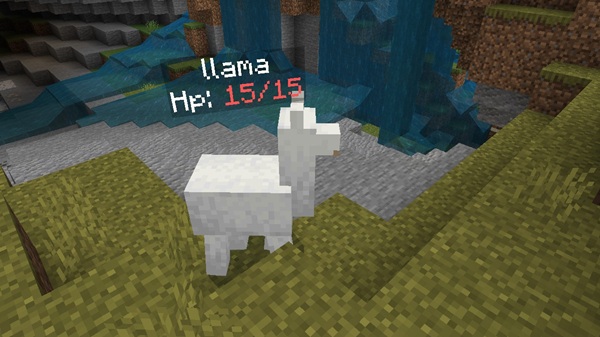
Entity Tag Addon – Clean Entity Labels with Purpose is a thoughtful quality-of-life addon for Minecraft Bedrock and MCPE. It doesn’t try to change how Minecraft works. Instead, it improves how you interact with entities by adding clarity, structure, and intention.
If you value clean gameplay, smooth performance, and purposeful tools, Entity Tag Addon is a reliable addition to your Minecraft world.
Installation Guide (MCPE & Bedrock)
Installing Entity Tag Addon is simple, even if you’re new to addons. Follow these steps carefully:
-
Download the addon file (
.mcaddonor.mcpack) -
Open the file to import it into Minecraft
-
Go to Settings → Storage to confirm it’s imported
-
Create a new world or edit an existing one
-
Enable the required Behavior Pack (and Resource Pack if included)
-
Turn on any required experimental settings
-
Start the world and begin using the addon
Always enable the addon before entering the world.